

What's changed: Deepened AZ-305 Chapter 2 (added comparison tables, scenarios, FAQs, exam traps, deep-dive paragraphs to each section; localized figures to Japanese)
2.2Designing Non-Relational and Storage
Understand non-relational and object storage—Azure Cosmos DB (APIs/consistency), Blob Storage (access tiers), Azure Files, and queues/tables. Pick stores matching access patterns.
For unstructured/key-value data, choose stores by access pattern: Cosmos DB for global low latency, Blob for objects.
2.2.1Non-relational choices
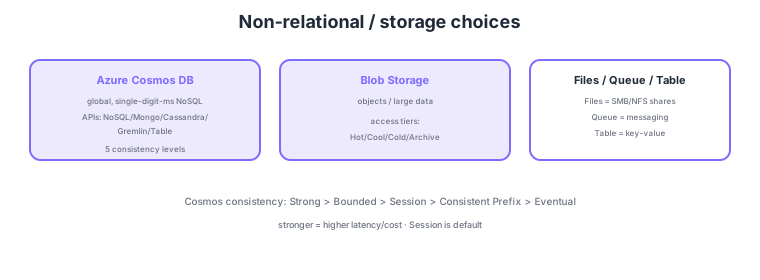
- Cosmos DB: globally distributed, single-digit-ms NoSQL; multiple APIs and five consistency levels.
- Blob Storage: objects/large data; optimize cost via access tiers (Hot/Cool/Cold/Archive).
- Azure Files: SMB/NFS shared files; useful for lift & shift.
- Queue/Table: Storage Queue = messaging, Table = structured key-value.
Common on AZ-305: global low-latency NoSQL = Cosmos DB (pick consistency by requirements), objects + tiered cost = Blob access tiers, shared files = Azure Files (SMB/NFS), archive = Blob Archive tier. Stronger Cosmos DB consistency increases latency/cost.
Cosmos DB consistency, strongest first: Strong → Bounded Staleness → Session → Consistent Prefix → Eventual. Session is the default and suits most apps.
AZ-305 non-relational design centers on "choosing the optimal store for the access pattern and consistency/geo/cost requirements." Cosmos DB provisions throughput in RU/s (provisioned/autoscale/serverless), and partition key selection is the key to scale and even distribution—pick a high-cardinality, low-skew key. Consistency levels are chosen by requirement, with latency/cost/availability trade-offs across the spectrum (Strong is strongest but adds latency/constraints; Session guarantees read-your-writes with good performance). Multi-region writes (multi-master) enable globally low-latency writes. Blob Storage auto-tiers via access tiers (Hot = frequent, Cool = infrequent with a minimum retention, Cold, Archive = cheapest but needs rehydration time to read) and lifecycle management, with redundancy designed via LRS/ZRS/GRS/GZRS. Azure Files (SMB/NFS) suits lift & shift; Azure NetApp Files suits high-performance needs. Queue/Table Storage are lightweight messaging/key-value; for richer features consider Service Bus / Cosmos DB. The key is to match read/write distribution, latency, geo-distribution, consistency, and cost (storage/retrieval/RU) to choose the right store and tier without over- or under-provisioning.
| Blob access tier | Use | Trait |
|---|---|---|
| Hot | Frequently accessed | High storage, low access cost |
| Cool | Infrequent (30+ days) | Lower storage; minimum retention |
| Cold | Rare (90+ days) | Even cheaper; still online |
| Archive | Long-term, near-never accessed | Cheapest; rehydration needed to read |
Scenario: Analyze log data frequently for the first 30 days, rarely after, but retain 7 years for compliance—minimize cost. → Use Blob lifecycle management rules to auto-move to Cool at 30 days and Archive at 90 days. Archive is cheapest but factor in rehydration time to read. Choose redundancy like GRS (geo-redundant) per requirements.
FAQ: Which Cosmos DB consistency? The default Session (read-your-writes) is optimal and well-balanced for most apps. For data that must be always latest (e.g., financial balances), Strong (more latency/cost). If availability and throughput are paramount and slightly stale reads are acceptable, Eventual. Choose by "how stale data you can tolerate."
Exam trap: Putting "infrequently accessed but must-be-instantly-available" data in the Archive tier is wrong—Archive is cheapest but unreadable until rehydration (hours). For rare-but-instant access, use Cool/Cold. Also, a skewed Cosmos DB partition key causes a hot partition that caps throughput.
2.2.2Section summary
- NoSQL = Cosmos DB (5 consistency levels) / objects = Blob (access tiers)
- Shared files = Azure Files / queue = Storage Queue
Sign in to track progress — Log in.
Quick check
(just a quick review)Q1. You need a globally distributed NoSQL with single-digit-ms latency for worldwide users. What?
Q2. Store large, rarely accessed backups long-term at the lowest cost. Which Blob option?
Q3. Migrate an on-prem file server to a managed Azure share keeping the SMB protocol. What?
Keep track of your progress
The full study guide is free to read. Sign up free to practice with the question bank, track what you have read, review your mistakes, and highlight passages.