

What's changed: Deepened AZ-104 Chapter 4 to Associate depth (tables, scenarios, FAQ, traps; localized figures)
4.3Network Connectivity and Name Resolution
Understand VNet-to-VNet connectivity with peering, on-prem connectivity via VPN/ExpressRoute, Azure Load Balancer, and name resolution with Azure DNS.
Connecting multiple networks and on-premises, and making them reachable by name, is part of the admin’s job. Learn peering, VPN/ExpressRoute, and DNS.
4.3.1Connectivity and name resolution options
For secure management access to VMs, use Azure Bastion. It provides RDP/SSH from the browser (Azure portal) without exposing public IPs or ports 3389/22 to the internet, so you do not need a separate jump-box VM.
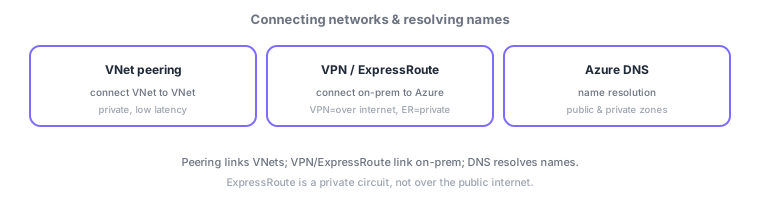
- VNet peering: connects VNet to VNet privately with low latency.
- VPN gateway: connects on-prem via an encrypted tunnel over the internet. ExpressRoute: a dedicated private circuit, faster and more reliable.
- Azure Load Balancer: distributes inbound traffic across VMs (L4). Azure DNS: name resolution with public/private zones.
Common on AZ-104: connect VNets = peering, on-prem over internet = VPN, dedicated circuit = ExpressRoute, name resolution = Azure DNS. If a high-reliability private circuit is required, choose ExpressRoute.
Organize connectivity by "VNet-to-VNet / on-prem / public / name resolution." VNet peering connects VNets privately with low latency (in-region or global peering); since it’s non-transitive, bundle many via hub-and-spoke (central hub with VPN/Firewall) or Virtual WAN. On-prem uses site-to-site VPN (S2S) (encrypted over the internet, needs a VPN gateway) and ExpressRoute (a dedicated circuit that bypasses the internet, low latency/high bandwidth/reliability); remote individuals use point-to-site VPN (P2S). Exposure/distribution uses a Load Balancer (L4, regional), Application Gateway (L7, WAF/path), and global Front Door/Traffic Manager. Name resolution uses Azure DNS (public zones) and private DNS zones (in-VNet resolution, paired with private endpoints). The axes: "VNet-to-VNet = peering," "on-prem dedicated = ExpressRoute / over internet = VPN," "consolidate many VNets = hub-and-spoke/Virtual WAN," "name resolution = Azure DNS/private DNS zone."
| What to connect | Use |
|---|---|
| VNet to VNet | VNet peering (many via hub-and-spoke) |
| On-prem, dedicated/reliable | ExpressRoute |
| On-prem over the internet | Site-to-site VPN (VPN gateway) |
| Private in-VNet name resolution | Private DNS zone |
Scenario: consolidate multiple VNets, connect HQ reliably, and let remote staff connect. Put a central hub VNet and peer each VNet (consolidate at the hub since peering is non-transitive). Connect HQ via ExpressRoute (dedicated, low latency) with site-to-site VPN as redundancy/backup. Remote staff use point-to-site VPN. Resolve private endpoints via a private DNS zone.
Q. VNet-to-VNet? Peering (non-transitive → hub-and-spoke). Q. On-prem dedicated? ExpressRoute. Q. On-prem over internet? Site-to-site VPN. Q. Individual remote access? Point-to-site VPN. Q. In-VNet name resolution? Private DNS zone. Q. Manage many VNets centrally? Virtual WAN.
Watch the mix-ups: (1) Peering is non-transitive—A-B and B-C don’t make A-C work (need hub routing/gateway transit). (2) ExpressRoute bypasses the internet—don’t confuse with an encrypted VPN (different use/reliability). (3) Don’t confuse L4 (LB) with L7 (App Gateway/Front Door). (4) Private endpoints need a private DNS zone or name resolution breaks.
ExpressRoute bypasses the internet, suiting mission-critical links needing low latency, high bandwidth, and reliability—at higher cost and setup effort than VPN.
4.3.2Section summary
- Peering (VNet-to-VNet) / VPN, ExpressRoute (on-prem) / DNS (name resolution)
- Dedicated reliable circuit = ExpressRoute; over internet = VPN
Sign in to track progress — Log in.
Quick check
(just a quick review)Q1. You want to connect two VNets privately with low latency. What do you use?
Q2. You want to connect on-prem to Azure over a dedicated private circuit that bypasses the internet. What fits best?
Q3. Which service resolves domain names to IP addresses in/around Azure?
Keep track of your progress
The full study guide is free to read. Sign up free to practice with the question bank, track what you have read, review your mistakes, and highlight passages.