

What's changed: Deepened AZ-104 Chapter 4 to Associate depth (tables, scenarios, FAQ, traps; localized figures)
4.2Network Security Groups (NSG)
Understand allowing/denying inbound/outbound traffic with NSGs, evaluation by priority, 5-tuple rules, and applying NSGs to subnets/NICs.
A network security group (NSG) decides what traffic to allow or block. Apply it to a subnet or NIC, and control inbound/outbound with rules.
4.2.1NSG rules
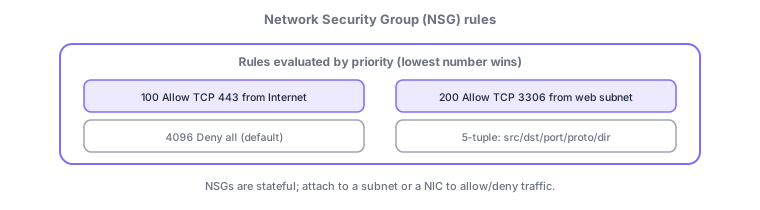
- Rules: allow/deny by source, destination, port, protocol, direction (a 5-tuple).
- Priority: lower numbers are evaluated first; the first match wins.
- Applied to: a subnet or NIC. NSGs are stateful (return traffic auto-allowed).
Common on AZ-104: allow/block a port = NSG rule, lower priority number evaluated first, NSGs are stateful, applied to subnet or NIC. By default inbound is largely denied while intra-VNet is allowed.
An NSG is a stateful filter attached to a subnet or NIC; rules use a 5-tuple (source, destination, port, protocol, direction) and priority (100–4096, lower first, first match wins). Default rules allow intra-VNet and Azure LB while denying inbound from the internet, overridden by your rules. Sources/destinations can be IPs, service tags (Internet/VirtualNetwork/AzureLoadBalancer/Storage, etc.), or application security groups (ASG), reducing IP management. When both subnet and NIC have NSGs, inbound is evaluated subnet → NIC and outbound NIC → subnet, passing only if both allow. Visualize/diagnose with flow logs and Network Watcher (IP flow verify/next hop/connection troubleshoot). For advanced L7/central inspection, use Azure Firewall or Application Gateway (WAF). The axes: "allow/deny a port = NSG," "specify by role not IP = ASG/service tags," "connectivity diagnosis = Network Watcher."
| Goal | Means |
|---|---|
| Allow/deny by port | NSG rule (5-tuple + priority) |
| Specify by role, not IP | ASG / service tags |
| Diagnose connectivity | Network Watcher / flow logs |
| L7 inspection / central defense | Application Gateway (WAF) / Azure Firewall |
Scenario: allow DB (3306) only from the web tier and block the rest. On the DB subnet NSG, add "priority 200, source = web ASG, destination port 3306, Allow," exceptions at lower priority, ending in the default deny. Web allows "443 from Internet (service tag)." If traffic fails, use Network Watcher IP flow verify to isolate which NSG (subnet or NIC) dropped it.
Q. Allow/deny a port? NSG rule. Q. Which evaluated first? Lower priority number. Q. Return traffic? Stateful, auto-allowed. Q. By role not IP? ASG/service tags. Q. Applied to? Subnet or NIC (if both, both must allow). Q. Connectivity diagnosis? Network Watcher.
Watch the mix-ups: (1) NSGs are stateful—no explicit rule needed for return traffic (unlike stateless NACL-style). (2) Both subnet and NIC NSGs must allow—a deny on either blocks it. (3) Priority: lower number first, first match wins. (4) NSGs are L3/L4—L7 filtering (URL/WAF) is Application Gateway/Azure Firewall.
If both a subnet and a NIC have NSGs, inbound is evaluated subnet→NIC and outbound NIC→subnet; traffic passes only if both allow it.
4.2.2Section summary
- NSG = allow/deny inbound/outbound with 5-tuple rules, evaluated by priority
- Stateful, applied to subnet/NIC
Sign in to track progress — Log in.
Quick check
(just a quick review)Q1. What allows/denies inbound traffic on a specific port (e.g., TCP 443) to a VM?
Q2. When multiple NSG rules exist, which is evaluated first?
Q3. Which correctly describes an NSG?
Keep track of your progress
The full study guide is free to read. Sign up free to practice with the question bank, track what you have read, review your mistakes, and highlight passages.