

What's changed: Deepened AZ-104 Chapter 4 to Associate depth (tables, scenarios, FAQ, traps; localized figures)
4.1Virtual Networks (VNet) and Subnets
Understand the foundation of Azure networking: virtual networks (VNet) and address space, subnetting (public/private), and IP address basics.
A virtual network (VNet) is your private network on Azure. You set an address space (e.g., 10.0.0.0/16) and split it into subnets by purpose.
4.1.1VNet and subnets
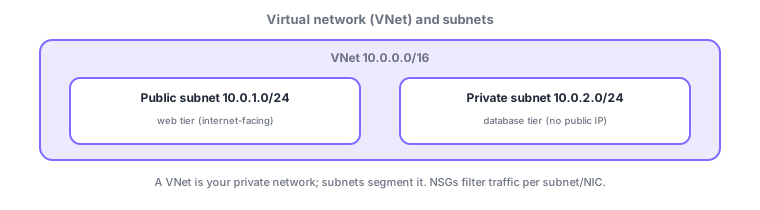
- VNet: a private network on Azure with an address space (CIDR).
- Subnet: segments a VNet by purpose; commonly split into public (web tier) / private (DB tier).
- Resources (e.g., VMs) are placed in a subnet and receive a private IP.
Common on AZ-104: VNet = private network, subnets separate public/private, DBs in a private subnet (no public IP). Resources within a VNet (same region) can communicate by default.
A VNet is your private network on Azure with an address space (CIDR) (design it to not overlap with on-prem or other VNets), split by purpose into subnets. The first/last few IPs of each subnet are reserved (for Azure) and unusable. Routing uses default system routes; override custom paths with user-defined routes (UDR)/route tables to send traffic through an NVA (e.g., a firewall). Control subnet-boundary traffic with NSG and group by app with ASG. To reach services (like S3’s Azure equivalents) without the internet, use service endpoints (per service) or private endpoints (expose PaaS on a private IP). For private-subnet VMs to egress, use a NAT gateway; expose the web tier via a public IP/load balancer. The axes: "private network = VNet," "segment = subnet," "DB = private subnet," "override routes = UDR," "PaaS privately = private endpoint."
| Goal | Use |
|---|---|
| Segment by purpose | Subnets |
| Custom routing | UDR / route table (via NVA) |
| Use PaaS privately | Private endpoint |
| Egress for private VMs | NAT gateway |
Scenario: place a 3-tier app (web/app/DB) securely. Split a VNet (10.0.0.0/16) into web (public)/app/DB (private) subnets. Keep DBs without public IPs and reach Storage/DB via a private endpoint (no internet). Give the app tier egress with a NAT gateway, and detour inspection traffic to an NVA (firewall) via a UDR. Control boundaries with NSG + ASG.
Q. Segment by purpose? Subnets. Q. Custom routing? UDR/route table. Q. PaaS on a private IP? Private endpoint. Q. Egress for private VMs? NAT gateway. Q. VNet-to-VNet? Peering (next section). Q. Address space caution? Don’t overlap.
Watch the mix-ups: (1) Overlapping address space with another VNet/on-prem breaks peering/VPN—plan it. (2) Each subnet reserves the first/last few IPs. (3) Service endpoints (per-service route) ≠ private endpoints (private IP exposure). (4) Private VMs need a NAT gateway (or similar) to egress (they may not by default).
To connect VNet to VNet, use "peering" (covered later). Subnets within the same VNet are routed by default.
4.1.2Section summary
- VNet = a private network with an address space
- Subnets separate public/private; keep DBs private
Sign in to track progress — Log in.
Quick check
(just a quick review)Q1. Which is the basic resource for creating a private network in Azure?
Q2. Where is it most secure to place a database server?
Q3. What is used to segment a VNet by purpose?
Keep track of your progress
The full study guide is free to read. Sign up free to practice with the question bank, track what you have read, review your mistakes, and highlight passages.