

What's changed: Deepened AZ-104 Chapter 2 to Associate depth (tables, scenarios, FAQ, traps; localized figures)
2.3Storage Access and Azure Files
Understand ways to access storage (access keys, SAS, Entra ID + RBAC) and SMB/NFS file shares via Azure Files.
Stored data must be accessed securely. Azure Storage offers three main access methods: access keys, SAS, and Entra ID + RBAC.
2.3.1Access methods
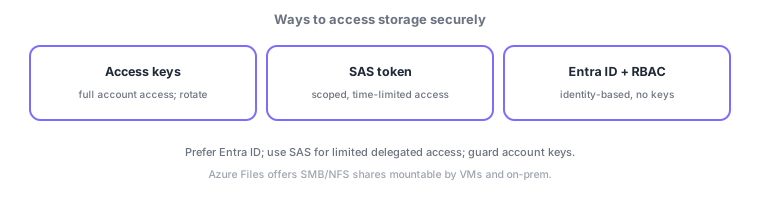
- Access keys: full access to the whole account; high blast radius, so guard them and rotate regularly.
- SAS (shared access signature): delegated access scoped (what/which) and time-limited; ideal for temporary sharing with third parties.
- Entra ID + RBAC: identity-based, no keys; the most recommended approach.
2.3.2Azure Files
- Azure Files: managed file shares mountable over SMB/NFS; usable simultaneously by multiple VMs and on-prem.
- Great for lift-and-shift, replacing on-prem file servers with cloud shares.
Common on AZ-104: time-limited scoped temporary access = SAS, key-free recommended method = Entra ID + RBAC, and SMB share = Azure Files. Treat account keys as a last resort.
Storage access principle: "prefer identity-based, scope and time-limit delegation, keys as last resort." Access keys grant full account access with a large blast radius and require regular rotation (two keys for zero-downtime). A SAS (shared access signature) delegates scoped/time-limited access: the safer user delegation SAS (signed with Entra ID credentials), the account-wide account SAS, and the resource-scoped service SAS (binding it to a stored access policy—a separate server-side policy—lets you change expiry/permissions or revoke in bulk). Most recommended is Entra ID + RBAC (data-plane roles like Storage Blob Data Contributor, no keys). For boundary control, disable public access, restrict to specific VNets via firewall/service endpoints/private endpoints, and enforce HTTPS in transit. Azure Files provides SMB/NFS managed shares with Entra Kerberos/AD DS auth and Azure File Sync for on-prem sync. The axes: "temporary delegation = SAS," "permanent/keyless = Entra ID + RBAC," "SMB share = Azure Files," "VNet-only = private endpoint."
| Requirement | Use |
|---|---|
| Permanent, key-free access | Entra ID + RBAC |
| Time/scope-limited delegation | SAS (prefer user delegation SAS) |
| Allow only from a VNet | Private endpoint / firewall |
| SMB/NFS shared files | Azure Files (+ File Sync) |
Scenario: give an external vendor 30-minute read access to one container, internal apps permanent access, and forbid public exposure. External: a user delegation SAS (read, 30 min, that container only). Internal apps: Entra ID + RBAC (Storage Blob Data Reader, keyless). Prevent exposure with disabled public access + a private endpoint (VNet-only) and enforced HTTPS. Avoid account keys; rotate if used.
Q. Temporary scoped hand-off? SAS (user delegation SAS is safest). Q. Permanent/keyless? Entra ID + RBAC. Q. SMB share? Azure Files. Q. Allow only from a VNet? Private endpoint/firewall. Q. Revoke SAS in bulk? Stored access policy. Q. On-prem sync? Azure File Sync.
Watch the mix-ups: (1) Account keys grant full access (large blast radius)—don’t distribute them; use Entra ID/SAS. (2) A SAS is hard to revoke individually once issued (invalidate via a stored access policy or key regeneration). (3) RBAC data-plane roles (Storage Blob Data *) differ from management-plane (Contributor)—data read/write needs the former. (4) Azure Files SMB needs port 445 (often blocked by on-prem firewalls).
A SAS lets you specify the target (container/blob), allowed operations (read/write, etc.), and expiry—enabling minimal sharing while limiting exposure.
2.3.3Section summary
- Prefer Entra ID + RBAC; use SAS for temporary sharing; guard keys
- Azure Files = SMB/NFS shared files (used by multiple VMs/on-prem)
Sign in to track progress — Log in.
Quick check
(just a quick review)Q1. You want to give a third party time-limited, scoped access to a specific blob. What fits best?
Q2. Which managed file share can be mounted over SMB by multiple VMs at once?
Q3. Which is the most recommended (key-free) way to access storage?
Keep track of your progress
The full study guide is free to read. Sign up free to practice with the question bank, track what you have read, review your mistakes, and highlight passages.