

What's changed: Deepened AZ-104 Chapter 2 to Associate depth (tables, scenarios, FAQ, traps; localized figures)
2.2Blob Access Tiers and Lifecycle
Understand cost optimization with Blob access tiers (Hot/Cool/Archive) and automatic tiering/deletion via lifecycle management policies.
You optimize cost by placing data in the right tier for its access frequency. Blob offers four access tiers: Hot, Cool, Cold, and Archive.
2.2.1Access tiers
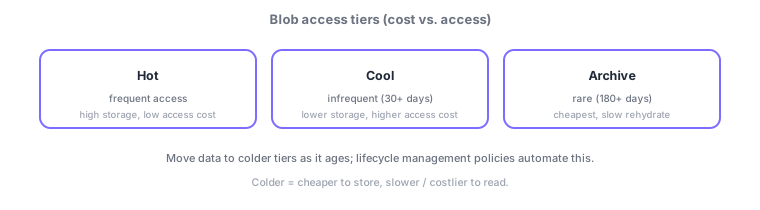
- Hot: frequently accessed data; higher storage cost, lower access cost.
- Cool: data kept 30+ days with infrequent access; cheaper storage, costlier access.
- Archive: rarely accessed data kept 180+ days; cheapest but reads require rehydration and are slow.
Common on AZ-104: rarely used long-term retention = Archive tier, and automatically move aging data to colder tiers = lifecycle management policy. Note Archive is not instantly readable.
Blob cost is optimized by "placing data in the tier matching its access frequency." Hot = frequent (high storage/low access cost); Cool = 30+ days, infrequent (low storage/higher access cost); Cold = even less frequent (90+ days); Archive = rarely used for 180+ days (cheapest but offline—reads require "rehydration," taking hours). Tiers apply to block blobs (GPv2), and you can set the account default tier. A lifecycle management policy auto-applies rules like "after N days since last modified/accessed → Cool → Archive after M → delete after L" via a rule engine, cutting cost without manual work (filters scope which blobs). Guard against accidental deletion with soft delete and versioning, and meet immutability needs with immutable storage (WORM). The axes: "frequent = Hot," "occasional (30+ days) = Cool," "rare (180+ days) = Archive," "auto tiering/deletion = lifecycle policy." A common trap: Archive is not instantly readable.
| Access frequency | Tier | Note |
|---|---|---|
| Frequent | Hot | High storage, low access |
| Infrequent (30+ d) | Cool | Low storage, high access |
| Rare (180+ d) | Archive | Cheapest, needs rehydration (slow) |
| Auto tier/delete | Lifecycle policy | Rules by age |
Scenario: keep audit logs for a year—viewed often for 30 days, rarely after, delete at one year. Define a lifecycle management policy: "Cool at 30 days → Archive at 90 → delete at 365." For tamper-proof compliance use immutable storage (WORM), and guard with soft delete + versioning. Don’t put still-needed data in Archive (rehydration is slow).
Q. Frequent access? Hot. Q. 30+ days infrequent? Cool. Q. 180+ days rare? Archive (cheapest, needs rehydration). Q. Auto tier/delete? Lifecycle management policy. Q. Guard deletion? Soft delete + versioning. Q. Tamper-proof? Immutable storage (WORM).
Watch the mix-ups: (1) Archive isn’t instantly readable—rehydration takes hours; don’t put data needing instant access there. (2) Cool/Archive are cheap to store but have access/early-deletion penalties (minimum retention). (3) Lifecycle defaults to "last modified" (enable last-access tracking separately). (4) Without soft delete enabled, deleted blobs can’t be restored.
A lifecycle management policy can define rules like "move to Cool after N days, Archive after M days, delete after L days," cutting cost without manual work.
2.2.2Section summary
- Pick Hot/Cool/Archive by access frequency to optimize cost
- Automate tiering/deletion with lifecycle management policies
Sign in to track progress — Log in.
Quick check
(just a quick review)Q1. Which Blob tier fits data rarely accessed for 180+ days where you want minimal cost?
Q2. You want aging blobs automatically moved to Cool or Archive. What do you use?
Q3. Which tier best stores images for a frequently accessed website?
Keep track of your progress
The full study guide is free to read. Sign up free to practice with the question bank, track what you have read, review your mistakes, and highlight passages.