

What's changed: Deepened AZ-104 Chapter 3 to Associate depth (tables, scenarios, FAQ, traps; localized figures)
3.1Virtual Machine (VM) Fundamentals
Understand IaaS compute basics: VM building blocks (size, disks, NIC, image), managed disks, and regions/zones for availability.
The most fundamental compute is the virtual machine (VM)—IaaS where you manage the OS yourself and pick a "size" (CPU/memory) for the workload.
3.1.1VM building blocks
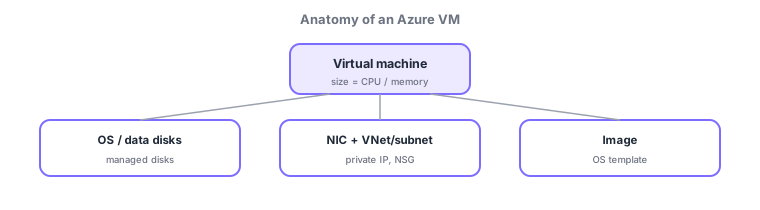
- Size: a CPU/memory combination; pick from series like general purpose, compute optimized, memory optimized.
- Managed disks: OS and data disks—virtual disks whose availability Azure manages.
- NIC / VNet / subnet: network connectivity; a private IP, traffic controlled by an NSG.
- Image: a template of OS and software; lets you reproduce identically configured VMs.
Common on AZ-104: VM = IaaS where you manage down to the OS, size selects CPU/memory, disks are managed disks. Also note that stopping (deallocating) a VM stops compute billing.
A virtual machine (VM) is IaaS where you manage down to the OS. Pick CPU/memory via size (series) and attach managed disks for OS/data (types Standard HDD/Standard SSD/Premium SSD/Ultra Disk differ in cost and IOPS). Back up disks with snapshots; at rest they’re encrypted by default with SSE (platform/customer-managed keys), and whole-OS encryption uses Azure Disk Encryption (BitLocker/DM-Crypt). Networking is NIC → subnet/VNet + NSG; initial setup uses cloud-init/Custom Script Extension; config is maintained by VM extensions. Reproduce identical builds with an image / Azure Compute Gallery. Billing key point: "Stop (deallocate)" halts compute billing (a plain shutdown doesn’t; disk charges continue). Optimize cost with Reserved Instances / Azure Hybrid Benefit / Spot VMs. Note the temp disk is wiped on reboot. The axes: "need OS control = VM," "stop billing = deallocate," "high IOPS = Premium/Ultra."
| Element | Role |
|---|---|
| Size (series) | CPU/memory combination |
| Managed disk | OS/data; HDD–Ultra differ in IOPS/cost |
| NIC + VNet/subnet + NSG | Connectivity and traffic control |
| Image / Compute Gallery | Reproduce identical builds |
Scenario: cut cost on a dev VM unused at night. Outside work hours, Stop (deallocate) (auto-shutdown) to halt compute billing. Use Premium/Ultra disks where high IOPS is needed (DB) and Standard for logs. Bake the standard build into an image (Compute Gallery) to roll out, and automate setup with the Custom Script Extension.
Q. Stop billing? Stop (deallocate). Q. High-IOPS disk? Premium/Ultra SSD. Q. Reproduce builds? Image/Compute Gallery. Q. Boot-time setup? cloud-init/Custom Script Extension. Q. Back up disks? Snapshots (or Azure Backup).
Watch the mix-ups: (1) "Stop" ≠ "Stop (deallocate)"—an OS shutdown keeps billing; only deallocation halts it. (2) The temp disk isn’t persistent (wiped on reboot/reallocation)—don’t store important data there. (3) Disk charges continue while the VM is stopped. (4) Ultra Disk has region/size constraints.
Choosing "Stop (deallocate)" rather than just stopping halts compute billing (storage charges for disks continue).
3.1.2Section summary
- VM = IaaS, built from size, managed disks, NIC, image
- Deallocating stops compute billing
Sign in to track progress — Log in.
Quick check
(just a quick review)Q1. Which Azure compute is the most flexible, where you manage down to the OS?
Q2. What determines a VM’s amount of CPU and memory?
Q3. To stop a VM’s compute billing, which state is appropriate?
Keep track of your progress
The full study guide is free to read. Sign up free to practice with the question bank, track what you have read, review your mistakes, and highlight passages.