

What's changed: Deepened AZ-104 Chapter 1 to Associate depth (tables, scenarios, FAQ, traps; localized figures)
1.3Subscriptions and Governance
Understand the resource hierarchy (management group → subscription → resource group → resource) and governance basics: Azure Policy enforcement, tags, and resource locks.
To run large environments cleanly, organize resources in a hierarchy and apply rules consistently. Azure does this through the management-group-to-resource hierarchy and Azure Policy.
1.3.1Resource hierarchy and governance tools
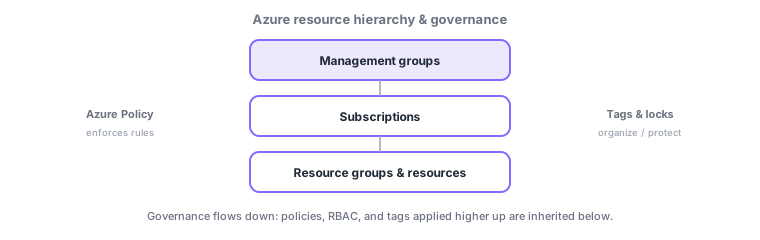
- Management groups: bundle subscriptions to apply policy/RBAC in bulk.
- Subscriptions: a billing and resource boundary. Resource groups contain related resources.
- Azure Policy: enforces rules like allowed regions or required tags (RBAC = permissions, Policy = rules).
- Tags: classify resources by key/value (useful for cost). Locks: prevent accidental delete/change (ReadOnly/CanNotDelete).
Common on AZ-104: the difference between RBAC (who can do what = permissions) and Azure Policy (what is allowed = rules), prevent accidental deletion = resource lock, and cost reporting = tags.
Governance basically "organizes in a hierarchy and applies consistent rules high up that inherit downward." The hierarchy is management group → subscription → resource group → resource. A management group applies policy/RBAC to many subscriptions at once; a subscription is a billing and quota boundary; a resource group bundles resources sharing a lifecycle. Azure Policy enforces rules like allowed regions, required tags, or allowed SKUs, with remediation of non-compliant resources and deny/audit effects (grouped as initiatives). RBAC = permissions (who can do what); Policy = rules (what is allowed)—different roles. Use tags (key/value) for cost reporting/classification, and resource locks (CanNotDelete/ReadOnly) to prevent accidental delete/change (locks override RBAC). Start large rollouts with an Azure Landing Zone, and visualize cost with Microsoft Cost Management + budget alerts. The axes: "enforce rules = Policy," "permissions = RBAC," "prevent deletion = locks," "classify/cost = tags."
| Goal | Use |
|---|---|
| Enforce allowed regions/required tags | Azure Policy (initiatives) |
| Who can do what | RBAC |
| Prevent accidental delete/change | Resource locks |
| Cost reporting/classification | Tags + Cost Management |
Scenario: forbid non-Japan regions across all subscriptions and protect production from deletion. Assign Azure Policy (allowed-regions deny for Japan East/West) at the management group scope to inherit downward. Apply CanNotDelete locks to production resources. Report per-department cost with tags + Cost Management, with alerts on budget overruns. Handle permissions separately via RBAC.
Q. Enforce rules? Azure Policy (deny/audit/remediation). Q. Grant permissions? RBAC. Q. Prevent deletion? Resource lock (CanNotDelete). Q. Cost reporting/classification? Tags + Cost Management. Q. Apply to many subscriptions? Management group scope.
Watch the mix-ups: (1) Policy (rules) ≠ RBAC (permissions)—"forbid a SKU" is Policy; "allow creation" is RBAC. (2) A resource lock overrides RBAC—even an Owner can’t delete under CanNotDelete (remove the lock first). (3) Tags don’t inherit to children by default (use a policy to inherit). (4) A subscription is a quota boundary—exceed limits via another subscription or a limit increase.
Policies, RBAC, and tags inherit from higher scopes downward. Setting them once at a management group applies across all subscriptions beneath it.
1.3.2Section summary
- Hierarchy = management group → subscription → resource group → resource
- Govern with Policy (rules) / tags (classification) / locks (protection)
Sign in to track progress — Log in.
Quick check
(just a quick review)Q1. Which service enforces rules like allowed regions or required tags on Azure resources?
Q2. What prevents accidental deletion of an important resource?
Q3. You want to group and report cost by project or department. What fits best?
Keep track of your progress
The full study guide is free to read. Sign up free to practice with the question bank, track what you have read, review your mistakes, and highlight passages.