

What's changed: Deepened AZ-104 Chapter 1 to Associate depth (tables, scenarios, FAQ, traps; localized figures)
1.2Role-Based Access Control (RBAC)
Understand Azure RBAC role assignments (security principal + role definition + scope), built-in roles, inheritance through the scope hierarchy, and least privilege.
After authentication (who) comes authorization (what they may do). Azure RBAC (role-based access control) grants fine-grained permissions on resources.
1.2.1The three parts of a role assignment
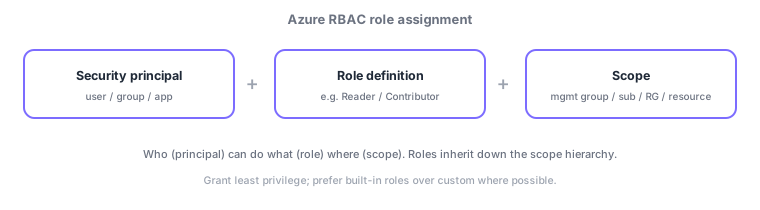
- Security principal: who you grant to (user/group/app).
- Role definition: the set of allowed actions, e.g., Reader (read), Contributor (create/modify), Owner (full + manage access).
- Scope: where it applies—management group → subscription → resource group → resource; higher assignments inherit downward.
A common AZ-104 distinction: Reader = read, Contributor = create/modify (no access management), Owner = full + manage access. Higher scopes inherit more broadly.
Azure RBAC combines three parts: "who (principal) can do what (role definition) where (scope)." Key built-in roles: Reader (read only), Contributor (create/modify but cannot manage access = grant roles), Owner (full + manage access), and User Access Administrator (manage permissions only). Scope is the hierarchy management group → subscription → resource group → resource, and higher assignments inherit downward. Role definitions use allow (Actions) plus NotActions, which subtracts from them (NotActions is an exclusion, not a deny). A deny assignment is a separate concept that overrides allows and cannot be created directly—Azure creates it (today via deployment stack deny settings or managed apps; Azure Blueprints retires on 31 January 2027). When built-ins don’t fit, create a custom role while keeping least privilege. RBAC governs Azure resource permissions, distinct from Entra ID directory roles (e.g., Global Administrator, which manage the tenant/identity). Use PIM to grant strong roles like Owner just-in-time with approval, reducing standing privilege. The axes: "read only = Reader," "create/modify = Contributor," "manage permissions too = Owner/User Access Administrator."
| Role | Can do |
|---|---|
| Reader | Read only |
| Contributor | Create/modify (cannot grant roles) |
| Owner | Full + manage access |
| User Access Administrator | Manage access only |
Scenario: let developers create resources but not grant permissions to others. Assign Contributor at the resource-group scope (create/modify yes, grant roles no). Give the access-management duty to a separate User Access Administrator. Keep Owners minimal and elevate just-in-time with PIM only when needed. Apply org-wide restrictions at the management group scope to inherit downward.
Q. Read only? Reader. Q. Create/modify but no granting? Contributor. Q. Full + manage access? Owner. Q. Manage permissions only? User Access Administrator. Q. Higher-scope assignment? Inherits downward. Q. Reduce standing privilege? Just-in-time elevation via PIM.
Watch the mix-ups: (1) Contributor cannot grant roles (manage access)—that’s Owner or User Access Administrator. (2) Azure RBAC (resource permissions) ≠ Entra directory roles (tenant/identity admin)—Global Administrator ≠ Owner. (3) Scope inherits, so an over-broad higher assignment over-grants (assign at the narrowest scope). (4) A deny assignment overrides allows.
First see if a built-in role meets the need; create a custom role only when none fits. Aim for least privilege.
1.2.2Section summary
- Role assignment = principal + role definition + scope
- Use Reader/Contributor/Owner; scope inherits downward
Sign in to track progress — Log in.
Quick check
(just a quick review)Q1. What three parts make up an Azure RBAC role assignment?
Q2. Which built-in role allows read-only access without modification?
Q3. How does a role assigned at the subscription scope affect underlying resource groups?
Keep track of your progress
The full study guide is free to read. Sign up free to practice with the question bank, track what you have read, review your mistakes, and highlight passages.