

What's changed: Deepened AZ-104 Chapter 1 to Associate depth (tables, scenarios, FAQ, traps; localized figures)
1.1Microsoft Entra ID Fundamentals
Understand Microsoft Entra ID (formerly Azure AD): tenants, users, groups, app registrations, and authentication with MFA / Conditional Access. The starting point for "Manage identities and governance" in AZ-104.
The first step to operating Azure securely is managing who can sign in. Microsoft Entra ID (formerly Azure AD) is the cloud identity and access management service that does this.
1.1.1Entra ID building blocks
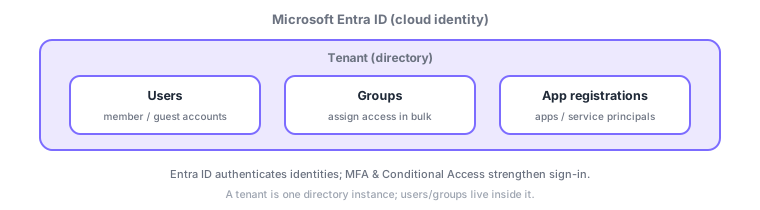
- Tenant: a per-organization directory (container of identities); users and groups live inside it.
- Users: member (internal) and guest (external) accounts.
- Groups: assign access in bulk to many users.
- App registrations / service principals: identities that let apps authenticate with Entra ID.
Common on AZ-104: strengthen sign-in = MFA + Conditional Access and invite external users = guest users (B2B). Remember groups are used to assign access in bulk.
AZ-104 identity management designs "who authenticates, how, and under what conditions sign-in is allowed." A tenant is a per-organization directory containing users (members = internal / guests = external B2B invites) and groups. Groups are assigned or dynamic (auto-membership by attribute rules) and assign licenses/access in bulk (group-based license assignment). Apps authenticate via app registrations / service principals, and managed identities let apps access Azure resources securely without passwords. Strengthen sign-in with multifactor authentication (MFA) and Conditional Access (require MFA or block by conditions like location, device, sign-in risk; needs Entra ID P1/P2). Also know passwordless (Windows Hello/FIDO2/Authenticator), self-service password reset (SSPR), risk-based Identity Protection (P2), and just-in-time PIM (P2). Sync on-prem AD with Microsoft Entra Connect. The axes: "external users = guests (B2B)," "app identity = service principal/managed identity," "conditional sign-in control = Conditional Access."
| Goal | Use |
|---|---|
| Invite external users | Guest users (B2B) |
| Bulk assign to many users | Groups (incl. dynamic) |
| App/VM authenticates securely | Service principal / managed identity |
| Conditional sign-in control | Conditional Access + MFA |
Scenario: let external partners use some resources and require MFA only for risky sign-ins. Invite partners as guest users (B2B) and grant access in bulk via a group. Use Conditional Access to require MFA (or block) only when "sign-in risk is high / from an untrusted location." For automated app access, authenticate keylessly with a managed identity.
Q. External users? Guest (B2B) invites. Q. Bulk access? Groups (incl. dynamic). Q. App/VM auth? Service principal/managed identity (avoid embedded keys). Q. Conditional sign-in? Conditional Access (P1/P2). Q. Sync on-prem AD? Entra Connect.
Watch the mix-ups: (1) Entra ID is authentication/authorization (identity service)—separate from Azure RBAC resource permissions (next section). (2) Conditional Access and Identity Protection/PIM need P1/P2 licenses (not on free tenants). (3) Managed identities (system/user-assigned) are the preferred keyless option—safer than hard-coding a service principal secret.
Conditional Access lets you fine-tune sign-in—e.g., require MFA only under certain conditions (location, device, risk). Some capabilities need higher-tier licenses.
1.1.2Section summary
- Entra ID = manage identities with tenant, users, groups, app registrations
- Strengthen sign-in with MFA + Conditional Access; externals are guests
Sign in to track progress — Log in.
Quick check
(just a quick review)Q1. Which service provides cloud identity and access management for Azure?
Q2. Which Entra ID construct best assigns access to many users at once?
Q3. Which capability helps strengthen sign-in security?
Keep track of your progress
The full study guide is free to read. Sign up free to practice with the question bank, track what you have read, review your mistakes, and highlight passages.