

What's changed: Deepened AI-102 Chapter 1 (ja figures; comparison tables/scenarios/FAQ/traps/deep paragraphs in all sections)
1.3Securing, Monitoring, and Deploying AI Solutions
Understand operations for AI resources: security (key management, network restrictions, Entra/managed identity), monitoring (metrics, diagnostic logs, cost), and running in containers on-prem/edge.
Like other Azure resources, AI solutions must be secured, monitored, and deployed appropriately. AI-102 also tests operations.
1.3.1Secure, monitor, deploy
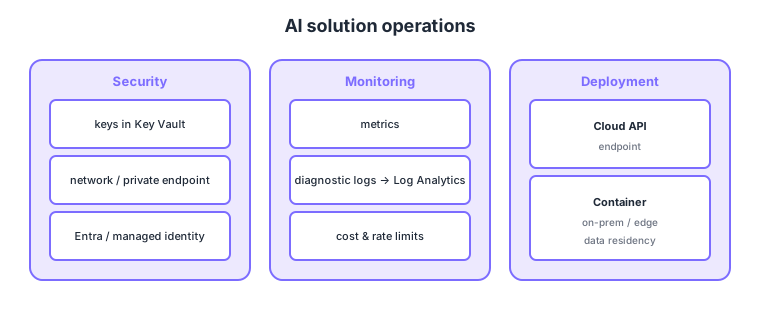
- Security: manage keys in Key Vault, apply network restrictions/private endpoints, prefer Entra/managed identity.
- Monitoring: track requests/errors, latency, and cost via metrics and diagnostic logs (Log Analytics).
- Containers: some AI services run as containers on-prem/edge (useful when data can’t leave, etc.).
- Cost/rate limits: the pricing tier affects throughput and cost; watch for throttling.
Common on AI-102: keys in Key Vault, network restrictions, Entra/managed identity = securing AI resources, metrics/diagnostic logs = Azure Monitor + Log Analytics, can’t move data / run at the edge = container deployment, pricing tier changes throughput/cost.
Even running AI services in containers, connectivity to Azure may be required for billing/usage metering—check the requirements.
For security, the standard practices are: disable key auth to allow only Entra ID, cut public access with network restrictions (allow only selected VNets/IPs) or a private endpoint, and handle secrets via Key Vault + managed identity. For monitoring, use Azure Monitor metrics (call count, latency, error rate, throttling) and diagnostic settings to send audit/request logs to Log Analytics for KQL analysis, and control spend with Cost Management and tier design. There are three deployment shapes: (1) cloud managed API (simplest), (2) containers (Docker) for some services on-prem/edge (for data-residency/offline needs, but periodic Azure connectivity is required for metering), and (3) model deployments like Azure OpenAI (managed by deployment name and TPM/PTU throughput). For generative AI, choose pay-as-you-go (PAYG) vs provisioned throughput (PTU) by requirements. On HTTP 429, respond with backoff retries, raising the tier/quota, or spreading across regions. This overlaps with AZ-500 security ops, but AI-102 tests AI-resource-specific keys/endpoints/quotas.
| Deployment shape | Where | Best for |
|---|---|---|
| Managed API | Azure cloud | Simplest, auto-scale |
| Container | On-prem / edge | Data residency/offline (needs periodic connect) |
| Model deployment | Azure OpenAI / Foundry | Generative AI, TPM/PTU control |
Scenario: medical data can’t leave the premises but you need AI text analysis on-prem. → Deploy the corresponding Azure AI service as a container on-prem to process without moving data out. Ensure periodic Azure connectivity for metering, keep keys in Key Vault, and protect access with a managed identity.
FAQ: Q. Can containers run fully offline? → A. Processing is local, but most cases require periodic Azure connectivity for metering. Q. How to stabilize generative-AI throughput? → A. Choose provisioned throughput (PTU) over PAYG to reserve capacity per deployment.
Trap: “running in a container removes any need for Azure connectivity” is wrong—processing is local, but periodic connectivity is often required for billing/metering. Also “metrics alone suffice for monitoring” is wrong—request/audit logs need diagnostic settings to Log Analytics for detailed analysis.
1.3.2Section summary
- Security = Key Vault, network restrictions, Entra/managed identity
- Monitoring = metrics/diagnostic logs, deployment = cloud API or containers
Sign in to track progress — Log in.
Quick check
(just a quick review)Q1. Which Azure service should you use to securely store/rotate AI service API keys?
Q2. You can’t move data out of Azure and want to run an AI service on-prem/edge. Which approach?
Q3. You want to track AI service requests, errors, latency, and cost. What do you use?