

What's changed: Deepened AI-102 Chapter 2 (ja figures; comparison tables/scenarios/FAQ/traps/deep paragraphs in all sections)
2.1Image Analysis and OCR (Azure AI Vision)
Understand Azure AI Vision image analysis (tags, object detection, captions) and OCR (Read) for text recognition that extract information from images—the core pre-built computer vision capabilities.
Azure AI Vision reads "what is in an image," "where things are," and "what text appears." You use it by calling pre-built models via API.
2.1.1Image analysis and OCR capabilities
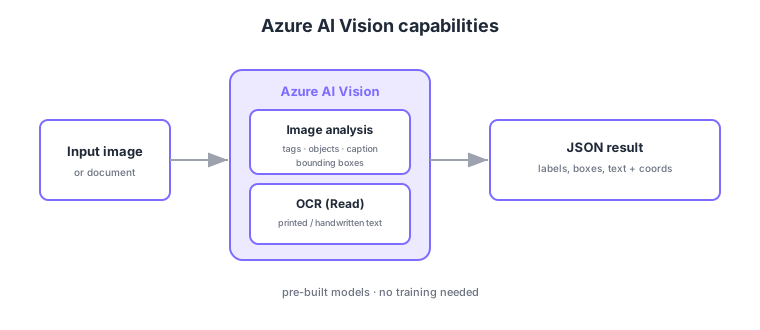
- Image analysis: tagging, object detection (bounding boxes), caption generation, and more.
- OCR (Read): extract printed/handwritten text from images/documents, with positions (coordinates).
- Smart crop/thumbnail: crop intelligently based on the region of interest.
- Pre-built: no model training needed—just call the API (custom is in the next section).
Common on AI-102: tags/objects/captions = Azure AI Vision image analysis, text extraction from images/docs = OCR (Read), object location = bounding box. Distinguish structured document extraction (forms/tables) = Document Intelligence (later chapter).
OCR (Read) handles handwritten text in addition to printed text and supports multilingual recognition.
Current Azure AI Vision (v4.0 / Florence foundation model) can fetch multiple visual features at once via Analyze Image (tags, objects, captions, dense captions, smart crop, people detection, brand/landmark), each with a confidence score. For text, the Read (OCR) API extracts printed/handwritten text in many languages and returns bounding boxes (coordinates) per line and word. Long jobs (large PDFs/images) run asynchronously (request → operation ID → poll for result), small images synchronously. Images are passed as URL or binary, and Florence-based features include image search via image/text embeddings (vectors). Video is handled separately by Azure AI Video Indexer. Structured extraction of “invoice/receipt key-value and tables” is not raw OCR—it’s the job of Document Intelligence (later chapter). Split roles: Read for plain text extraction, Document Intelligence for understanding document structure.
| Goal | Use | Returns |
|---|---|---|
| Describe an image | Image analysis (caption/tags) | Caption/tags + confidence |
| Locate objects | Object detection | Bounding boxes |
| Read text in images/docs | OCR (Read) | Text + line/word coords |
| Structure invoice fields | Document Intelligence (later) | Key-value, tables |
Scenario: auto-tag and describe uploaded photos and also extract text on a sign in them. → Use Azure AI Vision Analyze Image for tags/caption/objects, and run Read (OCR) on the same image to extract the sign’s text and coordinates. Process large images with the async API.
FAQ: Q. OCR vs Document Intelligence? → A. OCR (Read) returns raw text and coordinates only; structuring invoices into key-value/tables is Document Intelligence. Q. Is video analysis AI Vision? → A. No—video is handled by Azure AI Video Indexer.
Trap: “OCR (Read) returns structured invoice fields” is wrong—Read returns raw text + coordinates; structured extraction is Document Intelligence. Also “analyze video with AI Vision” is wrong—video is Video Indexer.
2.1.2Section summary
- Image analysis = tags, object detection, captions
- OCR (Read) = extract printed/handwritten text
Sign in to track progress — Log in.
Quick check
(just a quick review)Q1. You want to detect objects in an image with bounding boxes, tags, and captions. What do you use?
Q2. You want to extract printed/handwritten text from images or documents. Which capability?
Q3. Which is true of Azure AI Vision image analysis (pre-built)?