

What's changed: Deepened AI-102 Chapter 1 (ja figures; comparison tables/scenarios/FAQ/traps/deep paragraphs in all sections)
1.1Azure AI Services and Creating Resources
Understand the overview of Azure AI services (formerly Cognitive Services) as the foundation for AI solutions, creating resources, and consuming them via endpoints and keys. The starting point for "Plan and manage an Azure AI solution" in AI-102.
In Azure, Azure AI services provide AI capabilities as APIs—vision, language, speech, decision, and more. You consume advanced AI just by calling pre-built models.
1.1.1How to consume AI services
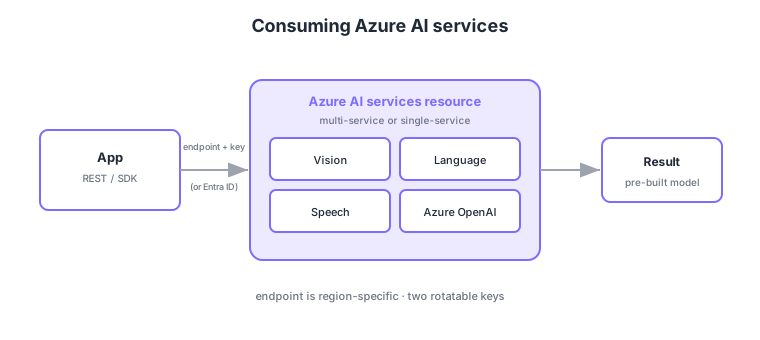
- Azure AI services: provide pre-built AI as APIs—vision, language, speech, OpenAI (formerly Cognitive Services).
- Multi-service vs single-service: a multi-service resource for many capabilities, or single-service resources per capability.
- Endpoint: the URL to call; region-specific and set when the resource is created.
- Keys / auth: authenticate with API keys (two, rotatable) or Entra ID / managed identity.
Common on AI-102: pre-built AI as APIs = Azure AI services, call URL = endpoint (region-specific), auth = keys (two, rotatable) or Entra/managed identity, many capabilities in one = multi-service resource. Don’t hardcode keys; manage them in Key Vault, etc.
Cognitive Services was renamed to Azure AI services; exams and docs may use either name for the same thing.
Choose resources by purpose. A multi-service resource (Azure AI services) bills/manages many capabilities under one key/endpoint, while single-service resources (e.g., Computer Vision only) isolate per capability and can each use the free (F0) tier. Azure AI Foundry (formerly Azure AI Studio) manages generative AI—models, data, evaluation, and deployment—per project. For auth, Microsoft Entra ID (managed identity) is preferred over key auth, granting least privilege via RBAC roles like Cognitive Services User. Endpoints sometimes need a custom subdomain (e.g., myair.cognitiveservices.azure.com) for token auth or network restrictions, and you pick the region by data residency and model availability. Pricing is set by the tier—F0 (free, low throughput) vs S0 (pay-as-you-go); exceeding limits returns HTTP 429 (throttling), handled with retries (exponential backoff) or a higher tier. Two keys are provided so you can rotate without downtime.
| Aspect | Multi-service | Single-service |
|---|---|---|
| Capabilities | Many in one resource | One capability each |
| Key/endpoint | Shared (one set) | Separate per capability |
| Free tier (F0) | One shared | Per capability |
| Best for | Manage many together | Single capability, cost isolation |
Scenario: use several AI capabilities (Vision, Language, Speech) in one app with unified billing and access. → Create one multi-service Azure AI services resource and access it via Entra ID (managed identity) with the Cognitive Services User role. Store keys in Key Vault and, if needed, restrict public access with a custom subdomain and a private endpoint.
FAQ: Q. Key auth or Entra ID auth? → A. For production, prefer Entra ID (managed identity) + RBAC; keep keys in Key Vault with rotation and never hardcode. Q. Why HTTP 429? → A. You exceeded the tier’s rate limit (throttling); retry with exponential backoff or move to a higher tier.
Trap: “the endpoint URL is the same from any region” is wrong—endpoints are region-specific, set at creation. Also “there’s only one key” is wrong—two are provided for zero-downtime rotation.
1.1.2Section summary
- Azure AI services = pre-built AI APIs (multi/single-service)
- Consume via endpoint + key/Entra auth
Sign in to track progress — Log in.
Quick check
(just a quick review)Q1. Which Azure service set provides pre-built AI (vision, language, speech) as APIs?
Q2. What is the region-specific URL used to call an Azure AI services resource called?
Q3. Which approach accesses AI services without keys and with no credentials in code?