

What's changed: Deepened SC-900 Chapter 2 to the AZ-900 baseline (identity as new perimeter & Entra ID, identity types + table, SSO/federation/hybrid identity, auth methods MFA/passwordless/SSPR, Conditional Access if-then & ID Protection, scenarios, FAQ, traps). Localized 2 figures
2.1Microsoft Entra ID and Identity Types
Understand that identity is the "new security perimeter," the role of Microsoft Entra ID (formerly Azure AD), identity types (users, service principals, managed identities, devices), and SSO/federation.
Security’s boundary used to be the "corporate network," but with cloud and remote work access comes from anywhere, making identity the "new security perimeter." Cloud security centers on using identity to determine and control who/what is accessing from which device. The identity platform (IdP) is Microsoft Entra ID (formerly Azure Active Directory), which handles sign-in, SSO, MFA, and Conditional Access.
2.1.1Identity types
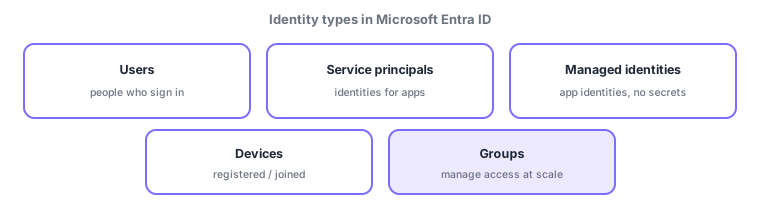
- Users: identities for people who sign in—members (e.g., employees) and guests invited from other orgs.
- Service principals: identities for apps/services (non-human) to access resources.
- Managed identities: let apps access Azure resources securely without managing secrets—a service principal automatically managed by Azure.
- Devices: identities for registered/joined endpoints; "is the device compliant?" can be a Conditional Access signal.
- Groups: collections of users/devices to streamline access management at scale (grant rights per group, not per user).
| Identity type | Represents | Use |
|---|---|---|
| User | People (member/guest) | Sign in and use |
| Service principal | App/service | App accesses resources |
| Managed identity | App on Azure | Connect securely, no secrets |
| Device | Endpoint | Evaluate device compliance |
2.1.2SSO, federation, and hybrid identity
Single sign-on (SSO) lets one sign-in be reused to reach multiple apps without signing in again—improving usability and security by reducing password reuse and entries. Federation establishes a trust relationship with another org or identity provider so identities authenticated on their side are accepted on yours (e.g., a partner’s identity accessing your app). Hybrid identity—syncing on-premises Active Directory with cloud Entra ID—also appears often.
Scenario: a company’s identity design. Employees are users (members) in Entra ID and reach Microsoft 365 and internal apps via SSO with one sign-in. Partners are invited as guest identities. An internal automation app uses a managed identity to connect to Storage without keys. On-prem AD is synced via hybrid identity. Rights are granted to department groups to streamline administration.
Watch the mix-ups: (1) managed identity (no secrets, auto-managed by Azure) vs service principal (app identities generally)—a managed identity is a kind of service principal with no key management. (2) SSO (one sign-in for many apps) vs federation (trust between orgs/IdPs). (3) member (your org) vs guest (invited external).
Q. Is Entra ID the same as on-prem Active Directory? No—on-prem AD centers on domain-joined PCs; Entra ID is an identity platform for cloud/web apps. Syncing both is hybrid identity. Q. Benefit of managed identity? No embedded passwords/keys in apps, lowering leak risk. Q. Does SSO weaken security? It reduces entries and password reuse, and combined with MFA/Conditional Access can strengthen it.
Common: identity is the new security perimeter, managed identity = no secret management, SSO = one sign-in for many apps, federation = trust across organizations, groups = access management at scale, hybrid identity = sync on-prem AD with Entra ID.
2.1.3Section summary
- Identity is the new perimeter; the platform is Microsoft Entra ID
- Identity types = users / service principals / managed identities / devices / groups
- SSO (one sign-in for many) / federation (trust across orgs)
Sign in to track progress — Log in.
Quick check
(just a quick review)Q1. Which identity type lets an app access Azure resources securely without managing secrets?
Q2. Which lets you sign in once to access multiple applications?
Q3. In the cloud, what is described as the "new security perimeter"?
Keep track of your progress
The full study guide is free to read. Sign up free to practice with the question bank, track what you have read, review your mistakes, and highlight passages.