

What's changed: Deepened SC-900 Chapter 1 to the AZ-900 baseline (Zero Trust three principles + defense-in-depth layers, shared responsibility, CIA table, AuthN/AuthZ order, three auth factors + MFA, encryption/hashing table, scenarios, FAQ, traps). Localized 2 figures
1.2Authentication, Authorization, and Encryption
Understand the difference between authentication (AuthN) and authorization (AuthZ), and the basics of encryption and hashing.
Access control rests on two steps: "who are you (authentication)" and "what can you do (authorization)." Authentication always comes first, authorization after—this order and distinction are tested repeatedly in SC-900. We also cover the basics of encryption (protecting the data itself) and hashing (tamper detection and password storage).
1.2.1Authentication and authorization
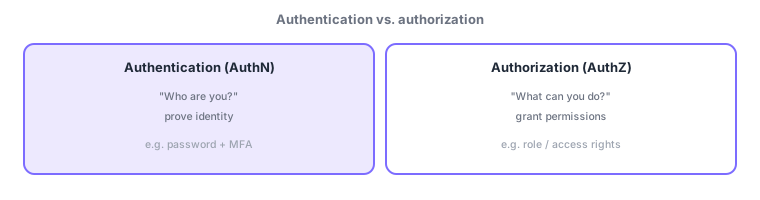
- Authentication (AuthN): verify "who you are" (prove identity)—the sign-in step.
- Authorization (AuthZ): decide "what you can do" once authenticated (permissions)—comes after authentication.
Authentication "evidence" falls into three factors: something you know (password, PIN), something you have (phone, token), and something you are (fingerprint, face). Multi-factor authentication (MFA) combines two or more factors of different types to strengthen authentication, so a leaked password alone cannot get in. MFA is a key way to realize Zero Trust’s "verify explicitly."
1.2.2Encryption and hashing
Encryption transforms data with a key so only authorized parties can reverse it (decrypt) with a key. By target, it applies at rest (on disk) and in transit (during communication). Two approaches: symmetric (same key to encrypt/decrypt—fast but key sharing is the challenge) and asymmetric (encrypt with a public key, decrypt with a private key—safe key distribution). By contrast, hashing is a one-way transform that cannot be reversed; the same input always yields the same value. It is used for tamper detection and for storing passwords, which need not be decrypted.
| Item | Reversible? | Main use |
|---|---|---|
| Symmetric encryption | Yes, with the key | Fast bulk data encryption |
| Asymmetric encryption | Yes, with private key | Key exchange, digital signatures |
| Hashing | No (one-way) | Password storage, tamper detection |
Scenario: signing in to an intranet portal. An employee uses a password (know) plus a phone approval (have) for MFA—identity proof (AuthN). After sign-in, which screens they can see depends on their role (HR, finance)—authorization (AuthZ). Passwords are stored hashed on the server, and traffic is protected by encryption in transit. Each mechanism plays its part.
Watch the mix-ups: (1) authentication (who) first, authorization (what) after—don’t reverse. (2) Encryption (reversible with a key) vs hashing (one-way) differ in purpose—passwords use hashing. (3) Symmetric (same key) vs asymmetric (public/private pair). (4) MFA needs two or more factors of different types, not two of the same.
Q. Authentication or authorization first? Authentication (identity) always first, authorization (permissions) after. Q. Encrypt or hash passwords? Hashing is standard since they need not be decrypted, making the original hard to recover if leaked. Q. Symmetric vs asymmetric? Commonly combined—symmetric for fast bulk data, asymmetric for key exchange and signatures.
Common: distinguish and order AuthN (who, first) vs AuthZ (what, after). Also know encryption (reversible with a key) vs hashing (one-way), symmetric vs asymmetric, MFA = two or more factors of different types, and encryption at rest/in transit.
1.2.3Section summary
- Two steps: authentication (who) → authorization (what you can do)
- Encryption (reversible) / hashing (one-way), symmetric / asymmetric keys
Sign in to track progress — Log in.
Quick check
(just a quick review)Q1. Which process verifies "who you are"?
Q2. Which decides "what an authenticated user can access"?
Q3. Which one-way, non-reversible transform fits storing passwords?
Keep track of your progress
The full study guide is free to read. Sign up free to practice with the question bank, track what you have read, review your mistakes, and highlight passages.