

What's changed: Deepened SC-900 Chapter 2 to the AZ-900 baseline (identity as new perimeter & Entra ID, identity types + table, SSO/federation/hybrid identity, auth methods MFA/passwordless/SSPR, Conditional Access if-then & ID Protection, scenarios, FAQ, traps). Localized 2 figures
2.2Authentication Methods and Conditional Access
Understand authentication methods like MFA and passwordless, and Conditional Access that controls access based on sign-in risk and conditions.
Password-only authentication is weak to leaks, reuse, and guessing—a main entry point for attacks. So Entra ID offers stronger authentication methods and fine-grained access control that adapts to context (signals). These concretely implement the previous chapter’s Zero Trust ("verify explicitly / assume breach").
2.2.1Authentication methods
- MFA: require a second factor of a different type (authenticator app, security key = have; biometrics = are) beyond a password (know).
- Passwordless: methods using no password at all—Windows Hello, FIDO2 keys, Microsoft Authenticator; resistant to phishing.
- Self-service password reset (SSPR): users reset their own passwords after verification, reducing admin burden and lockouts.
Authentication strength depends on how many factor types you combine. A password alone is weakest; adding factors via MFA strengthens it; passwordless—removing the password weakness entirely—is the most recommended direction. These are rolled out gradually by policy, balancing usability.
2.2.2Conditional Access
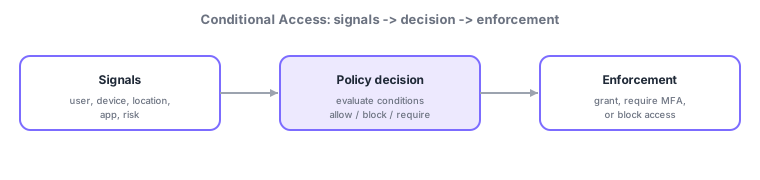
Conditional Access is a policy engine that, on each sign-in, evaluates signals (who, which device, from where, to which app, risk level) and automatically decides allow / block / require more (MFA or a compliant device). Think "if (conditions) → then (controls)"—e.g., "require MFA from outside on unmanaged devices," "block risky sign-ins." By asking for extra checks only when risk is higher, it balances usability and security.
Risk is assessed by Microsoft Entra ID Protection, which computes user risk / sign-in risk from leaked credentials, suspicious locations, impossible travel, and more, feeding Conditional Access to automatically "require MFA or block when risk is high."
Scenario: flexible, safe access control. Normal sign-ins from managed PCs are allowed smoothly. A sign-in from an unknown overseas location is rated high-risk by ID Protection, so Conditional Access requires MFA or blocks. Everyday forgotten passwords are self-resolved via SSPR. Over time, moving to passwordless reduces password-based attacks at the root—each feature working together.
Watch the mix-ups: (1) MFA (add factors) vs passwordless (use no password) differ; passwordless still verifies via multiple factors, MFA-like. (2) Conditional Access = control by policy vs ID Protection = compute risk—different roles, used together. (3) SSPR is "reset," MFA is "stronger sign-in"—different purposes.
Q. Conditional Access vs ID Protection? ID Protection rates sign-in risk; Conditional Access uses that risk as a condition to allow/require MFA/block. Q. Why is passwordless safer? There is no stealable/reusable password, reducing exposure to phishing and leaks. Q. Is MFA always two factors? "Multi" means two or more, the key being a combination of different types (know/have/are).
Common: MFA = strengthen with different factor types, passwordless = no password, Conditional Access = allow/block/require MFA by signals, ID Protection = compute risk, SSPR = self-service reset. Implements Zero Trust’s "verify explicitly / assume breach."
2.2.3Section summary
- Stronger auth: MFA / passwordless / SSPR
- Conditional Access = allow/block/require MFA based on signals
Sign in to track progress — Log in.
Quick check
(just a quick review)Q1. Which requires a second factor like an authenticator app or security key beyond a password?
Q2. Which controls access by signals, e.g., "require MFA for sign-ins from an unusual location"?
Q3. What is authentication without a password, like Windows Hello or FIDO2 keys, called?
Keep track of your progress
The full study guide is free to read. Sign up free to practice with the question bank, track what you have read, review your mistakes, and highlight passages.