

What's changed: In-scope coverage: added compute placement (Elastic Beanstalk/Outposts/VMware Cloud on AWS/Wavelength/Serverless Application Repository/ECS Anywhere/EKS Anywhere/EKS Distro), cost visibility (Cost and Usage Report/Compute Optimizer/License Manager), and management/governance (CloudFormation/Service Catalog/Control Tower/Systems Manager/CloudWatch/X-Ray/Managed Grafana/Managed Service for Prometheus/Health Dashboard/Well-Architected Tool/Management Console) across sections
4.3Cost Management Tools and Right-Sizing
Understand cost visibility, management, and recommendations via Cost Explorer, AWS Budgets, and Trusted Advisor, plus right-sizing resources.
Optimize cost in a cycle: visualize → manage with budgets → improve via recommendations. AWS provides tools for each.
4.3.1Cost management tools
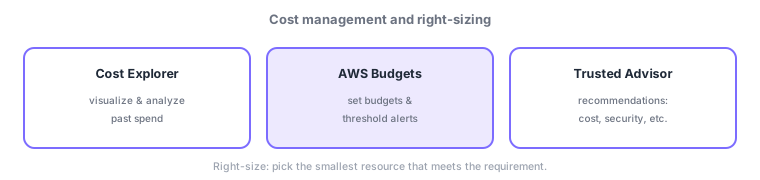
- Cost Explorer: visualize/analyze past cost—trends and breakdowns by service/tag.
- AWS Budgets: set budgets with threshold alerts for actual or forecasted overruns.
- Trusted Advisor: recommendations across cost, security, performance, fault tolerance, and limits (e.g., idle resources).
- Cost allocation tags: tag resources to allocate/analyze cost by team/project.
- Right-sizing: pick the smallest resource that meets the requirement, avoiding over-provisioning.
Optimize cost in a cycle: visualize → manage with budgets → improve via recommendations → right-size. First, use Cost Explorer to see "what costs how much" (break down by tag/team); set budgets and threshold alerts in AWS Budgets to catch overruns early; follow Trusted Advisor recommendations (idle instances, oversized volumes) to cut waste. Finish with right-sizing—stop "oversize just in case" and match the smallest resource that meets the requirement based on measurements. These work together with pricing models and storage classes from earlier sections.
| Goal | Tool/method |
|---|---|
| Visualize/analyze past cost | Cost Explorer |
| Alert on budget overrun | AWS Budgets |
| Recommend waste/improvements | Trusted Advisor |
| Allocate by team/project | Cost allocation tags |
| Fix over-provisioning | Right-sizing |
Scenario: a cost review. Check Cost Explorer monthly and identify services that spiked (by tag/team). Set Budgets per team to alert on overruns. Trusted Advisor flags "idle EC2 / oversized EBS" → cut via stopping or right-sizing. Also apply earlier optimizations: Savings Plans for baseline, S3 lifecycle to move logs to cheaper tiers.
Watch the mix-ups: (1) Cost Explorer = visualize/analyze the past vs Budgets = budgets and overrun alerts (forward-looking)—different roles. (2) Trusted Advisor gives recommendations (also security/performance/fault tolerance/limits, not just cost). (3) Right-sizing = smallest that meets the requirement, not largest. (4) Tags are key to cost allocation.
Q. Cost Explorer vs Budgets? Cost Explorer visualizes/analyzes past cost; Budgets sets budgets and alerts on (forecasted) overruns. Q. What does Trusted Advisor do? Recommends across cost, security, performance, fault tolerance, and limits (e.g., idle resources). Q. Right-sizing? Matching the smallest resource that meets the requirement, based on measurements (fixing over-provisioning).
Common: analyze past cost = Cost Explorer, budgets/alerts = Budgets, recommendations = Trusted Advisor, allocation = cost allocation tags, plus right-sizing (smallest that meets the requirement).
4.3.2Other key in-scope services (cost visibility, management and governance)
For cost visibility and right-sizing, know these. AWS Cost and Usage Report (CUR) exports the most detailed billing/usage line-item data to S3 for custom analysis and chargeback (Cost Explorer is interactive visualization). AWS Compute Optimizer recommends right sizes for EC2/EBS/Lambda from actual metrics—use it to fix over/under-provisioning. AWS License Manager centrally tracks software license entitlements and usage to prevent violations and excess cost.
Managed services for operations and governance are also in-scope. For provisioning: AWS CloudFormation (build infrastructure as reproducible code/templates) and AWS Service Catalog (publish approved configurations as a catalog). For multi-account governance: AWS Control Tower (auto-build a landing zone with guardrails). For operations: AWS Systems Manager (centralized patching/config/sessions) and the AWS Management Console (web console). For observability: Amazon CloudWatch (metrics/logs/alarms), AWS X-Ray for tracing, and the OSS-compatible Amazon Managed Grafana and Amazon Managed Service for Prometheus. For health and improvement: AWS Health Dashboard (notifications of AWS-side issues/maintenance) and the AWS Well-Architected Tool (review designs against the six pillars).
| What you want | Service |
|---|---|
| Most detailed billing data | AWS Cost and Usage Report |
| Right-sizing recommendations | AWS Compute Optimizer |
| Central license management | AWS License Manager |
| Infrastructure as code | AWS CloudFormation |
| Approved-config catalog | AWS Service Catalog |
| Multi-account governance | AWS Control Tower |
| Centralized operations | AWS Systems Manager |
| Metrics/logs/alarms | Amazon CloudWatch |
| Distributed tracing | AWS X-Ray |
| OSS-compatible observability | Amazon Managed Grafana / Amazon Managed Service for Prometheus |
| AWS health notifications | AWS Health Dashboard |
| Well-Architected review | AWS Well-Architected Tool |
| Web console | AWS Management Console |
4.3.3Section summary
- Cost Explorer (analyze) / Budgets (budget·alerts) / Trusted Advisor (recommendations) / cost allocation tags
- Fix over-provisioning via right-sizing; combine with pricing-model and storage-class optimization
Sign in to track progress — Log in.
Quick check
(just a quick review)Q1. Which AWS service visualizes and analyzes past costs to spot trends?
Q2. Which service notifies you as cost approaches/exceeds a threshold?
Q3. Which correctly describes "right-sizing" for cost optimization?
Keep track of your progress
The full study guide is free to read. Sign up free to practice with the question bank, track what you have read, review your mistakes, and highlight passages.