

What's changed: In-scope coverage: added compute placement (Elastic Beanstalk/Outposts/VMware Cloud on AWS/Wavelength/Serverless Application Repository/ECS Anywhere/EKS Anywhere/EKS Distro), cost visibility (Cost and Usage Report/Compute Optimizer/License Manager), and management/governance (CloudFormation/Service Catalog/Control Tower/Systems Manager/CloudWatch/X-Ray/Managed Grafana/Managed Service for Prometheus/Health Dashboard/Well-Architected Tool/Management Console) across sections
4.1Compute Pricing Models
Understand EC2 pricing models—On-Demand, Savings Plans/Reserved Instances, and Spot—and how to optimize cost by matching them to workloads.
The first step in cost optimization is choosing the pricing model that fits the workload. EC2 offers several purchasing options.
4.1.1EC2 pricing models
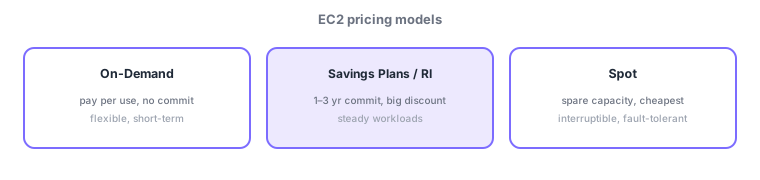
- On-Demand: pay per use, no commitment; for short-term/unpredictable workloads and dev/test. Most flexible, higher unit price.
- Savings Plans / Reserved Instances (RI): big discount (up to ~70%) for a 1–3 year commitment; for steady baseline usage.
- Spot Instances: cheapest (up to ~90% off, spare capacity) but interruptible; for fault-tolerant, stateless batch/big-data.
- Dedicated hosts/instances: physically isolated (for licensing/compliance, pricier).
Cost optimization starts with matching the pricing model to the workload’s nature. The deciding axis: "can you commit? / can you tolerate interruption?" Cover the always-on baseline with Savings Plans/RI (long-term commit for discounts), handle spikes/unpredictability with On-Demand, and run interruptible, stateless batch on Spot for the lowest cost—combine them. For example: baseline web tier on Savings Plans, burst above peak on On-Demand, nightly large batch on Spot.
| Model | Cost | Best for |
|---|---|---|
| On-Demand | Higher, no commit | Short-term, unpredictable, dev |
| Savings Plans / RI | Discounted (~70%), commit | Steady baseline |
| Spot | Cheapest (~90%), interruptible | Fault-tolerant batch |
Scenario: 3-tier web + nightly batch. Cover the always-on web/app baseline with Savings Plans for discounts, absorb traffic spikes above peak with On-Demand, and run large nightly data processing—built to tolerate interruption—on Spot for the lowest cost. The key: don’t rely on Spot alone for critical steady workloads.
Watch the mix-ups: (1) steady = Savings Plans/RI (commit for discount) / short-term, variable = On-Demand / interruptible = Spot (cheapest). (2) Spot can be interrupted—don’t use alone for critical steady workloads. (3) Savings Plans are flexible (broad compute); RIs discount specific instance attributes.
Q. Savings Plans vs Spot? Savings Plans discount via long-term commit (no interruption; steady); Spot is cheapest spare capacity but interruptible (fault-tolerant batch). Q. What runs on Spot? Stateless work that tolerates interruption/retry (batch, big data, CI). Q. Combine models? Yes—baseline on Savings Plans, burst on On-Demand, batch on Spot.
Common on SAA: steady = save with Savings Plans/RI, fault-tolerant batch = Spot (cheapest), short-term/variable = On-Demand. Spot can be interrupted—don’t use alone for critical steady workloads.
4.1.2Other key in-scope services (compute platforms and placement)
As a basis for cost optimization, know the choices for which platform/location runs the workload. AWS Elastic Beanstalk is a PaaS that auto-provisions EC2/ELB/Auto Scaling just by uploading app code—choose it to minimize infrastructure management. To extend AWS hardware/location: AWS Outposts places AWS racks on-premises (low latency / data residency), VMware Cloud on AWS runs an existing VMware environment as-is on AWS, and AWS Wavelength deploys at carrier 5G edge for ultra-low latency. To share/reuse serverless templates, use AWS Serverless Application Repository.
To run containers on-prem or in other environments with the same operations, there are Amazon ECS Anywhere and Amazon EKS Anywhere. The former manages containers on your own on-prem servers via the ECS control plane; the latter runs EKS (Kubernetes) on-premises. In addition, Amazon EKS Distro is the Kubernetes distribution EKS itself uses—run the same Kubernetes in your own environment.
| What you want | Service |
|---|---|
| PaaS, auto-provision from code | AWS Elastic Beanstalk |
| AWS racks on-premises | AWS Outposts |
| Run VMware on AWS (AWS resale ended April 2024; now sold by Broadcom) | VMware Cloud on AWS |
| 5G edge, ultra-low latency | AWS Wavelength |
| Share/reuse serverless templates | AWS Serverless Application Repository |
| ECS / EKS on-premises | Amazon ECS Anywhere / Amazon EKS Anywhere |
| Same Kubernetes distribution | Amazon EKS Distro |
4.1.3Section summary
- On-Demand (short/variable) / Savings Plans·RI (steady, discount) / Spot (cheapest, interruptible)
- Decide by "can you commit / tolerate interruption"; combine per tier to optimize
Sign in to track progress — Log in.
Quick check
(just a quick review)Q1. Which EC2 pricing model gives a big discount for a 1–3 year usage commitment?
Q2. Which EC2 pricing model is cheapest but interruptible, suiting fault-tolerant batch work?
Q3. Which pricing model is most flexible for short-term, unpredictable workloads?
Keep track of your progress
The full study guide is free to read. Sign up free to practice with the question bank, track what you have read, review your mistakes, and highlight passages.