

What's changed: In-scope coverage: added compute placement (Elastic Beanstalk/Outposts/VMware Cloud on AWS/Wavelength/Serverless Application Repository/ECS Anywhere/EKS Anywhere/EKS Distro), cost visibility (Cost and Usage Report/Compute Optimizer/License Manager), and management/governance (CloudFormation/Service Catalog/Control Tower/Systems Manager/CloudWatch/X-Ray/Managed Grafana/Managed Service for Prometheus/Health Dashboard/Well-Architected Tool/Management Console) across sections
4.2Storage Cost Optimization
Understand S3 storage classes (Standard / Standard-IA / Glacier), lifecycle policies, and optimizing cost by choosing the right storage.
Storage cost is optimized by choosing a class based on access frequency. S3 offers storage classes for different needs.
4.2.1S3 storage classes
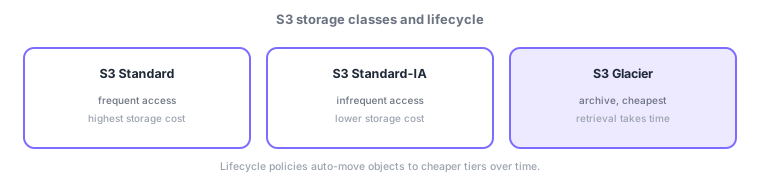
- S3 Standard: for frequently accessed data; higher storage cost, but no retrieval fee and fast access.
- S3 Standard-IA / One Zone-IA: infrequent access, cheaper storage (retrieval fee); One Zone-IA is cheaper in a single AZ with less redundancy.
- S3 Glacier (Instant/Flexible/Deep Archive): cheapest for archival; retrieval takes time (Deep Archive is cheapest/slowest).
- S3 Intelligent-Tiering: auto-moves objects to the optimal class by access frequency when patterns are unknown.
- Lifecycle policies: auto-transition to cheaper classes or delete over time.
Storage cost is optimized by matching the class to access frequency. Frequently read data → Standard (no retrieval fee); rarely used but retained → Standard-IA (cheap storage); long-term archives → cheapest Glacier tiers (retrieval takes time). New data on Standard, aging data to cheaper tiers—automate this with lifecycle policies (e.g., IA after 30 days, Glacier after 90, delete after a year). When access is unpredictable, Intelligent-Tiering monitors frequency and optimizes automatically. Cost trades off against retrieval speed/fees—work backward from how fast and how often you retrieve.
| Class | Access frequency | Trait |
|---|---|---|
| S3 Standard | Frequent | No retrieval fee, higher storage cost |
| Standard-IA | Infrequent | Cheap storage, retrieval fee |
| Glacier family | Archive | Cheapest, retrieval takes time |
| Intelligent-Tiering | Unknown/variable | Auto-optimizes class |
Scenario: storing logs and backups. Keep recent logs on Standard for search, move to Standard-IA after 30 days, archive audit data to Glacier after 90 days (rare retrieval is fine), and auto-delete after a year—all automated via lifecycle policies. For datasets with unpredictable access, let Intelligent-Tiering handle it. Choose tiers by retrieval speed/frequency requirements.
Watch the mix-ups: (1) frequent = Standard / infrequent = Standard-IA / archive = Glacier. (2) IA/Glacier have cheap storage but retrieval fees/time—frequent retrieval gets expensive. (3) Unknown access → Intelligent-Tiering. (4) Automate transitions with lifecycle policies. Note One Zone-IA has lower redundancy.
Q. Standard-IA vs Glacier? IA for occasional immediate retrieval; Glacier for long-term storage where rare/slow retrieval is fine. Q. When Intelligent-Tiering? When access is unpredictable/variable—it optimizes automatically. Q. Auto-move to cheaper tiers? Define day-based transitions/deletions with lifecycle policies.
Common: frequent = Standard, infrequent = Standard-IA, archive = Glacier, unknown/variable = Intelligent-Tiering, and lifecycle policies for auto-tiering. IA/Glacier incur retrieval fees/time.
4.2.2Section summary
- Standard (frequent) / Standard-IA (infrequent) / Glacier (archive) / Intelligent-Tiering (unknown)
- Use lifecycle policies to auto-transition/delete to cheaper tiers by age
Sign in to track progress — Log in.
Quick check
(just a quick review)Q1. Which S3 class best fits low-cost long-term archival of rarely accessed data?
Q2. Which auto-transitions or deletes S3 objects over time to cheaper classes?
Q3. Which S3 feature auto-moves data with unpredictable access to the optimal class?
Keep track of your progress
The full study guide is free to read. Sign up free to practice with the question bank, track what you have read, review your mistakes, and highlight passages.