

What's changed: Initial version (topic S2)
2.5Basic Operations Management
Learn server start/stop, CREATE/ALTER/DROP for database roles/users (ROLE/USER), VACUUM/ANALYZE for managing table bloat and statistics, autovacuum which automates them, system information functions that report server state, the metadata sources information_schema and pg_catalog (the system catalog), and GRANT/REVOKE for privilege management.
In day-to-day operations after the server is up, two things work together: the role/privilege mechanism governing "who can access what," and VACUUM-family maintenance that "keeps a bloated table healthy." Knowing the information sources (the system catalog) for inspecting current state is also foundational for troubleshooting.
2.5.1Roles/users and privilege management
- A database role is PostgreSQL's notion of a connecting principal (unifying the older concepts of "user" and "group"). CREATE ROLE creates one (adding the
LOGINattribute makes it able to connect—effectively a "user"); ALTER ROLE changes attributes, password, etc.; DROP ROLE deletes it. CREATE USER is merely an alias forCREATE ROLEwith theLOGINattribute on by default. - A role's main attributes are set with
CREATE ROLE/ALTER ROLE:LOGIN/NOLOGIN(may connect),SUPERUSER(all privileges),CREATEDB(may create databases),PASSWORD(a password), andVALID UNTIL 'timestamp'(password expiry; e.g.ALTER ROLE app VALID UNTIL '2025-12-31'). By least privilege, an application role should not be given unnecessarySUPERUSER/CREATEDB. - GRANT is the SQL statement that grants privileges (
SELECT,INSERT,UPDATE,DELETE, etc.) on an object such as a table to a role. REVOKE revokes a previously granted privilege. Either the object's owner or a superuser can execute these.
2.5.2VACUUM, ANALYZE, and autovacuum
- VACUUM is the maintenance command that reclaims dead tuples (space left behind by updates/deletes), controlling table bloat; it does not update the statistics used by the planner.
VACUUM FULLis a heavier operation that exclusively locks the table to physically compact it. ANALYZE updates the statistics used by the query planner (it does not reclaim space). It is also common to run both together, as inVACUUM ANALYZE. - autovacuum is the mechanism that automatically runs VACUUM and ANALYZE in the background on any table whose update/delete volume crosses a threshold (enabled by default). It is the operational lifeline that prevents table bloat from forgetting to run maintenance manually.
2.5.3System information functions and the system catalog
- System information functions are SQL functions that report the current connection/server state (e.g.
current_userfor the connected role's name,current_databasefor the connected database's name,version()for the server's version string). - information_schema is a set of metadata views compliant with the SQL standard (providing information on tables, columns, constraints, etc. in a standard form, with high portability across other RDBMSes). pg_catalog (the system catalog) is the set of PostgreSQL-specific internal metadata tables (
pg_class,pg_attribute, etc.), holding more detailed, implementation-dependent information. psql's meta-commands (like\d) internally query this system catalog.
The staples: CREATE USER is an alias for CREATE ROLE with LOGIN; VACUUM reclaims space, ANALYZE updates statistics (separate functions); autovacuum runs automatically once a threshold is crossed; GRANT grants privileges, REVOKE revokes them; information_schema is SQL-standard, pg_catalog is PostgreSQL-specific. The distinction between VACUUM and ANALYZE (where running just one is insufficient) is a recurring trap.
Trace a typical flow of creating a role for a new application and running it with restricted privileges. First, create a connectable role with CREATE ROLE app_reader LOGIN PASSWORD '...'; (writing CREATE USER app_reader ... gives effectively the same result). Next, since this role should only handle read-only work, grant only the privileges it needs, individually, such as GRANT SELECT ON orders TO app_reader;. If a broader privilege was granted by mistake, revoke just that one with REVOKE INSERT ON orders FROM app_reader;, leaving other privileges untouched. After running for a while, suppose someone reports that queries against a particular table have gotten slow. The first step in investigating is to suspect the planner is working from stale statistics. After a large volume of updates/deletes, run ANALYZE orders; to refresh the statistics, and if that alone does not help, dead tuples may have accumulated into physical bloat, so also consider VACUUM orders; (space reclamation). Normally autovacuum runs both automatically so manual intervention is not needed, but right after a large bulk update, when you want the effect immediately, a manual VACUUM ANALYZE is useful. Finally, the practical rule of thumb: use information_schema (e.g. information_schema.columns) when you want to reference this table's column definitions or constraints in a standard way from other tools, and use pg_catalog (e.g. pg_class) when you need to reach PostgreSQL-specific internal information, such as the table's physical page count.
| Command / mechanism | Target | Role |
|---|---|---|
| VACUUM | Dead space | Reclaims dead tuples |
| ANALYZE | Statistics | Updates planner statistics |
| autovacuum | Automates both | Runs automatically past a threshold |
| GRANT / REVOKE | Privileges | Grant / revoke |
Trap: "running VACUUM also updates the query planner's statistics" is wrong—VACUUM's job is only reclaiming dead tuples; updating statistics is the separate ANALYZE command's job (use VACUUM ANALYZE if you need both). Also, "CREATE USER and CREATE ROLE are completely different features" is wrong—CREATE USER is merely an alias for CREATE ROLE with the LOGIN attribute. "information_schema holds more detailed internal information than pg_catalog" is also wrong—pg_catalog is the more detailed, implementation-dependent one, while information_schema sticks to standard, SQL-standard-compliant information.
2.5.4Section summary
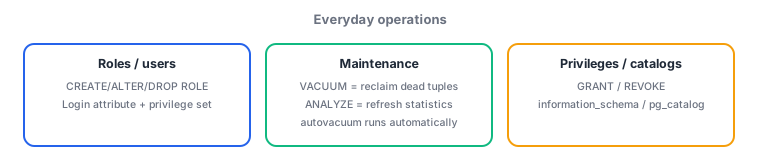
- Database roles: CREATE/ALTER/DROP ROLE; CREATE USER = alias for CREATE ROLE with LOGIN. GRANT = grant a privilege; REVOKE = revoke a privilege
- VACUUM = reclaims dead tuples (does not update statistics); ANALYZE = updates statistics (does not reclaim space); autovacuum = automates both
- System information functions (current_user, etc.) / information_schema = SQL-standard compliant; pg_catalog = PostgreSQL-specific, detailed information
Sign in to track progress — Log in.
Quick check
(just a quick review)Q1. After a large batch of updates, a search query against a table has become slower than before. The first suspicion in investigating is that the planner is working from stale statistics. Which command should you run to resolve this?
Q2. You create a new role for an application and want to allow only SELECT on a specific table. What is the correct procedure to avoid granting excessive privileges?
Q3. You want to reference a table's column definitions and constraints from other tools in a standard, SQL-standard-compliant form, not PostgreSQL-specific internals. Which information source should you use?
Keep track of your progress
The full study guide is free to read. Sign up free to practice with the question bank, track what you have read, review your mistakes, and highlight passages.