

What's changed: Initial version (topic S2)
2.3Configuration Files
Learn postgresql.conf, which governs overall server behavior (syntax, units, include; connection and authentication settings listen_addresses/port/max_connections; logging settings logging_collector/log_destination), pg_hba.conf, which defines per-client authentication methods (trust, md5, scram-sha-256, peer, and the significance of line order), and SET/SHOW for inspecting and changing values at runtime.
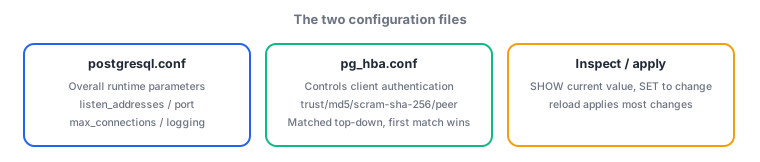
PostgreSQL's behavior is governed mainly by two configuration files: postgresql.conf, which defines the server's own behavior, and pg_hba.conf, which defines who can connect and how they are authenticated. Their roles are clearly separated, so accurately distinguishing "which file does this setting belong to" matters both in practice and on the exam.
2.3.1postgresql.conf
- postgresql.conf is the overall server configuration file, written one setting per line in
parameter = valueform. Lines starting with#are comments. Values can carry units (MB,GB, etc.) for sizes, and settings can be split across files using include (orinclude_dir). - Connection and authentication: listen_addresses is which network interfaces the server listens on (
localhostonly, or*for all, etc.). port is the TCP port it listens on (default 5432). max_connections is the cap on simultaneous connections. These are representative parameters that require a restart to change. - Error reporting and logging: logging_collector controls whether to enable the background process that writes logs to dedicated log files (
onto enable). log_destination specifies the output format for logs (stderr,csvlog,syslog, etc.).
2.3.2pg_hba.conf and SET/SHOW
- pg_hba.conf is the configuration file that defines client authentication (hba = host-based authentication). Each line is a tuple of connection type, database, user, client address, and authentication method. Lines are matched top to bottom, and the first matching line's method is what gets used, so line order matters enormously.
- Authentication methods: trust allows unconditionally with no password or other check (the loosest; dangerous outside a genuinely trusted closed network). md5 is password authentication using an MD5 hash (the traditional method). scram-sha-256 is password authentication using the stronger SCRAM-SHA-256 method (recommended since PostgreSQL 10). peer matches the OS username against the PostgreSQL role name (local socket connections only).
- SET is the SQL command that temporarily changes a runtime parameter for the current session (it reverts when the session ends). SHOW is the SQL command to inspect and display the current value of a parameter (
SHOW ALLlists everything).
The staples: pg_hba.conf is matched top to bottom, and the first matching line wins; trust allows unconditionally and is the loosest, while scram-sha-256 is the strongest; peer is local-only and matches the OS user against the role name; listen_addresses/port/max_connections require a restart; SET makes a temporary, session-scoped change, while SHOW only inspects. Confusing the roles of postgresql.conf and pg_hba.conf is also a classic wrong-answer pattern.
Trace a configuration change that lets an application on another in-house host connect to a newly deployed PostgreSQL server. First, in postgresql.conf, change listen_addresses = '*' (listen on all interfaces), and set port explicitly if needed. These parameters require a restart, so apply them with pg_ctl restart. Next, define in pg_hba.conf exactly which clients, as which users, authenticated how, may connect. For example, you might require scram-sha-256 password authentication for connections from the in-house network 192.168.1.0/24, while allowing peer (matching the OS user against the role name) for local administrative connections from the host running the server itself—adding a different line per use case. The easily missed detail here is line order. Since pg_hba.conf is evaluated top to bottom and the first match wins, mistakenly placing a broad 0.0.0.0/0 line using trust above the stricter in-house-only line would unintentionally grant unconditional access to the entire world. After changing the configuration, a full server restart is not needed—pg_ctl reload (or SELECT pg_reload_conf() as an administrator) is enough to apply it. Finally, as a sanity check you would run SHOW listen_addresses; or SHOW port; to confirm the currently effective values, and if you need to temporarily change the log level for just one session while investigating something, you would make a session-scoped adjustment like SET log_min_duration_statement = 0;—this combination is standard practice.
| Method | What it checks | Characteristics |
|---|---|---|
| trust | No check | Unconditional; loosest |
| md5 | MD5-hashed password | Traditional method |
| scram-sha-256 | SCRAM-SHA-256 password | Strongest; recommended since PG10 |
| peer | OS username matches role name | Local connections only |
Trap: "pg_hba.conf prioritizes the most specific matching line" is wrong—evaluation always proceeds top to bottom, and the first matching line is used, regardless of how specific any later line is. Also, "changes to listen_addresses or max_connections take effect with just pg_ctl reload" is wrong—these are representative parameters that require a restart. Furthermore, "a value changed with SET becomes permanently effective server-wide" is wrong—SET is a temporary change scoped to the current session only; permanent settings belong in postgresql.conf.
2.3.3Section summary
- postgresql.conf = overall server settings (
parameter = value, units, include). listen_addresses/port/max_connections require a restart; logging_collector/log_destination control logging - pg_hba.conf = client authentication, evaluated top to bottom with the first match winning. trust (loosest) / md5 / scram-sha-256 (strongest) / peer (local only)
- SET = temporary, session-scoped change; SHOW = inspect the current value (
SHOW ALLlists everything)
Sign in to track progress — Log in.
Quick check
(just a quick review)Q1. You configured multiple lines in pg_hba.conf, but the intended authentication method was not applied and a looser method was used instead. What is the most likely cause?
Q2. You want to change the network interfaces the server listens on to allow connections from an external host. After changing listen_addresses, what is required?
Q3. For investigation, you want to temporarily change the log verbosity for just the current session, without affecting the server-wide permanent configuration. Which SQL command should you use?
Keep track of your progress
The full study guide is free to read. Sign up free to practice with the question bank, track what you have read, review your mistakes, and highlight passages.