

What's changed: Initial version (topic S2)
2.4Backup and Point-in-Time Recovery
Learn PostgreSQL backup methods systematically: SQL-level pg_dump/pg_dumpall/pg_restore, filesystem-level backup, the concept of PITR (point-in-time recovery), WAL (write-ahead log) and WAL archiving (archive_command), the non-exclusive low-level backup approach, and data import/export via SQL COPY and psql's \copy.
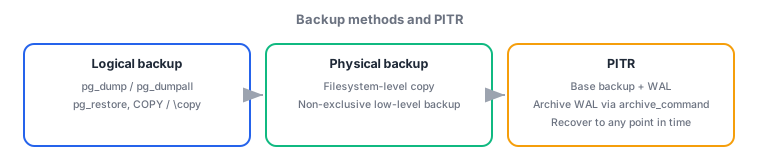
A backup is not just "something you take and keep"—you must choose the method to fit the purpose. Moving a single database to another environment is fine with a logical backup, but recovering right up to the moment before a failure requires a physical backup combined with WAL, i.e. PITR. This section organizes the representative methods and when to use each.
2.4.1Logical backup: the pg_dump family and COPY
- pg_dump is a logical backup tool that exports a single database as SQL statements or its own custom binary format (
-F cfor custom format,-F pfor plain SQL). pg_dumpall dumps the entire cluster (every database plus global information such as roles and tablespaces). pg_restore restores output from pg_dump's custom-format dumps etc. (-dspecifies the target database,-jfor parallel restore). Plain SQL output is fed directly intopsql. - COPY is a SQL command executed server-side to quickly move data between a table and a file (
COPY table TO/FROM 'file'). Because the server process reads/writes the file directly, the target file path must exist on the server. \copy is psql's meta-command version, which reads/writes against the filesystem of the client (the machine running psql). The differing permission and file-location constraints versus COPY are the key practical point.
2.4.2Physical backup and PITR
- Filesystem-level backup is a physical backup that copies the raw files under the data directory as-is (using
tar,cp, etc.). It must be taken either while the server is stopped, or, if taken while running, by following the low-level backup procedure described below (signaling the start and end of the backup). - WAL (write-ahead log) is the log of changes recorded before they are applied to the data files. It is used for crash-consistency recovery, and also enables replaying forward to any past point in time via WAL archiving—the mechanism (configured with
archive_mode = onand archive_command) of continuously copying completed WAL segments to separate storage. - PITR (point-in-time recovery) combines a base backup (physical backup) with archived WAL to restore the database to any point in the past (e.g. right before a mistaken operation). It is central to incident response scenarios like rolling back to just before an important table was accidentally dropped.
- Non-exclusive low-level backup is the procedure for taking a physical backup from a running cluster (the exclusive method is being phased out; the non-exclusive method is current). You signal the start of the backup via a SQL function, copy the files, then signal the end—this way, changes written during the copy remain consistent once combined with WAL.
The staples: pg_dump is a single database; pg_dumpall is the entire cluster (including global info like roles); COPY uses a server-side path, \copy uses a client-side path; PITR = base backup + archived WAL; enabling WAL archiving requires archive_mode and archive_command; a physical backup taken while running follows the non-exclusive low-level procedure (signal start → copy → signal end). The rationale for choosing between pg_dump and filesystem-level backup (logical vs. physical) is also tested.
Organize practical backup design by purpose. For cloning just one production database into a development environment, the simplest path is pg_dump -F c -f backup.dump mydb to take a custom-format dump, then pg_restore -d mydb_dev backup.dump in the dev environment. For migrating the entire server (multiple databases plus roles), pg_dump on a single database would omit role and tablespace information, so pg_dumpall is required instead. On the other hand, the stricter requirement of recovering data up to "a few minutes before the incident" cannot be met by a logical backup. This is where PITR comes in. First, regularly take a physical base backup (if taken while running, follow the non-exclusive low-level backup procedure: call a SQL function to signal the backup's start, copy the files, then signal its end). At the same time, enable WAL archiving by setting archive_mode = on and archive_command (e.g. a shell command that copies each completed WAL segment to safe storage) in postgresql.conf. After an incident, restore the most recent base backup and replay the archived WAL up to the target time, restoring the database to that exact moment. Finally, for a simple data-movement task like exporting just one table's data to another system, you would either write to a server-side path with COPY orders TO '/tmp/orders.csv' WITH CSV, or, if you lack permission to place files on the server, specify a client-side path from within psql with \copy orders TO '/home/user/orders.csv' WITH CSV—this distinction comes up often in practice.
| Method | Type | Scope / characteristics |
|---|---|---|
| pg_dump | Logical | Exports a single database |
| pg_dumpall | Logical | Entire cluster + global info (roles, etc.) |
| Filesystem-level | Physical | Copies the data directory as-is |
| PITR (base + WAL) | Physical | Restores to any past point in time |
Trap: watch out for the misconception that "pg_dumpall efficiently dumps just one database including roles and tablespaces." pg_dumpall targets the entire cluster; for an efficient partial dump of a single database you use pg_dump instead. Also, "both COPY and \copy operate on the client-side filesystem" is wrong—COPY uses a server-side path, while \copy uses a client-side path. "PITR works even without configuring WAL archiving" is also wrong—PITR requires both a base backup and a continuous chain of archived WAL.
2.4.3Section summary
- Logical backup: pg_dump (single DB), pg_dumpall (entire cluster + global info), pg_restore (restore custom-format dumps etc.)
- Physical backup: filesystem-level backup; PITR = base backup + archived WAL (enabled via archive_command); non-exclusive low-level backup (signal start → copy → signal end)
- COPY uses a server-side path (SQL statement); \copy uses a client-side path (psql meta-command)
Sign in to track progress — Log in.
Quick check
(just a quick review)Q1. You want to back up the entire cluster as one unit—multiple databases plus all role and tablespace definitions. Which command should you use?
Q2. You accidentally dropped an important table and want to restore precisely to the state a few minutes before the incident. Which method meets this requirement?
Q3. From a client machine that lacks permission to write files on the server, you want to export a table's contents to a local file on the client itself via psql. Which feature should you use?
Keep track of your progress
The full study guide is free to read. Sign up free to practice with the question bank, track what you have read, review your mistakes, and highlight passages.