

What's changed: Deepened MS-900 Chapter 3 to the AZ-900 baseline (M365 security Entra ID/Defender XDR/Zero Trust + table, identity-first; compliance Purview/Service Trust Portal/data residency + table, shared-responsibility mapping; scenarios, FAQ, SC-900 links). Localized 1 figure
3.2Compliance and Trust
Understand the elements supporting trust in Microsoft 365—Microsoft Purview compliance (information protection, data lifecycle), the Service Trust Portal, and data residency.
Using Microsoft 365 confidently in business requires compliance and trust (transparency). Microsoft provides mechanisms for both.
3.2.1Compliance and trust tools
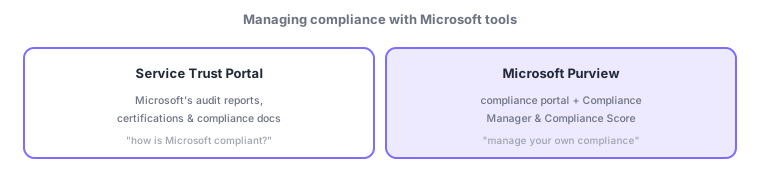
- Microsoft Purview: an integrated suite to manage your compliance—information protection (sensitivity labels), DLP, data lifecycle (retention), eDiscovery, audit.
- Service Trust Portal: a portal to obtain Microsoft’s audit reports (ISO/SOC), certifications, and compliance documents (verify the cloud-side compliance).
- Data residency: know the region (geographic location) where data is stored to meet region-specific regulations.
Compliance has two sides—"how Microsoft itself complies" and "how you manage your own compliance"—mapping to Chapter 1’s shared responsibility model. The Service Trust Portal covers the former (obtain Microsoft’s third-party audit/certification evidence); Microsoft Purview covers the latter (classify with sensitivity labels, prevent leaks with DLP, manage lifecycle with retention). Also, data residency—which region data is stored in—matters for country-specific data-protection regulations. These mirror SC-900; MS-900 expects the big picture of how Microsoft 365 supports compliance and transparency.
| Goal | Mechanism |
|---|---|
| Manage/score your own compliance | Microsoft Purview (Compliance Manager) |
| Obtain Microsoft’s audit/cert docs | Service Trust Portal |
| Check where data is stored | Data residency |
| Classify/prevent leaks of sensitive data | Sensitivity labels, DLP (Purview) |
Scenario: audit and information protection. If a partner asks for the cloud’s ISO certification, obtain it from the Service Trust Portal and submit it. Label your documents "Confidential" and encrypt them with Purview sensitivity labels, block external sending with DLP, and delete after a period with retention. Check the storage region via data residency for regulations. You can demonstrate compliance on both the cloud (Trust Portal) and customer (Purview) sides.
Watch the mix-ups: (1) Service Trust Portal (Microsoft’s compliance = obtain docs) vs Microsoft Purview (manage your own)—opposite subjects. (2) Purview bundles information protection, DLP, retention, eDiscovery, audit. (3) Data residency is "which region the data physically sits in"—key for regulations.
Q. Purview vs Service Trust Portal? Purview manages your own compliance; the Service Trust Portal provides Microsoft’s compliance documents. Q. Why does data residency matter? Many countries regulate where data is stored. Q. Relation to SC-900? Both cover Purview/Trust Portal—MS-900 the big picture, SC-900 the details.
Common: manage your compliance = Microsoft Purview, Microsoft’s compliance docs = Service Trust Portal, where data is stored = data residency (shared with SC-900). Also: shared responsibility "cloud side = Trust Portal / customer side = Purview."
3.2.2Section summary
- Purview (manage your compliance: labels/DLP/retention/eDiscovery/audit) / Service Trust Portal (Microsoft’s docs)
- Address region-specific regulations via data residency; mirrors SC-900
Sign in to track progress — Log in.
Quick check
(just a quick review)Q1. Which Microsoft suite manages your compliance with sensitivity labels, DLP, etc.?
Q2. Where can you obtain Microsoft’s audit reports, certifications, and compliance documents?
Q3. Which concept—the region where data is stored—matters for regulatory requirements?