

What's changed: Deepened MS-900 Chapter 3 to the AZ-900 baseline (M365 security Entra ID/Defender XDR/Zero Trust + table, identity-first; compliance Purview/Service Trust Portal/data residency + table, shared-responsibility mapping; scenarios, FAQ, SC-900 links). Localized 1 figure
3.1Security in Microsoft 365
Understand identity management with Microsoft Entra ID (SSO, MFA, Conditional Access), threat protection with Microsoft Defender, and Zero Trust in the Microsoft 365 context.
Microsoft 365 security starts from identity, protecting in layers with threat protection and Zero Trust (covered in depth in SC-900).
3.1.1Security pillars
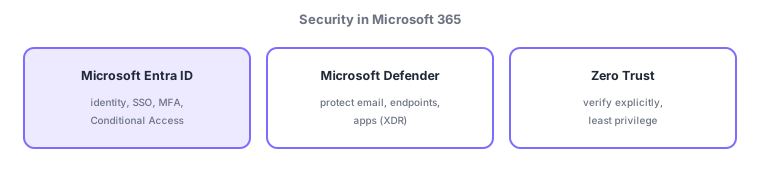
- Microsoft Entra ID: the identity platform; protects sign-in with SSO, MFA, and Conditional Access.
- Microsoft Defender: detect/respond to threats across email, endpoints, identity, and apps (XDR).
- Zero Trust: "never trust, always verify"—the three principles verify explicitly, least privilege, assume breach.
In cloud Microsoft 365, access comes from everywhere, so the starting point of defense is identity, not the network perimeter. First, Microsoft Entra ID protects sign-in (MFA and Conditional Access verify "a legitimate user"); then Microsoft Defender detects/responds to threats across email, devices, and apps. The overarching design is Zero Trust (never trust, always verify). For MS-900, grasp the big picture that "Microsoft 365 includes such layered protection" rather than the details (covered in SC-900). Intune (device management, previous chapter) also integrates with Conditional Access as part of this defense in depth.
| Protects | Service/concept | Key feature |
|---|---|---|
| Identity/sign-in | Microsoft Entra ID | SSO, MFA, Conditional Access |
| Threats (email/device/app) | Microsoft Defender | XDR (cross-domain detect/respond) |
| Overall philosophy | Zero Trust | Verify explicitly, least privilege, assume breach |
Scenario: safe access from outside. An employee signs in to Microsoft 365 on the go → Entra ID verifies identity with MFA, and Conditional Access evaluates "managed device? usual location?" to allow or challenge. A suspicious email attachment is detected and quarantined by Defender. These implement Zero Trust ("never trust, always verify").
Watch the mix-ups: (1) identity/sign-in = Entra ID / threat detect-respond = Defender / overall philosophy = Zero Trust—different roles. (2) Security starts from identity, not the perimeter. (3) Details are in SC-900; MS-900 expects the big picture that Microsoft 365 includes these.
Q. Entra ID vs Defender? Entra ID protects identity/sign-in (MFA, Conditional Access); Defender detects/responds to threats (XDR). Q. What is Zero Trust? "Never trust, always verify"—verify every time, regardless of location. Q. Why start from identity? In the cloud, access comes from everywhere, so identity is more effective than a perimeter.
Common: identity/sign-in protection = Entra ID (MFA, Conditional Access), threat protection = Microsoft Defender (XDR), Zero Trust = always verify. Security protects in layers starting from identity (details in SC-900).
3.1.2Section summary
- Entra ID (identity/MFA/Conditional Access) / Defender (threat protection XDR) / Zero Trust
- Security protects in layers, starting from identity (details in SC-900)
Sign in to track progress — Log in.
Quick check
(just a quick review)Q1. Which identity platform protects sign-in in Microsoft 365?
Q2. Which Microsoft 365 capability detects/responds to threats across email, endpoints, and apps?
Q3. Which security approach is "never trust, always verify"?