

What's changed: Initial version (topic 2.01, subtopics 2.01.1–2.01.5)
1.5Managing and Troubleshooting the Running Kernel
Learn module management and failure analysis on a running kernel: module operations (depmod, modinfo, modprobe, insmod, lsmod, rmmod) and configuration at /etc/modprobe.d/, version checks with uname, tuning kernel parameters through procfs (/proc, /proc/sys/kernel/) and sysctl (/etc/sysctl.conf, /etc/sysctl.d/), sysfs (/sys), hardware inspection (dmesg, lspci, lsdev, lsusb, journalctl), udev rules and udevadm monitor, and crash dumps via kdump/kexec.
"The system does not recognize new hardware", "I need to tune a kernel parameter", "I need to diagnose a mystery crash"—these are all skills for interacting with the running kernel. As the closing subtopic of Exam 201, this section covers four practical tool groups: modules, procfs/sysfs, udev, and crash dumps.
1.5.1Working with kernel modules
- Inspection: lsmod (list loaded modules, a formatted view of
/proc/modules), modinfo (show a module's details, parameters, and dependencies), and uname -r (check the running kernel version). - Loading: modprobe (loads with dependency resolution, consulting
/lib/modules/<kver>/modules.dep) vs insmod (loads a single module directly, with no dependency resolution). Unload with rmmod (ormodprobe -r). - depmod regenerates
modules.dep(run this after adding new modules, etc.). /etc/modprobe.d/ is where per-module load options, aliases, and blacklist settings live.
1.5.2procfs/sysctl/sysfs and hardware/crash analysis
- /proc (procfs) is a virtual filesystem exposing kernel internal state as files. The tree under
/proc/sys/kernel/holds writable parameters, tuned with the sysctl command or made persistent via/etc/sysctl.conf//etc/sysctl.d/. - /sys (sysfs) exposes the device/driver hierarchy as files. The division of labor: procfs is general kernel state, sysfs is centered on the device model.
- Hardware/failure inspection: dmesg (the kernel ring buffer, including boot-time messages), lspci (list PCI devices), lsusb (list USB devices), lsdev (device resource usage), and journalctl (the systemd journal, which can search dmesg-equivalent info alongside everything else).
- udev dynamically creates and manages
/deventries as devices are attached/detached. Rules live under/etc/udev/, and udevadm monitor lets you watch events in real time. For serious crash analysis, use kdump (captures a dump at crash time) and kexec (switches to another kernel without a full reboot—also how kdump boots its dedicated capture kernel).
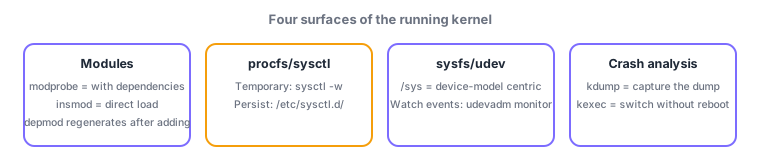
Most-tested contrasts: with dependency resolution = modprobe, without = insmod; temporary change = sysctl, persistent = /etc/sysctl.conf,d/; procfs is general kernel state, sysfs is device-model centric; watch events live = udevadm monitor. Also make sure to retain "depmod regenerates modules.dep after adding modules," tying back to the compiling subtopic (2.01.4).
Trace a typical troubleshooting flow. A newly added storage controller is not recognized: first check with lspci whether the device is even visible, then tail dmesg for driver load errors. Once you know the module, modprobe <module> loads it with dependencies resolved; confirm with lsmod and check parameters/description with modinfo <module>. If modprobe says it cannot find a module you just added, run depmod -a to regenerate modules.dep and retry. To stop a module from auto-loading for a specific device, blacklist it in /etc/modprobe.d/blacklist.conf. For tuning a kernel parameter—say, trying IP forwarding temporarily—use sysctl -w net.ipv4.ip_forward=1 (which really just writes /proc/sys/net/ipv4/ip_forward); to survive a reboot, write it to /etc/sysctl.d/99-forward.conf and apply with sysctl --system. If a USB device does not show up under /dev, check whether events are firing with udevadm monitor and suspect a mistake in the rules (/etc/udev/rules.d/). For recurring, unexplained kernel panics, pre-configuring kdump means that at crash time the system switches via kexec to a lightweight capture kernel, grabs a memory dump, and leaves it available for post-mortem analysis.
| Goal | Command / location | Note |
|---|---|---|
| Load with dependency resolution | modprobe | insmod has no dependency resolution |
| Regenerate modules.dep | depmod -a | Run right after adding modules |
| Tune parameter temporarily / persistently | sysctl -w / /etc/sysctl.d/ | Backed by /proc/sys/ underneath |
| Watch device events | udevadm monitor | Rules live under /etc/udev/ |
Trap: "insmod also resolves and loads dependency modules automatically" is wrong—modprobe is the one that resolves dependencies; insmod only loads a single module directly (and fails if a dependency is not already loaded). Also wrong: "a change made with sysctl -w survives a reboot"—sysctl -w only applies at runtime; persisting it requires an entry in /etc/sysctl.conf or /etc/sysctl.d/.
1.5.3Section summary
- Modules = modprobe (with dependencies) / insmod (direct) / rmmod; run depmod after adding modules to regenerate modules.dep
- Parameters = tune procfs (/proc/sys) via sysctl (persist under /etc/sysctl.d/); devices via sysfs/udev; crash analysis via kdump/kexec
Sign in to track progress — Log in.
Quick check
(just a quick review)Q1. You just manually added a new module file under /lib/modules/<kver>/, and modprobe now fails to find and load it. What should you run first?
Q2. You want IP forwarding to remain enabled across reboots. Which procedure is correct?
Q3. A connected USB device produces no entry under /dev. What is the most direct way to check whether the kernel is actually emitting device events?
Keep track of your progress
The full study guide is free to read. Sign up free to practice with the question bank, track what you have read, review your mistakes, and highlight passages.