

What's changed: Initial version (topic 2.01, subtopics 2.01.1–2.01.5)
1.3Components of the Linux Kernel
Learn the structure of the kernel image itself and its source tree: the compressed executable image bzImage, the xz data compression used inside it, the kernel source tree at /usr/src/linux/, and the accompanying documentation at /usr/src/linux/Documentation/.
Before compiling a kernel or handling modules, you need to know what the kernel artifact is actually made of. This section lays the groundwork for the next two sections (compiling and runtime management): the kernel image and the source tree.
1.3.1The bzImage kernel image
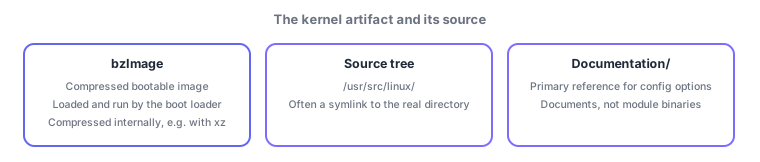
- bzImage (big zImage) is the standard format for a compressed, bootable kernel executable image on x86-family Linux. It is exactly what the boot loader loads, decompresses, and executes.
- The kernel proper inside a bzImage is compressed with one of several data-compression methods, including xz (chosen at kernel config time). A small decompression stub inside the image unpacks it at boot.
1.3.2Layout of the kernel source tree
- /usr/src/linux/ is the conventional location where kernel source is unpacked. On many distros it is a symlink to the directory named after the actual version.
- /usr/src/linux/Documentation/ holds the official documentation for each kernel subsystem's specs and configuration. It is the primary reference for what a given config option actually does.
Exam questions test the plain mapping: bootable compressed image = bzImage, conventional source tree location = /usr/src/linux/, primary reference for specs = Documentation/. This subtopic carries a lighter weight (2) but connects directly to the make bzImage target in the next section on compiling—do not skip it.
Picture the practical workflow around kernel packages. Unpacking a distro's kernel source package typically creates a real directory like /usr/src/linux-<version>/, with /usr/src/linux set up as a symlink pointing to it. This convention lets build scripts and tools like DKMS reference /usr/src/linux without caring about the exact version. To understand what a config option does (say, a filesystem driver or RAID support), the standard move is to read the relevant subsystem's writeup under /usr/src/linux/Documentation/. The final make output is bundled into a single bootable image, bzImage, whose contents are compressed with something like xz—so the on-disk image is far smaller than the uncompressed kernel.
| Component | What it is | Note |
|---|---|---|
| bzImage | Compressed bootable kernel image | Loaded, unpacked, and run by the boot loader |
| xz | One of the data-compression methods used inside bzImage | Chosen at kernel config time |
| /usr/src/linux/ | Conventional kernel source tree location | Often a symlink to the real directory |
| /usr/src/linux/Documentation/ | Official documentation | Primary reference for config options |
Trap: "bzImage is the full kernel source code" is wrong—bzImage is the compiled, compressed executable image; the source lives at /usr/src/linux/. Also wrong: "Documentation/ holds kernel module binaries"—it holds documents; modules live under /lib/modules/<kver>/.
1.3.3Section summary
- bzImage = the compressed, bootable kernel executable image (compressed internally with xz, etc.); loaded and run by the boot loader
- Source lives at /usr/src/linux/ (often a symlink) / check specs under Documentation/, the primary reference
Sign in to track progress — Log in.
Quick check
(just a quick review)Q1. On x86-family Linux, what is the standard compressed, bootable kernel image format that the boot loader loads, unpacks, and executes?
Q2. You want to confirm the exact meaning of a kernel config option for a filesystem driver. Where is the most appropriate primary reference?
Q3. Which path is conventionally used across many distros as the location where kernel source code is unpacked?
Keep track of your progress
The full study guide is free to read. Sign up free to practice with the question bank, track what you have read, review your mistakes, and highlight passages.