

What's changed: Initial version (topic 2.01, subtopics 2.01.1–2.01.5)
1.1The Boot Process and GRUB
Go deep on the firmware layer from power-on to kernel handoff: the difference between BIOS and UEFI, the disk-layout contrast between MBR and the ESP (EFI System Partition), managing boot entries with efibootmgr, generating and installing GRUB2 config (grub-mkconfig/grub2-mkconfig, grub-install/grub2-install), and the role of initrd/initramfs.
Level 2 expects you to triage a "won't boot" incident. Building on the Level 1 outline (firmware → boot loader → kernel → systemd), Exam 201 goes deeper into firmware implementation differences (BIOS vs UEFI) and the internals of the boot loader (GRUB2).
1.1.1Firmware and disk layout
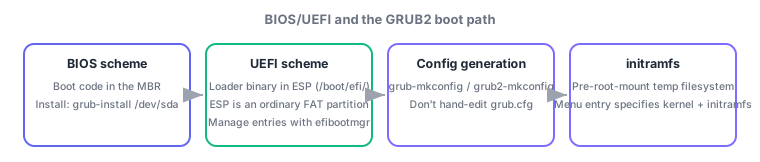
- BIOS is legacy firmware. It executes the boot code in the MBR (Master Boot Record) at the start of the boot device and hands off to the boot loader. Partition info also lives in the MBR.
- UEFI is modern firmware. Its fundamental difference from the MBR scheme: the boot loader executable itself lives in a dedicated partition, the ESP (EFI System Partition) (mounted at
/boot/efi/). - efibootmgr lists, adds, removes, and reorders UEFI boot entries (which boot loader to try, in what order). You can also recover by launching a boot loader manually from the UEFI shell, a simple shell built into the firmware.
1.1.2GRUB2 config generation and initramfs
- Do not hand-edit the GRUB2 config. Generate it from
/etc/default/gruband/etc/grub.d/withgrub-mkconfig(Debian family) /grub2-mkconfig(RHEL family), writing to/boot/grub/grub.cfgor/boot/grub2/grub.cfgdepending on the distro. - grub-install/grub2-install install the boot loader binary itself onto the disk (the MBR for BIOS mode, the ESP for UEFI mode). Generating config (mkconfig) and installing the boot code (install) are separate steps.
- The temporary filesystem bundling the drivers/tools the kernel needs before mounting the real root is initrd (legacy) / initramfs (current). A GRUB2 menu entry specifies both the kernel and the initramfs image.
The most-tested contrast: where the boot code lives (BIOS = MBR, UEFI = ESP) vs what generates config (grub-mkconfig/grub2-mkconfig) vs what installs the boot code (grub-install/grub2-install). Also tested: the ESP is just a FAT partition mounted at /boot/efi/, not a special reserved region like the MBR.
Walk through the incident-response flow. Given a "won't boot" report, first confirm UEFI or BIOS. On UEFI machines, check the firmware setup screen or efibootmgr -v for missing or reordered boot entries; recreate one with efibootmgr -c -L "Linux" -l \EFI\debian\grubx64.efi, or boot the loader directly from the UEFI shell as a temporary workaround. If GRUB2's config itself is broken, edit /etc/default/grub for any kernel/boot-option change and regenerate with grub2-mkconfig -o /boot/grub2/grub.cfg (hand-editing grub.cfg gets overwritten by the next mkconfig run). If the boot loader binary is corrupt or missing, mount the target root partition and the ESP correctly, then reinstall the boot code with grub2-install /dev/sda (BIOS) or grub2-install --target=x86_64-efi (UEFI). If a kernel panic happens right after initramfs unpacking fails, suspect a missing driver in initramfs (e.g., a special RAID/encryption driver).
| Aspect | BIOS scheme | UEFI scheme |
|---|---|---|
| Boot code location | MBR (first sector) | ESP (EFI System Partition, /boot/efi/) |
| Partition format | Special region (the MBR itself) | A normal FAT partition |
| Boot entry management | Managed via boot loader menu | Registered with the firmware via efibootmgr |
| Install command | grub-install /dev/sda | grub-install --target=x86_64-efi |
Trap: "grub-mkconfig writes the boot loader binary to disk" is wrong—mkconfig generates config; install places the boot code. Also wrong: "the ESP is a special region outside the partition table like the MBR"—the ESP is an ordinary FAT partition mounted at /boot/efi/.
1.1.3Section summary
- BIOS = boot code in the MBR / UEFI = boot loader binary in the ESP (/boot/efi/); manage boot entries with efibootmgr
- Generate config with grub-mkconfig/grub2-mkconfig / install boot code with grub-install/grub2-install; initrd/initramfs is the pre-root-mount temporary filesystem
Sign in to track progress — Log in.
Quick check
(just a quick review)Q1. On a UEFI system, the GRUB2 boot entry has vanished from the firmware boot menu. What is the most appropriate first step?
Q2. You need to permanently change a kernel boot option. After editing /etc/default/grub on an RHEL-family distro, what should you do next?
Q3. Which statement correctly describes the disk-layout difference between the BIOS and UEFI schemes?
Keep track of your progress
The full study guide is free to read. Sign up free to practice with the question bank, track what you have read, review your mistakes, and highlight passages.