

What's changed: In-scope service coverage (axis B): added Athena/OpenSearch Service large-scale log-analysis definitions, roles, and selection criteria to s1 (CloudWatch).
5.3Optimizing Performance and Cost
Understand optimization: caching (ElastiCache/DAX/CloudFront), Lambda tuning (memory/concurrency/cold-start mitigation), and efficient data access (Query, retries with exponential backoff, pagination).
Once you measure and find issues, make it faster and cheaper. Caching, compute tuning, and efficient data access are the staple levers.
5.3.1Optimization levers
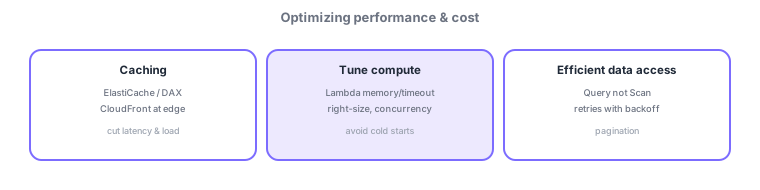
- Caching: ElastiCache/DAX (in front of DynamoDB) or CloudFront (edge) to cut latency and DB load.
- Lambda tuning: adjust memory for CPU; use provisioned concurrency to mitigate cold starts.
- Efficient data access: Query not Scan, retries with exponential backoff for throttling, pagination for large results.
Common on DVA: speed up reads = caching (CloudFront/ElastiCache/DAX), mitigate cold starts = provisioned concurrency, throttling (429 / ProvisionedThroughputExceeded) = retry with exponential backoff, avoid Scan, use Query.
Optimize in order: measure → find the bottleneck → apply a lever. If reads are heavy, use caching to cut DB load and latency. For static content or API responses use CloudFront (edge); for general in-memory use ElastiCache (Redis/Memcached); for DynamoDB specifically use DAX for microsecond reads. For Lambda, more memory also raises CPU proportionally, so memory sizing is the real tuning knob—find the sweet spot with Lambda Power Tuning. Mitigate first-call latency (cold starts) with provisioned concurrency, and cap concurrency with reserved concurrency. In DynamoDB, avoid full-table Scan and use Query (or a GSI), projecting only needed attributes to lower cost. Handle throttling (429 / ProvisionedThroughputExceeded) with retries using exponential backoff plus jitter, and fetch large result sets via pagination.
| Problem | Lever |
|---|---|
| Slow reads / high DB load | Caching (CloudFront/ElastiCache/DAX) |
| Lambda first-call latency | Provisioned concurrency |
| DynamoDB throttling | Retry with backoff + jitter |
| Full scan is heavy | Avoid Scan; use Query/GSI |
Scenario: DynamoDB reads on a hot product page get throttled. Put DAX in front for microsecond reads and lower DB load. Switch access from Scan to Query (specify the partition key), and absorb spikes with the SDK’s exponential backoff + jitter. Also serve static assets via CloudFront to reduce origin load.
Q. Microsecond DynamoDB reads? DAX. Q. More Lambda CPU? Raise memory (proportional). Q. Cold starts? Provisioned concurrency. Q. Throttling? Retry with backoff + jitter. Q. Scan vs. Query? Prefer Query/GSI.
AWS SDKs retry with exponential backoff by default. If throttling persists, revisit capacity planning or access patterns (key design).
5.3.2Section summary
- Optimize with caching / Lambda tuning / efficient data access
- Cold starts = provisioned concurrency, throttling = exponential backoff
Sign in to track progress — Log in.
Quick check
(just a quick review)Q1. You want microsecond-level read speedups for DynamoDB. Which cache fits best?
Q2. You want to reduce first-call latency from Lambda cold starts. Which fits best?
Q3. What is the correct app-side response to DynamoDB throttling (ProvisionedThroughputExceeded)?
Keep track of your progress
The full study guide is free to read. Sign up free to practice with the question bank, track what you have read, review your mistakes, and highlight passages.