

What's changed: In-scope service coverage (axis B): added CodeArtifact/CloudShell (s1) and Amplify (s3) definitions, roles, and selection criteria.
4.3Deployment Strategies and Elastic Beanstalk
Understand deployment-strategy trade-offs (all-at-once/rolling/blue-green/canary; speed vs. safety/rollback) and the PaaS Elastic Beanstalk.
How you release a new version involves a speed vs. safety trade-off. Choose a strategy considering downtime and ease of rollback.
4.3.1Deployment strategies
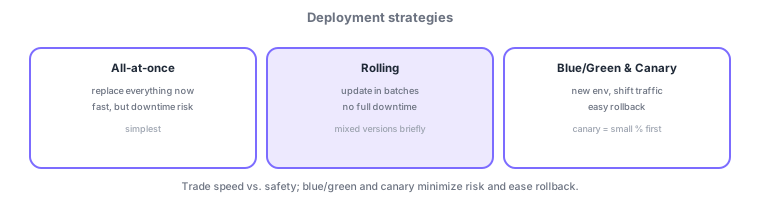
- All-at-once: replace everything at once; fastest but downtime risk.
- Rolling: update in batches; avoids full downtime but mixes versions briefly.
- Blue/Green: stand up a new env and shift traffic; easy rollback. Canary shifts a small % first, then ramps up.
- Elastic Beanstalk: a PaaS that builds/deploys an environment from uploaded code (with selectable strategies).
Common on DVA: avoid downtime with easy rollback = blue/green, gradual release from a small % = canary, upload code and get an environment = Elastic Beanstalk. Lambda aliases + weights also enable gradual deploys.
The selection criteria are acceptable downtime and rollback speed/cost. All-at-once is fastest and cheapest but causes a cutover outage and needs a redeploy on failure. Rolling updates a portion at a time to avoid full downtime, but mixes versions during the update and temporarily reduces capacity (rolling with an additional batch preserves capacity). Blue/green stands up a whole new environment (green) and switches traffic; on trouble you just revert to the old one (blue), so rollback is instant (at higher cost). Canary sends a small slice to the new version first, then ramps up if healthy. For serverless, Lambda aliases + weighted traffic shifting with CodeDeploy let you declare gradual deploys like Canary (e.g., 10%→all) or Linear (increase at fixed intervals). CodeDeploy’s DeploymentConfig sets the percentage and interval, and a CloudWatch alarm can trigger automatic rollback. Elastic Beanstalk is a PaaS where you pick among these strategies and just upload code to automate provisioning through deployment.
| Strategy | Downtime | Rollback | Cost |
|---|---|---|---|
| All-at-once | Yes | Redeploy | Low |
| Rolling | None (mixed) | Some effort | Low |
| Blue/Green | None | Instant (switch back) | High |
| Canary | None | Easy (catch early) | Medium |
Elastic Beanstalk’s deployment methods are also tested on DVA. All-at-once updates all instances together (with downtime); Rolling works in batches; Rolling with additional batch adds a new batch to preserve capacity; Immutable launches a fresh set of instances before swapping (safe, easy rollback); Traffic splitting validates on a slice of traffic, canary-style. Environment config can be codified via .ebextensions and config files, and environments come in web server and asynchronous worker types. For containers, use ECS rolling updates or CodeDeploy blue/green (switch to a new task set). The decision axis is always the same: weigh whether downtime is acceptable, how fast you can roll back, and whether you can pay for extra capacity against your requirements.
Scenario: update a production Lambda with low risk. Use a Lambda alias + weights to send 10% to the new version first (canary). Set the percentage and interval with CodeDeploy DeploymentConfig, and auto-rollback via a CloudWatch alarm if the error rate rises; otherwise shift to 100%.
Q. Avoid downtime with instant rollback? Blue/green. Q. Validate safely on a small slice first? Canary. Q. Gradual Lambda deploys? Alias + weights + CodeDeploy. Q. Offload infra management? Elastic Beanstalk (PaaS).
For Lambda, aliases plus weighted traffic shifting enable canary/linear deploys that move traffic gradually to a new version (with CodeDeploy).
4.3.2Shipping full-stack web apps: AWS Amplify
To ship a frontend-centric web/mobile app quickly, AWS Amplify fits. Amplify combines frontend hosting with CI/CD: connect a Git repository and a push triggers build, deploy, and global delivery (CDN) automatically, with per-pull-request preview environments and per-branch deploys. You can also provision backends—auth (Cognito), data (AppSync/DynamoDB), storage (S3)—and it suits serving SPAs or SSG sites. Rule of thumb: ship a frontend-led app with hosting included, fast = Amplify; compose arbitrary infrastructure finely as IaC = CloudFormation/SAM/CDK plus your own pipeline; manage a server-based app environment as a PaaS = Elastic Beanstalk. Amplify stands up frontend delivery with less configuration than wiring CodePipeline/CodeBuild yourself.
| What you want | Choice |
|---|---|
| Ship a frontend-led app with hosting, fast | AWS Amplify |
| Manage a server-based app env as PaaS | AWS Elastic Beanstalk |
| Compose arbitrary infra finely as IaC | CloudFormation / SAM / CDK |
4.3.3Section summary
- Strategy = speed vs safety; blue/green and canary give easy rollback
- Elastic Beanstalk is a PaaS where you just upload code
Sign in to track progress — Log in.
Quick check
(just a quick review)Q1. Which deployment strategy avoids downtime and lets you roll back quickly if there is a problem?
Q2. Which gradual deployment first sends only a small portion of traffic to the new version?
Q3. Which AWS PaaS builds and deploys an environment automatically when you just upload code?
Keep track of your progress
The full study guide is free to read. Sign up free to practice with the question bank, track what you have read, review your mistakes, and highlight passages.