

What's changed: In-scope service coverage (axis B): added CodeArtifact/CloudShell (s1) and Amplify (s3) definitions, roles, and selection criteria.
4.1CI/CD Pipelines
Understand CI/CD basics: automating source→build→test→deploy with CodePipeline, the roles of CodeBuild (build/test) and CodeDeploy (deploy), and buildspec. The core of "Deployment" in DVA-C02.
CI/CD automatically builds, tests, and deploys code changes. On AWS, CodePipeline orchestrates the whole flow, with dedicated services for each stage.
4.1.1Pipeline stages
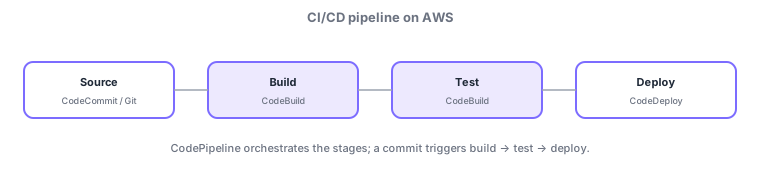
- CodePipeline: orchestrates the whole flow source→build→test→deploy.
- CodeBuild: builds/tests the source; steps are defined in buildspec.yml.
- CodeDeploy: deploys to EC2/on-prem/Lambda/ECS; steps in appspec.
- CodeCommit is a Git repo (external Git works too); a commit triggers the pipeline. Note: CodeCommit is closed to new customers since July 2024 (existing use continues); new setups typically use GitHub etc. with CodeConnections.
Common on DVA: orchestration = CodePipeline, build/test steps = CodeBuild’s buildspec.yml, deploy steps = CodeDeploy’s appspec. Watch for swapped roles.
The crux of CI/CD is separating roles. CodePipeline only orchestrates the stages (source→build→test→deploy), delegating the actual work to each service. CodeBuild runs build/test from buildspec.yml steps (install/pre_build/build/post_build phases) and places outputs (artifacts) in S3 to hand to the next stage. CodeDeploy deploys per appspec instructions (which files go where, plus hooks). Stages connect via artifacts, and an approval action can require manual approval. Source can be CodeCommit or external Git like GitHub; a commit or pull request acts as the trigger that auto-starts the pipeline. CI/CD’s safety is that it stops on a failed stage (so bad code never reaches production).
| Stage | Service | Spec file |
|---|---|---|
| Orchestrate the flow | CodePipeline | (pipeline definition) |
| Build/test | CodeBuild | buildspec.yml |
| Deploy | CodeDeploy | appspec.yml |
| Source control | CodeCommit / external Git | (repository) |
Drilling into CodeBuild: builds run in isolated containers where you set the runtime environment (image, compute size) and environment variables. Don’t put passwords/API keys in plaintext env vars—reference Secrets Manager / Parameter Store (consistent with the prior chapter on secrets). It supports caching (S3 or local) to speed dependency downloads, parallel phases, and test reports. In CodePipeline a single stage can hold multiple actions running in parallel, and you can deploy cross-region/cross-account. For source change detection, prefer webhook/event-driven (EventBridge) over polling to trigger pipelines efficiently. Artifacts and caches are stored in S3.
Scenario: require manual approval before production. After source (CodeCommit) → build/test (CodeBuild buildspec.yml), insert a CodePipeline approval action; once an owner approves, CodeDeploy ships to production. If tests fail, the pipeline halts there and the bad build never reaches production.
Q. buildspec vs. appspec? buildspec = CodeBuild build/test steps; appspec = CodeDeploy deploy steps. Q. How do stages connect? Via artifacts (in S3). Q. Use external GitHub? Yes—connect it in the source stage.
Watch the mix-ups: (1) buildspec.yml = CodeBuild, appspec = CodeDeploy—a common swap. (2) CodePipeline only orchestrates; it doesn’t build/deploy itself. (3) Outputs pass between stages as artifacts.
4.1.2Dependency packages and a developer shell (CodeArtifact, CloudShell)
CI/CD builds pull dependency packages from public repositories, but for internal sharing, availability, and security you may want to bring this in-house. AWS CodeArtifact is a managed package repository supporting npm, pip, Maven, NuGet, and more; it acts as a proxy/cache for public repositories while letting an organization share private packages. Referencing CodeArtifact from CodeBuild pins versions and limits exposure to upstream outages or malicious packages. Separately, when you want the AWS CLI instantly from just a browser, AWS CloudShell helps. CloudShell is a pre-authenticated browser shell with the AWS CLI/SDKs bundled, so you can run commands on the spot without setting up local keys or a CLI. Rule of thumb: share/proxy dependency packages = CodeArtifact; run the CLI straight from a browser = CloudShell.
| What you want | Choice |
|---|---|
| Share packages, proxy public repositories | AWS CodeArtifact |
| Run an authenticated AWS CLI from a browser | AWS CloudShell |
4.1.3Section summary
- CodePipeline (orchestrate) / CodeBuild (buildspec) / CodeDeploy (appspec)
- A commit triggers automated build → test → deploy
Sign in to track progress — Log in.
Quick check
(just a quick review)Q1. Which AWS service orchestrates the whole CI/CD flow source→build→test→deploy?
Q2. Which file defines the build steps for CodeBuild?
Q3. Which AWS service deploys an application to EC2, Lambda, etc.?
Keep track of your progress
The full study guide is free to read. Sign up free to practice with the question bank, track what you have read, review your mistakes, and highlight passages.