

What's changed: Deepened DP-600 Chapter 3 (ja figures; comparison tables/scenarios/FAQ/traps/deep paragraphs in all sections)
3.1Semantic Models and DAX
Understand the Power BI semantic model (formerly dataset), relationships, measures (DAX), and the Direct Lake storage mode. Implement and optimize the "meaning layer" of analytics.
A semantic model gives prepared data business meaning (measures, relationships, hierarchies). Calculations are defined in DAX.
3.1.1Semantic model building blocks
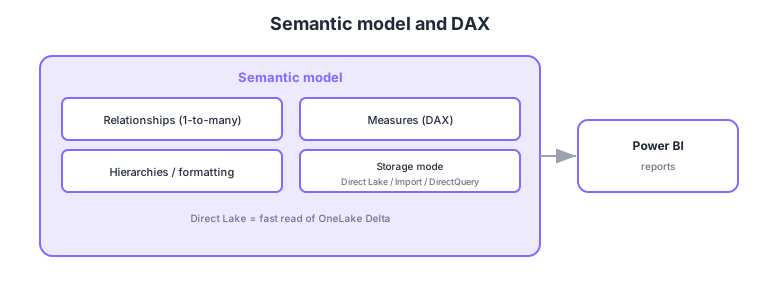
- Relationships: define one-to-many relations between tables (fact ↔ dimension).
- Measures (DAX): define calculations like SUM, CALCULATE, time intelligence in DAX.
- Storage mode: choose Direct Lake (fast read of OneLake Delta) / Import / DirectQuery.
- Hierarchies/formatting: add drill hierarchies and display formats for report usability.
Common on DP-600: meaning layer = semantic model, calculations = measures (DAX), fact ↔ dimension = one-to-many relationships, fast read of OneLake Delta = Direct Lake mode. Star schema + measures + Direct Lake is the key to performance.
CALCULATE is the core DAX function for modifying filter context, widely used in time intelligence like YoY.
The heart of DAX is context: row context (evaluated per row) and filter context (set by slicers/matrix). Measures (aggregation expressions, lazily evaluated) differ from calculated columns (precomputed per row and stored); prefer measures for aggregation (calculated columns can bloat the model). CALCULATE is the core function that modifies filter context, combined with FILTER/ALL/REMOVEFILTERS/USERELATIONSHIP, and time intelligence (TOTALYTD, SAMEPERIODLASTYEAR) builds YoY etc. (requires a contiguous date dimension + Mark as date table). Relationships are typically one-to-many, single-direction (bidirectional risks ambiguity/performance); switch inactive relationships with USERELATIONSHIP. For performance, the VertiPaq columnstore engine (used by Direct Lake/Import) compresses and aggregates fast, and a star schema + a few good measures is fastest. Keep variable reports DRY with field parameters/calculation groups (Tabular Editor). A good model (star + measures + proper relationships) keeps DAX simple and drives performance.
| Aspect | Measure | Calculated column |
|---|---|---|
| Evaluation | Aggregated at query time (lazy) | Precomputed per row at refresh |
| Storage | Not stored (light) | Stored (can bloat) |
| Use | Aggregations (total sales, YoY) | Row-level categorization/keys |
Scenario: show “total sales” and “year-over-year.” → Create a measure SUM(Sales[Amount]) and compute prior-year with CALCULATE + SAMEPERIODLASTYEAR (with the date dimension Marked as date table). No per-row precomputation is needed, so use measures and keep the model a star with single-direction one-to-many.
FAQ: Q. Measure vs calculated column? → A. Use measures for aggregation (not stored, light); calculated columns for row-level categorization/keys. Building aggregations as calculated columns bloats the model. Q. Should I use bidirectional relationships? → A. Prefer single-direction one-to-many; bidirectional can cause ambiguity/performance issues—use sparingly when truly needed.
Trap: “build aggregations (total sales) as calculated columns for efficiency” is wrong—aggregations should be measures (lazy, not stored); aggregating in calculated columns bloats the model. Also “YoY is easy in DAX on a single table without relationships” is wrong—it requires a contiguous date dimension and proper relationships.
3.1.2Section summary
- Semantic model = relationships + measures (DAX) + hierarchies
- Storage mode = Direct Lake / Import / DirectQuery
Sign in to track progress — Log in.
Quick check
(just a quick review)Q1. Which expression language defines calculations (measures) in Power BI?
Q2. Which storage mode reads OneLake Delta fastest in a semantic model?
Q3. What relationship is typically set between facts and dimensions?
Keep track of your progress
The full study guide is free to read. Sign up free to practice with the question bank, track what you have read, review your mistakes, and highlight passages.