

What's changed: Deepened DP-600 Chapter 2 (ja figures; comparison tables/scenarios/FAQ/traps/deep paragraphs in all sections)
2.2Serving Data (SQL Analytics Endpoint and Direct Lake)
Understand how to serve prepared data for analysis—the SQL analytics endpoint (T-SQL queries), Power BI Direct Lake, and sharing/access—bridging the prepared gold layer to semantic models.
Prepared data (gold layer) must be served in a form usable by analysts and reports. Fabric serves it fast via the SQL analytics endpoint and Direct Lake.
2.2.1Serving methods
For serving semantic models, use the XMLA endpoint (connect/deploy from external tools like SSMS/Tabular Editor) and the Direct Lake storage mode that reads OneLake data directly at near-import speed. Classify items with Sensitivity labels.
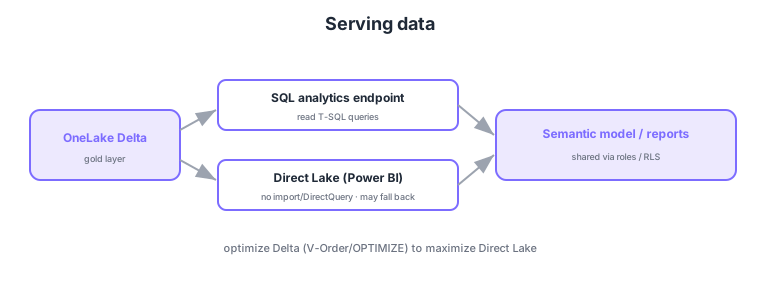
- SQL analytics endpoint: query Lakehouse/Warehouse data with read T-SQL (Lakehouse is read-only).
- Direct Lake: Power BI reads OneLake Delta fast without import/DirectQuery.
- Sharing/access: share reports/semantic models and deliver to users via roles/RLS.
- Fallback: Direct Lake may fall back to DirectQuery when conditions aren’t met.
Common on DP-600: read T-SQL = SQL analytics endpoint, fast read without import/DirectQuery = Direct Lake, fall back to DirectQuery when conditions unmet, serve via sharing/roles. To maximize Direct Lake, optimize Delta with V-Order/OPTIMIZE.
Direct Lake needs no import refresh schedule and reads the latest Delta directly—especially effective for large data.
Power BI has three storage modes: Import (data loaded into the model—fastest but needs refresh schedules and memory; freshness as of refresh), DirectQuery (query the source each time—always fresh but slower with source load), and Direct Lake (load OneLake Delta directly into memory for reads—combining import-like speed with DirectQuery-like freshness). Direct Lake can fall back to DirectQuery (on complex features, mixing other sources, or exceeding limits), and for max performance optimize Delta with V-Order/OPTIMIZE. For serving, the SQL analytics endpoint (Lakehouse read-only; Warehouse read-write) supports T-SQL queries and views. Deliver via sharing, apps (Power BI apps), and workspace roles plus semantic-model RLS/OLS for per-user control. Choose by freshness/scale/concurrency/cost: “large + fresh = Direct Lake,” “small + fastest = Import,” “always-fresh lightweight = DirectQuery.”
| Mode | Freshness | Speed | Best for |
|---|---|---|---|
| Import | As of refresh | Fastest | Small/medium, speed-first |
| DirectQuery | Always live | Slower | Always-live, lightweight |
| Direct Lake | Near-live | Fast | Large + fresh |
Scenario: show a hundreds-of-millions-row gold layer in Power BI—fresh and fast, with no refresh schedule. → Configure a Direct Lake semantic model and optimize Delta with V-Order/OPTIMIZE. Design to avoid fallback from complex features, control rows per user with RLS, and distribute via a Power BI app. Use the SQL analytics endpoint for ad-hoc T-SQL checks.
FAQ: Q. Is Direct Lake closer to Import or DirectQuery? → A. The best of both—import-like speed with near-live freshness; but it falls back to DirectQuery when conditions aren’t met. Q. Can I write via a Lakehouse SQL analytics endpoint? → A. No—read-only; write with Spark or use a Warehouse.
Trap: “Direct Lake requires a refresh schedule like Import” is wrong—it reads Delta directly, needing no scheduled refresh (near-live). Also “Direct Lake always runs as DirectQuery” is wrong—it normally loads directly into memory and only falls back to DirectQuery when conditions aren’t met.
2.2.2Section summary
- Serve = SQL analytics endpoint (T-SQL) / Direct Lake (fast Power BI)
- Deliver = sharing/roles/RLS, Direct Lake has fallback
Sign in to track progress — Log in.
Quick check
(just a quick review)Q1. You want to query Lakehouse/Warehouse data with read T-SQL. What do you use?
Q2. Which serving mode lets Power BI read OneLake Delta fast without import/DirectQuery?
Q3. What can happen when Direct Lake conditions are not met?
Keep track of your progress
The full study guide is free to read. Sign up free to practice with the question bank, track what you have read, review your mistakes, and highlight passages.