

What's changed: Deepened DP-300 Chapter 5 (ja figures; comparison tables/scenarios/FAQ/traps/deep paragraphs in all sections)
5.1Backup and Restore
Understand Azure SQL automated backups and point-in-time restore (PITR), long-term retention (LTR), geo-restore, and retention (RPO/RTO concepts). The basis of recovering from data loss.
Azure SQL takes automated backups against accidental deletion and failures. You can restore to a point in time or to another region as needed.
5.1.1Backup and restore types
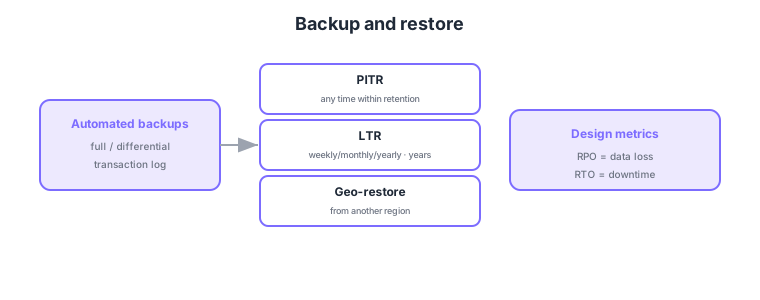
- Automated backups: full/differential/transaction-log taken automatically; can be stored geo-redundantly by default.
- Point-in-time restore (PITR): restore to any time within retention (good for recovering from mistakes).
- Long-term retention (LTR): retain weekly/monthly/yearly for years (for compliance).
- Geo-restore: restore from geo-redundant backups in another region (on regional failure).
Common on DP-300: restore to before a mistake = PITR, multi-year retention = LTR, restore to another region = geo-restore, acceptable data loss = RPO, acceptable downtime = RTO. Design backup/HA-DR per the required RPO/RTO.
PITR retention defaults to days up to a few weeks; configure LTR for longer-term retention beyond that.
Azure SQL automated backups combine full (about weekly), differential (every few hours), and transaction log (every 5–10 minutes), where log frequency effectively sets the RPO. PITR uses these to restore to any second-level point within retention (default 7 days, max 35) as a new DB (restore under a new name then switch, rather than overwrite). LTR retains weekly/monthly/yearly full backups for up to 10 years to meet regulatory/audit needs. Backup storage redundancy is LRS/ZRS/GRS, and geo-restore uses GRS geo-redundant backups to restore in another region (a last resort on regional failure—being asynchronous, RPO is larger and RTO is in hours). For mistakes, a deleted DB can be restored within retention. RPO/RTO relate as “shorter log interval = smaller RPO” and “time to restore = RTO”; for tighter requirements, combine with next section’s HA/DR (zone redundancy, geo-replication). On MI you can also take native COPY_ONLY backups to Blob.
| Restore method | Use | Scope/retention |
|---|---|---|
| PITR | Recover from mistakes/recent failures | Same region, up to 35 days |
| LTR | Regulatory/audit long-term | Weekly/monthly/yearly, up to 10 yrs |
| Geo-restore | Recover from regional failure | Another region, GRS backups |
Scenario: requirement is “restore to any point within the last 30 days, and keep yearly backups for 7 years for audit.” → Set PITR retention to 30 days and configure an LTR policy keeping yearly backups for 7 years. For regional failures, use GRS backup storage to enable geo-restore.
FAQ: Q. PITR vs LTR? → A. PITR restores to any point within retention (max 35 days); LTR retains weekly/monthly/yearly for up to 10 years. Q. Does restore overwrite? → A. No—you typically restore as a new DB under a different name, then switch the app after verification.
Trap: “use PITR for multi-year retention” is wrong—PITR is up to 35 days; multi-year is LTR. Also “geo-restore gives zero RPO on regional failure” is wrong—geo-redundant backups are asynchronous, so recent updates can be lost (larger RPO).
5.1.2Section summary
- Restore = PITR (point-in-time) / LTR (long-term) / geo-restore (another region)
- Design metrics = RPO (data loss), RTO (downtime)
Sign in to track progress — Log in.
Quick check
(just a quick review)Q1. You accidentally deleted lots of data and want to revert to a few hours ago. What do you use?
Q2. You must retain backups for years for compliance. What do you configure?
Q3. The primary region is down; you want to restore from another region’s backups. What do you use?
Keep track of your progress
The full study guide is free to read. Sign up free to practice with the question bank, track what you have read, review your mistakes, and highlight passages.