

What's changed: Deepened DP-300 Chapter 4 (ja figures; comparison tables/scenarios/FAQ/traps/deep paragraphs in all sections)
4.1Automating Tasks with Jobs
Understand ways to automate routine operations—SQL Server Agent (VM/Managed Instance), Elastic Jobs (Azure SQL Database, across many DBs), and Azure Automation. The mechanism depends on the deployment.
Automate routine tasks like backup checks, statistics updates, and index rebuilds—but the available mechanism differs by deployment (SQL Database vs MI/VM).
4.1.1Automation mechanisms
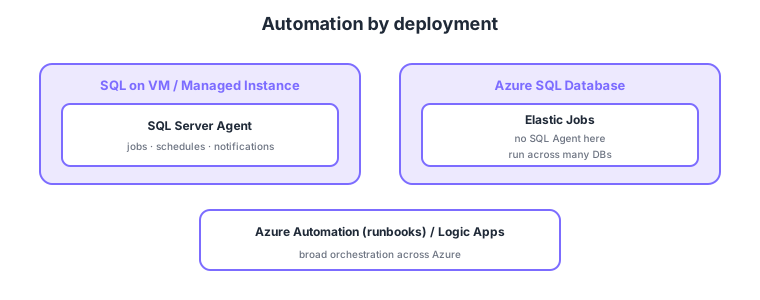
- SQL Server Agent: a job scheduler available on VM / Managed Instance (jobs, schedules, notifications).
- Elastic Jobs: since Azure SQL Database lacks SQL Agent, run jobs across many DBs.
- Azure Automation: automate broader Azure operations via runbooks (e.g., PowerShell).
- Typical tasks: update statistics, rebuild indexes, integrity checks, backup verification, etc.
Common on DP-300: VM/MI job automation = SQL Server Agent, Azure SQL Database lacks SQL Agent → Elastic Jobs, scheduled execution across many DBs = Elastic Jobs, broad Azure automation = Azure Automation. Watch that the choice depends on deployment.
Managed Instance has SQL Agent, so on-prem Agent jobs migrate almost as-is; moving to SQL Database requires replacing them with Elastic Jobs.
SQL Server Agent consists of jobs (made of multiple steps), schedules, alerts, and operators (notification targets), running T-SQL, PowerShell, or SSIS packages (available on VM/MI; absent in SQL Database). Elastic Jobs has a job agent plus a dedicated job database, groups targets via target groups (servers/pools/individual DBs), and runs T-SQL in parallel across many DBs—great for applying statistics updates or schema changes fleet-wide. Azure Automation uses runbooks (PowerShell/Python) with schedules and Hybrid Runbook Workers to automate cloud/on-prem operations (scale changes, backup verification, nightly maintenance). Logic Apps builds no-code workflows for notifications and approvals. The standard practice is to schedule routine DB tasks (update statistics, rebuild indexes, integrity checks via DBCC CHECKDB, purge old backups) and notify operators/action groups on failure.
| Mechanism | Available on | Strength |
|---|---|---|
| SQL Server Agent | VM / Managed Instance | In-instance jobs/notifications |
| Elastic Jobs | Azure SQL Database | Parallel across many DBs |
| Azure Automation | Across Azure (hybrid) | Broad ops via runbooks |
Scenario: nightly, run statistics-update and old-log-purge T-SQL across 100 Azure SQL Databases. → SQL Database lacks SQL Agent, so use Elastic Jobs, group the DBs in a target group, and run on a schedule. Complement broad Azure operations like scale changes with Azure Automation runbooks.
FAQ: Q. Can I create SQL Agent jobs on Azure SQL Database? → A. No—SQL Database has no SQL Agent; use Elastic Jobs for cross-DB automation. Q. Elastic Jobs vs Azure Automation? → A. Elastic Jobs specializes in parallel T-SQL across DBs; Azure Automation broadly automates Azure operations via runbooks.
Trap: “you can schedule jobs with SQL Server Agent on Azure SQL Database” is wrong—SQL Database has no SQL Agent; use Elastic Jobs. SQL Agent is available on VM / Managed Instance. The deployment-dependent choice is a common trap.
4.1.2Section summary
- VM/MI = SQL Server Agent, SQL Database = Elastic Jobs
- Broad Azure = Azure Automation (runbooks)
Sign in to track progress — Log in.
Quick check
(just a quick review)Q1. What is the standard mechanism to schedule jobs on SQL Server on VM or Managed Instance?
Q2. Azure SQL Database lacks SQL Agent. To schedule jobs across many DBs, what do you use?
Q3. Which Azure service automates broad Azure operations via runbooks (e.g., PowerShell)?
Keep track of your progress
The full study guide is free to read. Sign up free to practice with the question bank, track what you have read, review your mistakes, and highlight passages.