

What's changed: Deepened DP-300 Chapter 3 (ja figures; comparison tables/scenarios/FAQ/traps/deep paragraphs in all sections)
3.2Query and Index Optimization
Understand reading execution plans, indexes (missing/unused/fragmentation), statistics, and optimization via automatic tuning and intelligent query processing. After measuring comes improving.
Once bottlenecks are found, improve by revising indexes and queries. Azure SQL also provides assistance like automatic tuning.
3.2.1Optimization techniques
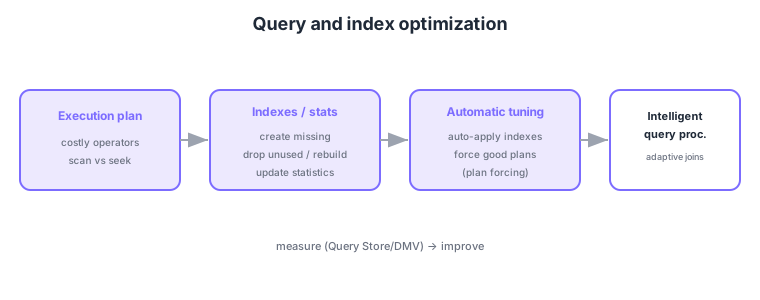
- Execution plan: spot inefficiency via costly operators and scan vs seek.
- Indexes: create missing, drop unused/duplicate, rebuild fragmented, and update statistics.
- Automatic tuning: auto-apply recommended indexes and force good plans on regression.
- Intelligent query processing: improves query performance automatically (e.g., adaptive joins).
Common on DP-300: create missing / drop unused / rebuild fragmented indexes, auto-apply + force good plans = automatic tuning, scan vs seek in execution plans, Query Store + automatic tuning to fix regressions. Frequent table scans suggest index review.
Stale statistics can lead to suboptimal plans; updating statistics is part of optimization for frequently changed tables.
Choose indexes by purpose: a clustered index (one per table, orders rows physically), nonclustered indexes (multiple; key columns plus INCLUDE columns), a covering index matching the query, a filtered index for a subset, and columnstore indexes for analytics. Detect missing ones via the missing-index DMV/recommendations, unused/duplicate via sys.dm_db_index_usage_stats, fix fragmentation with REORGANIZE (online, light) or REBUILD (heavy, can be online), and keep plans optimal by updating statistics. On the query side, in the execution plan watch for scan→seek, key lookups, implicit conversions, and non-SARGable predicates (functions on columns), rewriting as needed. Azure SQL’s automatic tuning (auto-apply CREATE/DROP INDEX recommendations, FORCE LAST GOOD PLAN) and intelligent query processing (adaptive joins, batch mode, memory-grant feedback) help. Since indexes speed reads but cost writes/storage, the key is balance—don’t over-index.
| Index type | Characteristic | Best for |
|---|---|---|
| Clustered | One per table, orders rows | Range scans, primary key |
| Nonclustered | Multiple; INCLUDE columns | Specific lookups, covering |
| Columnstore | Columnar, compressed, aggregation | Analytics/DWH workloads |
| Filtered | Subset of rows | Skewed-value lookups |
Scenario: a query with a specific WHERE clause is slow with table scans every time. → Confirm the scan in the execution plan and create a covering nonclustered index (search keys + INCLUDE the returned columns) to turn it into a seek. Balance against write load, drop unused indexes found via DMVs, and stabilize regressions with automatic tuning’s plan forcing.
FAQ: Q. Reorganize or rebuild for fragmentation? → A. Light fragmentation: online, lightweight REORGANIZE; heavy: REBUILD (also updates stats, can be online). Q. Are more indexes always better? → A. No—they speed reads but cost writes/storage; drop unused ones and keep balance.
Trap: “more indexes always mean faster” is wrong—reads get faster but writes (INSERT/UPDATE/DELETE) and storage cost more, and unused/duplicate ones hurt. Also “a predicate applying a function to a column (e.g., WHERE YEAR(col)=2024) still uses the index” is wrong—it’s non-SARGable, so seeks don’t apply.
3.2.2Section summary
- Optimization = execution plan → indexes/statistics → automatic tuning
- Assistance = automatic tuning, intelligent query processing
Sign in to track progress — Log in.
Quick check
(just a quick review)Q1. A query is slow with frequent table scans. What should you consider first?
Q2. Which Azure SQL feature auto-applies recommended indexes and forces good plans on regression?
Q3. Index fragmentation has degraded performance. What is a common remedy?
Keep track of your progress
The full study guide is free to read. Sign up free to practice with the question bank, track what you have read, review your mistakes, and highlight passages.