

What's changed: Deepened DP-300 Chapter 1 (ja figures; comparison tables/scenarios/FAQ/traps/deep paragraphs in all sections)
1.3Database Migration and Provisioning
Understand migration to Azure SQL (Azure Database Migration Service, compatibility assessment, offline/online) and automated provisioning (ARM/Bicep, CLI).
To move an existing DB to Azure, first assess compatibility, then choose the migration method by whether you can tolerate downtime (offline) or want to minimize it (online).
1.3.1Migration and provisioning
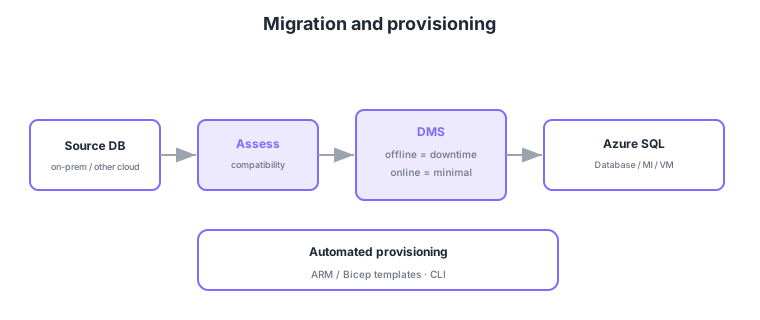
- Assessment: assess compatibility before migrating and decide the right target (SQL Database/MI/VM).
- Azure Database Migration Service (DMS): assists migrating large/multiple databases.
- Offline vs online: offline has downtime (simpler); online minimizes downtime (continuous sync).
- Automated provisioning: build reproducibly with ARM/Bicep templates or CLI.
Common on DP-300: assess compatibility first, migrate large/multiple DBs = Azure Database Migration Service, minimize downtime = online migration, reproducible build = ARM/Bicep/CLI. Choose offline/online by downtime tolerance.
Migration starts with assessment. Use Azure Migrate or Data Migration Assistant (DMA) to surface compatibility issues (deprecated features, blockers) and recommend a target (SQL Database/MI/VM), and estimate sizing via SKU recommendations. Execute with Azure Database Migration Service (DMS) or the Azure SQL Migration extension (ADS), choosing offline (bulk copy with downtime) or online (continuous change sync with a final cutover, minimal downtime). For MI, Log Replay Service (LRS) using log shipping/native backup-restore is also available. After migrating, adjust the compatibility level and check for regressions with Query Store. Provision declaratively with ARM/Bicep, Azure CLI/PowerShell, or Terraform, governed by tags, Azure Policy, and naming conventions. The same config can be reproduced across environments, and wiring it into CI/CD prevents configuration drift. Choose the target by “need for instance features,” “need for OS control,” and “tolerable downtime.”
| Stage | Tool | Role |
|---|---|---|
| Assess | Azure Migrate / DMA | Compatibility, target, SKU sizing |
| Migrate | DMS / ADS extension / LRS | Run offline or online |
| Provision | ARM/Bicep, CLI, Terraform | Declarative, reproducible config |
Scenario: migrate a 24/7 business DB to Azure SQL without stopping operations. → Assess compatibility and pick a target with DMA/Azure Migrate, then use DMS online migration to sync changes continuously and cut over at a planned time to minimize downtime. Provision declaratively with Bicep for reproducibility and rollback.
FAQ: Q. Assessment vs migration? → A. Assessment (DMA/Azure Migrate) is the upfront compatibility check plus target/SKU sizing; migration (DMS, etc.) moves the actual data. Q. When downtime is nearly intolerable? → A. Use online migration with continuous sync and only a brief cutover.
Trap: “choose offline migration when you want minimal downtime” is wrong—continuous sync to limit downtime is online migration. Also “pick the target without assessment” is wrong—assess compatibility first for deprecated features/blockers. And ARM/Bicep automate provisioning, not migration—keep them distinct.
1.3.2Section summary
- Migration = assess → DMS → (offline/online) → Azure SQL
- Provisioning = automate with ARM/Bicep, CLI
Sign in to track progress — Log in.
Quick check
(just a quick review)Q1. Which Azure service assists migrating multiple on-prem SQL databases to Azure?
Q2. You want to minimize downtime during migration. Which method?
Q3. You want to build the database environment reproducibly and automatically. What do you use?
Keep track of your progress
The full study guide is free to read. Sign up free to practice with the question bank, track what you have read, review your mistakes, and highlight passages.