

What's changed: Deepened DP-300 Chapter 1 (ja figures; comparison tables/scenarios/FAQ/traps/deep paragraphs in all sections)
1.1SQL Deployment Options in Azure
Understand the three options for running SQL on Azure—Azure SQL Database (PaaS), Azure SQL Managed Instance (PaaS, high compatibility), and SQL Server on Azure VM (IaaS)—and how to choose. The starting point for DP-300.
Running SQL on Azure offers three options trading off management scope vs compatibility. Choose by how much you delegate to Azure vs control yourself.
1.1.1Three deployment options
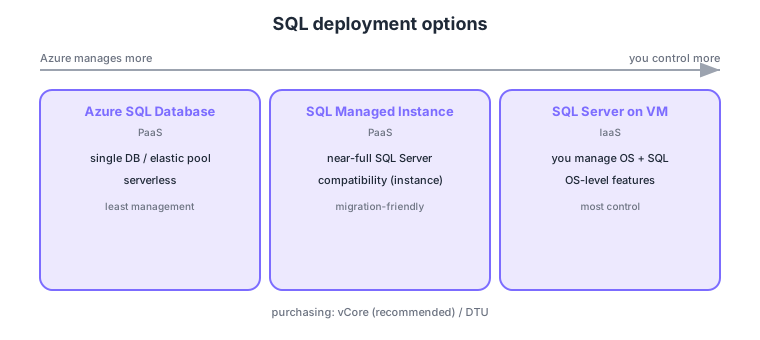
- Azure SQL Database: PaaS single database; single DB, elastic pool, serverless—least management.
- Azure SQL Managed Instance: PaaS with near-full SQL Server compatibility (instance-level); great for migrating from on-prem.
- SQL Server on Azure VM: IaaS where you manage OS and SQL; most control (when OS-level features are needed).
- Purchasing models: vCore (flexible, recommended) and DTU (simple); service tiers like Hyperscale for large scale.
Common on DP-300: easiest PaaS single DB = Azure SQL Database, near-full SQL Server compatibility for migration = Managed Instance, OS-level control = SQL on VM, flexible purchasing = vCore. Choose MI/VM for compatibility/control, SQL Database to offload operations.
Some instance features like SQL Agent (jobs) and cross-DB queries are limited in SQL Database but available in Managed Instance; requirements drive the choice.
Deployment choice follows the shared-responsibility line. SQL Database has Azure manage OS, patching, backups, and HA while you focus on the DB and data (create DBs under a logical server, choosing a single DB, an elastic pool to share resources across DBs, or serverless to bill only when used). Managed Instance keeps instance features—SQL Agent, cross-DB queries, CLR, linked servers—while going PaaS, deployed into a dedicated subnet (VNet), making it ideal for migration. SQL on VM gives full control of OS and engine, chosen when you need a specific build, OS-level features, or third-party integration. Purchasing models are vCore (specify compute and storage independently; reuse licenses via Azure Hybrid Benefit; reserved discounts apply) and DTU (a bundled compute/memory/IO metric). Note SQL Database/MI offer provisioned and serverless compute models, and Azure performs maintenance (you can pick a maintenance window).
| Aspect | SQL Database | Managed Instance | SQL on VM |
|---|---|---|---|
| Type | PaaS (single DB) | PaaS (instance) | IaaS |
| Compatibility | DB-level (some limits) | Near-full SQL Server | Full (any build) |
| Mgmt burden | Least | Medium | Most (incl. OS) |
| Best for | New, cloud-optimized | On-prem migration | OS/specific features |
Scenario: move on-prem SQL Server to Azure while keeping SQL Agent jobs and cross-DB queries and offloading operations. → Choose Managed Instance (keeps instance features with PaaS operations). If you have OS-level special requirements, choose SQL on VM; for a new, cloud-optimized app, choose SQL Database.
FAQ: Q. vCore or DTU? → A. vCore is recommended (flexibility, Azure Hybrid Benefit, reserved discounts); DTU suits small or simple sizing. Q. What is an elastic pool? → A. Sharing vCore/DTU across multiple DBs to optimize cost when many DBs peak at different times.
Trap: “SQL Database (single DB) supports SQL Agent jobs and cross-DB queries as-is” is wrong—those are Managed Instance (or SQL on VM) features. Also “Azure manages OS and patching for SQL on VM” is wrong—being IaaS, OS/patching is your responsibility.
1.1.2Section summary
- SQL Database (PaaS single DB) / Managed Instance (PaaS high compat) / SQL on VM (IaaS)
- Purchasing = vCore (recommended) / DTU
Sign in to track progress — Log in.
Quick check
(just a quick review)Q1. Which PaaS option for a single database minimizes management effort?
Q2. You want to migrate on-prem SQL Server to Azure PaaS with near-full compatibility. Which do you choose?
Q3. Which fits when you need OS-level configuration and full control of SQL Server?
Keep track of your progress
The full study guide is free to read. Sign up free to practice with the question bank, track what you have read, review your mistakes, and highlight passages.