

What's changed: Deepened DP-300 Chapter 2 (ja figures; comparison tables/scenarios/FAQ/traps/deep paragraphs in all sections)
2.1Authentication and Access Control
Understand Azure SQL authentication (Microsoft Entra authentication and SQL authentication) and in-database authorization (roles, least privilege). Securely control who can access what.
Securing a database starts with "who can access" (authentication) and "what they can do" (authorization). Entra authentication is recommended for Azure SQL.
2.1.1Authentication and authorization
On-premises and multicloud SQL Server can be brought into the Azure control plane with Azure Arc-enabled SQL, applying inventory, patching, Microsoft Defender for Cloud, Azure Policy, and auditing centrally—consistent operations regardless of location.
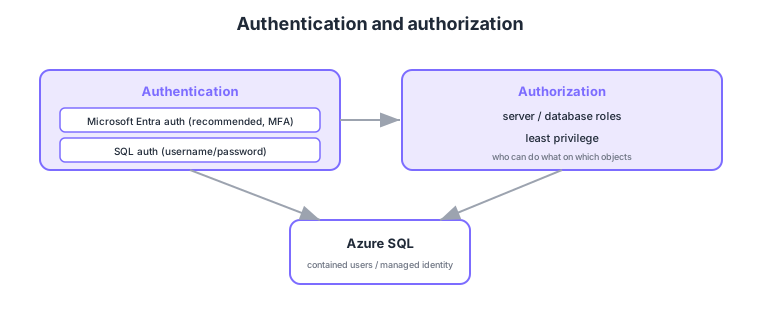
- Microsoft Entra authentication: recommended; centralized, works with MFA and Conditional Access.
- SQL authentication: username/password; used when Entra isn’t available, but management is more dispersed.
- Authorization via roles: bundle permissions with server/database roles, reducing per-user grants.
- Least privilege: grant only the minimum permissions (avoid over-granting db_owner).
Common on DP-300: recommended auth = Microsoft Entra authentication (centralized, MFA), bundle permissions via roles, grant least privilege. Entra auth beats SQL auth for centralized management and MFA.
Contained users and managed identities help manage access per database without depending on server logins.
Azure SQL authentication is layered. There are logins (server/instance level) and users (database level); in SQL Database, contained users (created directly in the DB without a master login) are preferred. With Microsoft Entra authentication you set an Entra admin on the server and map individual users, groups, apps (service principals), and managed identities to DB users (apps connect with an Entra token—passwordless). Authorization uses fixed database roles (db_datareader/db_datawriter/db_owner, etc.), custom roles, and fine-grained GRANT/DENY/REVOKE (with DENY taking precedence), enforcing least privilege. Narrow further with row-level security (RLS) per row and column-level permissions per column. On the network side, layer server/database firewalls (allowed IPs), private endpoints, VNet service endpoints, and disabling public access. Combine Entra + Conditional Access + MFA and avoid shared SQL logins.
| Aspect | Entra authentication | SQL authentication |
|---|---|---|
| Credentials | Entra ID (token), passwordless possible | Username/password |
| MFA/Conditional Access | Supported | Not supported |
| Management | Centralized (recommended) | Per-DB, more dispersed |
| App connection | Secure via managed identity | Credentials in connection string |
Scenario: connect an app to Azure SQL without a password in the connection string, allowing only read/write. → Give the app a managed identity, create it as a DB user via the Entra admin, and grant db_datareader + db_datawriter (not db_owner). Connect with an Entra token and restrict the path with firewall/private endpoints.
FAQ: Q. Login vs user? → A. A login is a server/instance principal; a user is a database principal. In SQL Database, contained users (avoiding master dependence) are preferred. Q. To show only certain rows? → A. Use row-level security (RLS) to filter rows per user.
Trap: “SQL authentication supports MFA and Conditional Access” is wrong—those are benefits of Entra authentication. Also “grant db_owner to everyone to simplify access” is wrong—it violates least privilege; grant only needed permissions (and remember DENY overrides GRANT).
2.1.2Section summary
- Authentication = Entra (recommended) / SQL
- Authorization = roles + least privilege
Sign in to track progress — Log in.
Quick check
(just a quick review)Q1. Which recommended Azure SQL authentication is centralized and integrates with MFA/Conditional Access?
Q2. How do you efficiently grant permissions to many users and reduce per-user grants?
Q3. Which is a correct access-control principle?
Keep track of your progress
The full study guide is free to read. Sign up free to practice with the question bank, track what you have read, review your mistakes, and highlight passages.