

What's changed: Deepened DOP-C02 Chapter 5 (added comparison tables, scenarios, FAQs, exam traps, deep-dive paragraphs to each section; localized figures to Japanese)
5.1Event-Driven Automation
Understand automated responses to events—EventBridge (rules/targets), CloudWatch alarms, EventBridge Scheduler, and SNS/SQS. Trigger actions automatically on state changes.
Incident response starts with detecting events. EventBridge and alarms receive events and trigger actions automatically.
5.1.1Routing events
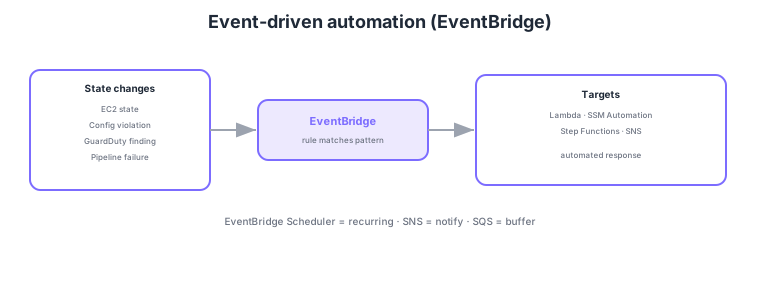
- EventBridge: filter AWS service state-change events with rules and route to targets.
- Targets: automate via Lambda / SSM Automation / Step Functions / SNS, etc.
- EventBridge Scheduler: schedule recurring runs via cron/rate expressions.
- SNS/SQS: SNS = notification fan-out, SQS = buffering/retries for decoupled processing.
Common on DOP-C02: react to service state changes = EventBridge rules, scheduled runs = EventBridge Scheduler (or CloudWatch Events rules), automation targets = Lambda/SSM Automation/Step Functions. A classic pattern routes GuardDuty/Config/CodePipeline findings via EventBridge to automated responses.
DOP-C02 probes how you receive events and deliver them reliably. EventBridge event patterns match source/detail-type/detail in JSON, optionally reshaping payloads for targets via an input transformer. AWS service state changes flow to the default event bus, while SaaS/in-house app events arrive on a custom bus or via partner event sources. A schema registry manages event structures, and cross-account events are aggregated via bus-to-bus routing. For scheduling, beyond classic "rules (cron/rate)," the more flexible EventBridge Scheduler—with time zones and one-time execution—is recommended. For delivery reliability, set a retry policy and a DLQ for target-delivery failures to avoid drops. SNS fans out to Email/SMS/HTTP/Lambda/SQS, and message filtering (subscription filter policies) delivers only the relevant messages per subscriber. SQS buffers to absorb consumer spikes and transient failures, using FIFO when ordering is required. Combining these to branch a state change into notify, ticket, and auto-remediate is the canonical shape of event-driven operations.
| Requirement | Service/feature | Key point |
|---|---|---|
| React to state changes | EventBridge rule | Filter by pattern → target |
| Flexible scheduling | EventBridge Scheduler | cron/rate; time zones; one-time |
| Notify many endpoints | SNS (fan-out) | Selective delivery via filter policy |
| Buffer/retry intake | SQS | Absorb spikes; FIFO for ordering |
Scenario: Aggregate GuardDuty findings and Config violations from production accounts into a dedicated security account for centralized automated response. → From each account’s default event bus, route the relevant events with a rule to the security account’s custom bus via cross-account forwarding. At the aggregation point, rules trigger Lambda/SSM Automation by severity, with a DLQ on each target for delivery failures.
FAQ: EventBridge rule schedule vs EventBridge Scheduler? A rule is fine for simple recurring triggers already wired into existing ops, but for new work, EventBridge Scheduler is generally recommended—it offers time-zone support, one-time schedules, flexible retries/flex windows, and scales to large numbers of schedules.
Exam trap: If an EventBridge target invocation fails, the event is lost without a DLQ configured. Always set a retry policy + DLQ for important automated responses. Also, "deliver the same event to multiple subscribers" is SNS fan-out / multiple targets—note that a single SQS queue has one message consumed by one consumer (fan-out needs SNS → multiple SQS).
5.1.2Section summary
- Detect/route = EventBridge (rule → target)
- Scheduled = Scheduler / notify = SNS / buffer = SQS
Sign in to track progress — Log in.
Quick check
(just a quick review)Q1. When GuardDuty detects a threat, you want to auto-invoke an isolation Lambda. Where do you receive the finding?
Q2. You want to run maintenance automation on a daily nightly schedule. What?
Q3. You want one incident event delivered to several actions (notify, ticket, remediate) at once. What?
Keep track of your progress
The full study guide is free to read. Sign up free to practice with the question bank, track what you have read, review your mistakes, and highlight passages.