

What's changed: Deepened DOP-C02 Chapter 5 (added comparison tables, scenarios, FAQs, exam traps, deep-dive paragraphs to each section; localized figures to Japanese)
5.3Notification and Escalation
Understand incident notification and operations—SNS, EventBridge, Systems Manager Incident Manager, Chatbot (Slack/Teams), and dead-letter queues (DLQ). Reach the right people reliably and coordinate response.
Beyond detection and remediation, notifying the right people and escalating matters. SNS and Incident Manager coordinate response.
5.3.1Notification and incident management
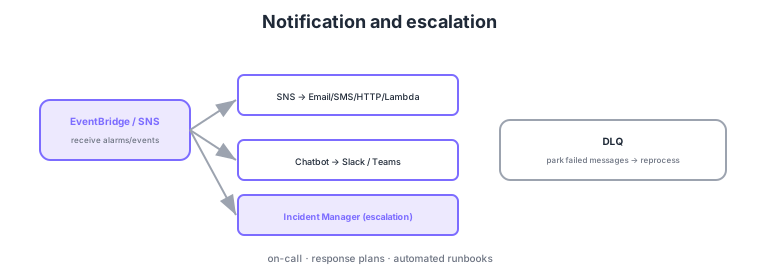
- SNS: fan out notifications to Email/SMS/HTTP/Lambda.
- Chatbot: relay ops notifications/alarms to Slack/Teams.
- Incident Manager: coordinate escalation plans, response plans, and on-call for major incidents.
- DLQ: park messages that fail delivery/processing for later reprocessing.
Common on DOP-C02: notification fan-out = SNS, Slack/Teams = Chatbot, major-incident coordination/on-call = Incident Manager, park failed messages = DLQ. Configure DLQs so failed Lambda/SQS processing is not lost.
DOP-C02 probes operational design that "reaches the right people via the right channel, loses nothing, and coordinates response." SNS fans out to Email/SMS/HTTP(S)/Lambda/SQS/mobile push, delivers only relevant messages per subscriber via subscription filter policies, and can park delivery failures with its own DLQ (redrive). Chat integration uses AWS Chatbot (Amazon Q Developer in chat applications) to push alarms and CloudWatch graphs to Slack/Teams and even run approved commands from chat. Major incidents are coordinated by Systems Manager Incident Manager, which governs response plans, escalation plans, on-call schedules (rotations), and contact channels, auto-triggering runbooks on occurrence, paging stakeholders, and supporting post-incident analysis. Delivery/processing reliability hinges on DLQs: Lambda async invocations and SQS consumer failures can be parked per-message for later reprocessing (redrive) and root-cause analysis. Design keys are routing by severity (info to Slack, critical to on-call paging) and curbing alert fatigue (composite alarms, filtering). Integrated with detection and auto-remediation, these improve incident MTTR and the reliability of escalation.
| Goal | Service | Key point |
|---|---|---|
| Multi-channel notification | SNS | Fan-out; filter policy; DLQ |
| Chat integration | AWS Chatbot | Alarms/graphs to Slack/Teams |
| Major-incident coordination | Incident Manager | Response plans; on-call; post-incident |
| Preserve failed messages | DLQ | Park → redrive to reprocess |
Scenario: Minor warnings are fine in chat, but production-down events should page on-call by phone with coordinated response. → Route by severity with an SNS subscription filter policy: info-level to Slack via Chatbot, critical-level triggers an Incident Manager response plan that pages on-call escalation (phone/SMS) and fires automated runbooks. Afterward, record a post-incident analysis in Incident Manager to drive prevention.
FAQ: Is SNS notification enough, or do I need Incident Manager? For simply "delivering notifications," SNS (+ Chatbot) suffices. For coordinating major-incident response—on-call rotations, staged escalation, automatic response-plan invocation, post-incident records—use Incident Manager. Notification (SNS) and coordination (Incident Manager) are different roles.
Exam trap: For a "don’t lose failed events" requirement, forgetting a DLQ means Lambda async invocations and SQS messages are discarded after retry limits with no way to investigate. Always configure a DLQ for important async processing. Also, Chatbot is for notification/approved-command integration, while coordination (on-call/escalation) of incidents is Incident Manager’s role.
5.3.2Section summary
- Notify = SNS (fan-out) + Chatbot (Slack/Teams)
- Coordinate = Incident Manager / failure parking = DLQ
Sign in to track progress — Log in.
Quick check
(just a quick review)Q1. You want to deliver alert notifications to Email, SMS, and Lambda simultaneously. What?
Q2. You want to relay ops alarms/incident notifications to a Slack channel. What?
Q3. A Lambda repeatedly fails to process events. You want to keep the messages for later investigation/reprocessing. What?
Keep track of your progress
The full study guide is free to read. Sign up free to practice with the question bank, track what you have read, review your mistakes, and highlight passages.