

What's changed: In-scope coverage: added App Runner, App2Container, AWS Copilot, Serverless Application Repository, CloudShell, AWS CLI/SDK, CodeStar to s3
1.3Automated Testing and Artifact Management
Understand pipeline quality gates—automated tests, manual approval actions, artifacts (CodeArtifact/ECR), and CodeGuru. Stop bad changes before deployment.
Embed quality gates in the pipeline so only tested/approved changes proceed. Version and reuse build artifacts.
1.3.1Quality gates and artifacts
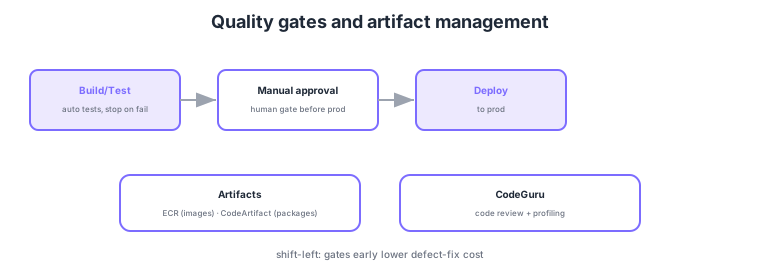
- Automated tests: run in Build/Test stages; stop the pipeline on failure to prevent bad deploys.
- Manual approval action: insert a human gate before production deploy.
- Artifacts: version container images in ECR and libraries/packages in CodeArtifact.
- CodeGuru: assist quality with code review (Reviewer) and performance profiling (Profiler).
Common on DOP-C02: test failure stops the pipeline, human gate before prod = manual approval action, container images = ECR, language packages = CodeArtifact, automated code review = CodeGuru. Placing quality gates early (shift-left) lowers defect-fix cost.
Quality gates design "at which stage, what you verify, and how you record it." CodeBuild test reports ingest JUnit/TestNG results to visualize pass rates and trends in the console. Tests escalate unit → integration → E2E, and catching defects earlier (shift-left) is cheaper. A manual approval action integrates with SNS to notify approvers and records who approved and when. Mismatching artifacts is a frequent exam theme: container images = Amazon ECR (image scanning, lifecycle policies, immutable tags), language packages = CodeArtifact, and build outputs (zip, etc.) = S3 are clearly separated. ECR image scanning (Basic/Enhanced) embeds vulnerability detection in the pipeline, with Enhanced integrating Amazon Inspector. CodeGuru Reviewer uses ML to flag code defects and security issues (e.g., hardcoded secrets), while CodeGuru Profiler pinpoints runtime CPU/memory hotspots. Note that as of 7 November 2025 you can no longer create new repository associations in CodeGuru Reviewer (existing associations keep working); Amazon Q Developer offers equivalent code review and Amazon Inspector offers code scanning. Amazon CodeGuru is still listed in the DOP-C02 exam scope, so we cover it here. Combining these to enforce "can’t proceed unless it passes" gates at each stage is the core of DevOps quality assurance.
| What to store | Where | Notes |
|---|---|---|
| Container images | Amazon ECR | Image scan, lifecycle, immutable tags |
| Language packages | CodeArtifact | Proxy public repos via upstreams |
| Build outputs (zip, etc.) | Amazon S3 | CodePipeline artifact store |
| Code-quality findings | CodeGuru | Reviewer = review / Profiler = runtime |
Scenario: For a containerized app, embed in CI/CD a mechanism that keeps vulnerable images out of production. → Push built images to ECR and detect vulnerabilities with ECR image scanning (Enhanced = Amazon Inspector integration). If severity is high, fail the pipeline stage before the manual approval action. Additionally run CodeGuru Reviewer on the source to catch hardcoded secrets and drive a fix toward Secrets Manager references.
FAQ: Manual approval or automated tests? Use both. Automated tests verify machine-checkable quality (unit/integration/vulnerability scans) fast and repeatedly; manual approval is for gates needing human judgment (go/no-go for production, final change-management sign-off). Approval requests reach stakeholders via SNS notifications.
Exam trap: Don’t confuse CodeGuru Reviewer (code review) with CodeGuru Profiler (runtime profiling). "Find what’s burning CPU in production" is Profiler; "flag code defects/secrets at pull-request time" is Reviewer. Also, detecting vulnerable containers is ECR image scanning/Inspector, not CodeGuru.
1.3.2Services that complement the SDLC
Beyond the core CI/CD services (CodePipeline/CodeBuild/CodeDeploy), in-scope exam topics include services that automate container deployment, support SDLC peripheral operations, and standardize toolchain bootstrapping.
1.3.2.1Container deployment automation
App Runner is a fully managed service that automatically builds, deploys, and scales web services and APIs from a source-code repository or container image. AWS fully manages load balancing, auto-scaling, and TLS certificate provisioning, significantly reducing operational overhead compared to ECS/Fargate. In a DevOps context, the selection criterion is "minimize infrastructure management when publishing a web container"; use ECS when fine-grained network control or integration with an existing ECS platform is required.
App2Container (A2C) analyzes existing Java/.NET applications running on a server and automatically generates a Dockerfile, ECS/EKS task definitions, CloudFormation templates, and a CI/CD pipeline scaffold. Its DevOps role is automating legacy-app modernization, reducing the cost and error rate of manual containerization. Select it during the phase of migrating existing applications to containers.
AWS Copilot is a CLI for building, deploying, and operating containerized applications on ECS, Fargate, and App Runner. Declare the service type (e.g., Load Balanced Web Service, Backend Service) and environments (test, prod, etc.), and it automatically generates CloudFormation stacks, a pipeline, VPC, and logging configuration. In a DevOps context, use it when you want to stand up a container environment and CI/CD pipeline declaratively with minimal steps. Note: it is unrelated to GitHub Copilot.
1.3.2.2SDLC support and reuse tools
Serverless Application Repository (SAR) is an AWS-managed repository for searching, deploying, and publishing serverless applications defined as SAM templates. Reusable serverless components (auth flows, image processors, notification handlers, etc.) can be deployed in near-one-click, and the repository is also used to share internal common components within an organization.
CloudShell is an authenticated shell environment available directly in the AWS Management Console from a browser. The AWS CLI, common runtimes (Python, Node.js, etc.), and appropriate permissions are pre-configured, with 1 GiB of persistent storage. In a DevOps context, use it when you want to run operational commands or scripts immediately without storing credentials locally, or when you need to start troubleshooting instantly.
AWS CLI is a tool for operating AWS services from the command line, embedded in shell scripts, CI pipelines, and automation scripts. AWS SDK (e.g., boto3 for Python) is the official library for calling AWS APIs from each language, providing built-in authentication resolution, automatic retry, and pagination. Both are essential foundations for SDLC automation scripts and are widely used in custom pipeline steps and Lambda handlers.
Note: AWS CodeStar reached end of life on July 31, 2024 and no new projects can be created (the following is for conceptual understanding). CodeStar used project templates and an integrated dashboard to launch CodeCommit, CodeBuild, CodeDeploy, and CodePipeline together, standardizing CI/CD toolchain bootstrapping, and it also provided team-member access management and issue-tracking integration. Today, to stand up a toolchain quickly you configure CodePipeline, CodeBuild, and CodeConnections (or CodeCatalyst) directly.
| Service | DevOps role | When to choose |
|---|---|---|
| ==App Runner== | Publish web/API containers with minimal ops | Avoid managing LB/scaling/TLS |
| ==App2Container== | Containerize legacy Java/.NET apps | Automate legacy-app modernization |
| ==AWS Copilot== | Declaratively build ECS/Fargate/App Runner env + CI/CD | Simplify container environment setup |
| ==Serverless Application Repository== | Search, deploy, share SAM apps | Distribute reusable serverless components |
| ==CloudShell== | Instant execution in authenticated browser shell | Operational commands without local credentials |
| ==AWS CLI== / ==AWS SDK== | Automate AWS from CLI/scripts/Lambda | Custom pipeline steps and general automation |
| ==CodeStar== | Standardize CI/CD toolchain bootstrapping | Stand up a new project quickly |
DOP-C02 in-scope: publish web container with minimal ops = App Runner, auto-containerize legacy Java/.NET = App2Container, CLI to set up ECS/Fargate = AWS Copilot, catalog of SAM apps = Serverless Application Repository, authenticated browser shell = CloudShell, automate AWS from CLI = AWS CLI, launch toolchain at once = CodeStar. Keep each service's primary use distinct.
1.3.3Section summary
- Quality gates = automated tests + manual approval action
- Artifacts = ECR (images) / CodeArtifact (packages)
- SDLC support = App Runner / App2Container / Copilot / SAR / CloudShell / CLI & SDK / CodeStar
Sign in to track progress — Log in.
Quick check
(just a quick review)Q1. When automated tests fail in the pipeline, you want to prevent bad code from reaching production. How?
Q2. You want to store and version container images for ECS/EKS deployments. What?
Q3. You want a human final-check gate in the pipeline before production deploy. What?
Keep track of your progress
The full study guide is free to read. Sign up free to practice with the question bank, track what you have read, review your mistakes, and highlight passages.