

What's changed: In-scope coverage: added App Runner, App2Container, AWS Copilot, Serverless Application Repository, CloudShell, AWS CLI/SDK, CodeStar to s3
1.2Deployment Strategies
Understand low-risk deployments—CodeDeploy, in-place/blue-green, rolling/canary/linear. Release while minimizing downtime and blast radius.
Deployment is about switching over safely. CodeDeploy offers multiple strategies for EC2/ECS/Lambda.
1.2.1Choosing a deployment method
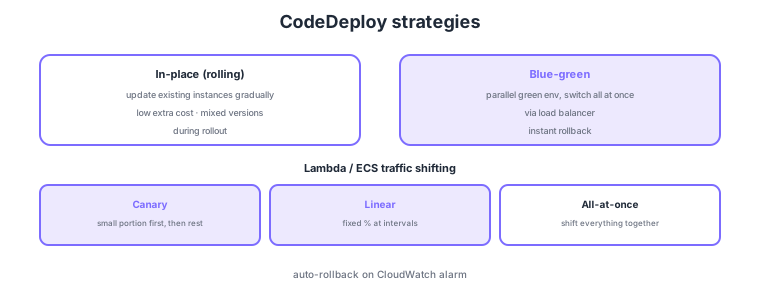
- In-place: update existing instances gradually (rolling); low extra cost but mixed versions during rollout.
- Blue-green: build a parallel environment and switch all at once; instant rollback on issues (minimal downtime).
- Canary: send a small portion first → shift the rest if healthy.
- Linear: shift a fixed percentage at intervals. All-at-once shifts everything together.
Common on DOP-C02: parallel env + all-at-once switch + instant rollback = blue-green, validate from a small portion = canary, fixed percentage steps = linear, update existing gradually = in-place/rolling, plus automatic rollback on CloudWatch alarms. Choose blue-green or canary to minimize downtime/risk.
CodeDeploy integrates with CloudWatch alarms to auto-rollback when thresholds are breached mid-deploy. For Lambda/ECS, pre/post hooks can run smoke tests.
DOP-C02 probes which strategies apply per target (EC2/on-prem, ECS, Lambda) and their safety mechanisms. For EC2/on-prem, define hooks in AppSpec (appspec.yml) (BeforeInstall/AfterInstall/ApplicationStart/ValidateService, etc.), running scripts at each hook. Blue-green launches a new Auto Scaling group or ECS task set in parallel, shifts the load balancer (ALB/NLB) target group, and keeps the old environment briefly before termination—making instant rollback easy. For Lambda/ECS, choose predefined traffic-shifting configs like Canary10Percent5Minutes (10% for 5 minutes, then the rest) or Linear10PercentEvery1Minute, and run smoke tests via Lambda validation functions in BeforeAllowTraffic/AfterAllowTraffic hooks. Automated rollback centers on CloudWatch alarm integration—if an alarm enters ALARM mid-deploy, it reverts to the prior version automatically. For Lambda alone, alias weighted routing also achieves gradual shift. These are options to limit downtime and blast radius.
| Strategy | How it switches | Best for |
|---|---|---|
| In-place/rolling | Update existing gradually | Low extra cost; brief mixed versions OK |
| Blue-green | Switch all at once to a parallel env | Minimal downtime; instant rollback required |
| Canary | Small portion, then the rest | Quick validation in production |
| Linear | Fixed percentage at intervals | Gradual, observed migration |
Scenario: Roll out a new Lambda version safely rather than all at once, with auto-revert if error rate rises. → Choose CodeDeploy Canary10Percent5Minutes and run a light check in BeforeAllowTraffic. Set CloudWatch alarms on production metrics (error rate/latency); if they hit ALARM mid-deploy, auto-rollback fires. This caps blast radius at 10% and reverts within minutes if something breaks.
FAQ: Blue-green vs canary? If you want to switch wholesale to a new environment and revert entirely on issues, use blue-green (you pay for the parallel environment). If you want to validate on a slice of production traffic before widening, use canary/linear (shift traffic percentages within the same environment). Decide by whether the priority is minimal downtime or staged validation.
Exam trap: Claiming "auto-rollback is configured" does nothing if no CloudWatch alarm is associated—rollback triggers are alarms or deployment-failure events. Also, EC2 blue-green needs temporary extra resources (cost) for the new environment—under a "minimize cost" requirement, in-place/rolling may be the intended choice.
1.2.2Section summary
- Low-risk switch = blue-green / canary / linear
- CodeDeploy = EC2/ECS/Lambda + auto-rollback on CloudWatch alarms
Sign in to track progress — Log in.
Quick check
(just a quick review)Q1. You build a parallel environment, switch all at once, and roll back instantly on issues. Which strategy?
Q2. You send 10% of traffic to the new version first, then shift the rest if healthy. Which method?
Q3. You want auto-rollback if error rate exceeds a threshold mid-deploy. CodeDeploy integrates with what?
Keep track of your progress
The full study guide is free to read. Sign up free to practice with the question bank, track what you have read, review your mistakes, and highlight passages.