

What's changed: In-scope coverage: added App Runner, App2Container, AWS Copilot, Serverless Application Repository, CloudShell, AWS CLI/SDK, CodeStar to s3
1.1CI/CD Pipelines
Understand AWS CI/CD services—CodePipeline (orchestration), CodeBuild (build/test), CodeCommit (source), and CodeArtifact (dependency packages). Automate from code to deployment.
The core of DevOps is continuous integration/delivery (CI/CD). A pipeline automates source → build → test → deploy.
1.1.1CI/CD service composition
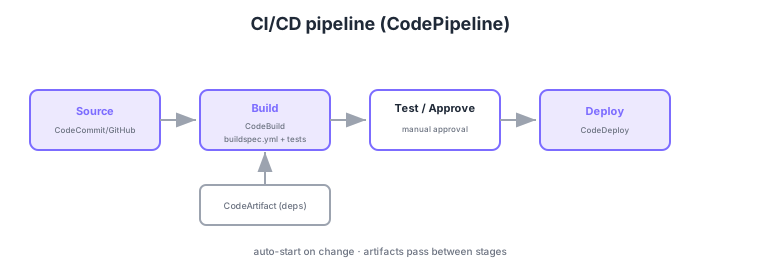
- CodePipeline: orchestrates stages (Source/Build/Test/Deploy), auto-starting on change.
- CodeBuild: a managed build service running build/tests per buildspec.yml.
- CodeCommit: a managed Git repository (source); GitHub and others also work as source. Note: since July 2024 CodeCommit is closed to new customers (existing use continues); new setups typically use GitHub etc. with CodeConnections.
- CodeArtifact: an artifact repository centralizing dependency packages (npm/pip/Maven, etc.).
Common on DOP-C02: pipeline orchestration = CodePipeline, build/test = CodeBuild (buildspec.yml), source = CodeCommit/GitHub, dependency packages = CodeArtifact. Insert a manual approval action between stages to gate production deploys.
CodeBuild defines build/test/artifact phases in buildspec.yml. Including tests in the Build stage stops the pipeline on failure, preventing bad code from deploying.
DOP-C02 probes how you structure pipelines and where you enforce control. CodePipeline is built from stages (sequential) and actions (parallel/sequential within a stage), passing artifacts between stages via an artifact store (S3). Source change detection uses EventBridge for CodeCommit and a Webhook via CodeStar Connections (CodeConnections) for GitHub—lower latency than polling. CodeBuild defines buildspec.yml phases (install/pre_build/build/post_build) plus artifacts/cache/reports, and can build Docker images in privileged mode or reach resources inside a VPC. In multi-account setups, the standard pattern has the CI/CD account AssumeRole into each environment account to deploy, sharing the KMS key used to encrypt artifacts across accounts. CodeArtifact can set public repositories (npm/PyPI, etc.) as upstreams to transparently proxy and cache them, unifying internal and public packages behind one endpoint.
| Role | Service | Key point |
|---|---|---|
| Stage orchestration | CodePipeline | Auto-start on change; place approvals/actions |
| Build/test execution | CodeBuild | buildspec.yml; privileged/VPC; test reports |
| Source control | CodeCommit / GitHub | Trigger via EventBridge or CodeConnections |
| Dependency packages | CodeArtifact | Proxy public repos via upstreams |
Scenario: Dev, staging, and prod are separate accounts and you want one pipeline to deploy through them. → Put CodePipeline in a CI/CD account and AssumeRole into deploy roles prepared in each environment account. Encrypt artifacts with S3 + KMS, granting each account decrypt via the KMS key policy. Insert a manual approval action between staging and prod, and give the prod account only least-privilege roles.
FAQ: For a GitHub source, polling or webhook? Webhook triggering via CodeStar Connections (CodeConnections) is recommended. Polling checks periodically, adding latency to pipeline starts; webhooks trigger immediately on push and reduce wasted runs.
Exam trap: Wanting to "build a Docker image during the build" but forgetting to enable CodeBuild privileged mode will fail. Also, CodeArtifact is for dependency packages (npm/pip/Maven), whereas container images go to ECR—don’t mismatch the artifact type to its store.
1.1.2Section summary
- CI/CD = CodePipeline (orchestrate) + CodeBuild (build/test)
- Source = CodeCommit/GitHub / dependencies = CodeArtifact
Sign in to track progress — Log in.
Quick check
(just a quick review)Q1. You want to define source→build→test→deploy stages and auto-advance the pipeline on change. What?
Q2. Which managed service runs build and unit tests per buildspec.yml?
Q3. You want to centrally manage npm/pip dependencies and pull them securely in builds. What?
Keep track of your progress
The full study guide is free to read. Sign up free to practice with the question bank, track what you have read, review your mistakes, and highlight passages.