

What's changed: In-scope coverage: added a compute/storage in-scope services block to Ch3 (Lightsail/Elastic Beanstalk/Outposts/FSx/Storage Gateway/Elastic Disaster Recovery)
3.1Compute Services
Understand AWS compute—Amazon EC2, containers (ECS/EKS/Fargate), and AWS Lambda—the control-vs-convenience trade-off, plus Auto Scaling and load balancing.
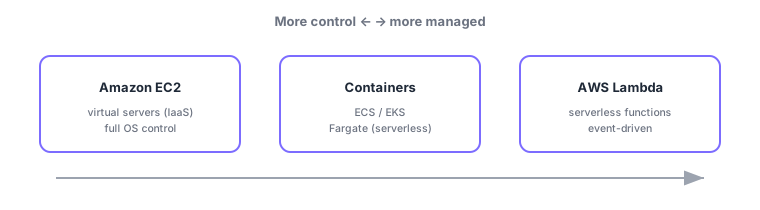
AWS offers compute across a wide range—from high-control (you manage) to nearly hands-off (serverless). As with other clouds, choose along the "control vs effort" axis. The mainstays are Amazon EC2 (virtual servers) / containers (ECS, EKS, Fargate) / AWS Lambda (serverless).
3.1.1Amazon EC2 and purchasing options
Amazon EC2 is virtual servers (IaaS), the most flexible compute where you manage the OS and above. CLF-C02 also asks about purchasing options for cost: On-Demand (per-second/hour, most flexible), Reserved Instances (RI)/Savings Plans (commit 1–3 years for a discount), Spot (spare capacity up to ~90% off, can be interrupted, good for batch), and Dedicated Hosts (dedicated physical host, for licensing needs).
3.1.2Containers and serverless
- Containers: run/manage containers with Amazon ECS (AWS-native) / Amazon EKS (Kubernetes).
- AWS Fargate: serverless for ECS/EKS—run containers without managing the underlying EC2.
- AWS Lambda: serverless—run functions on events (HTTP, S3 events, schedules) and pay only for execution.
| Service | Type | Good for |
|---|---|---|
| Amazon EC2 | Virtual servers (IaaS) | OS control, lift-and-shift |
| ECS / EKS | Container management | Production containers |
| Fargate | Serverless containers | Containers without managing servers |
| AWS Lambda | Serverless (FaaS) | Event-driven, automation |
3.1.3Scaling and load balancing
- Auto Scaling: automatically adjusts the number of EC2 (and more) with demand or failures (elasticity).
- Elastic Load Balancing (ELB): distributes traffic to healthy targets across instances/AZs (high availability).
Scenario: pick per use. Run an OS-dependent legacy app on EC2 (discount steady usage with RI/Savings Plans, run nightly batch cheaply on Spot). Build new microservices on ECS/EKS + Fargate to skip server management. Handle event work like thumbnail generation on upload with Lambda. One system mixes several where each fits.
Watch the mix-ups: (1) EC2 (IaaS, you manage) vs Lambda (serverless, event-driven). (2) ECS/EKS (manage containers) vs Fargate (run them serverlessly)—Fargate is a launch mode for ECS/EKS, not a separate service. (3) Purchasing: Spot = interruptible, cheapest, RI/Savings Plans = discount for commitment, On-Demand = flexible but priciest.
Common points: EC2 = virtual servers (IaaS) / Lambda = serverless / Fargate = serverless containers / ECS & EKS = container management, purchasing options (On-Demand/RI & Savings Plans/Spot/Dedicated Hosts), and Auto Scaling = auto-adjust / ELB = load balancing.
3.1.4Section summary
- EC2 (most control, IaaS, optimize via purchasing options) / containers (ECS/EKS, Fargate = no servers) / Lambda (serverless)
- Purchasing: On-Demand / RI & Savings Plans (discount) / Spot (cheap, interruptible) / Dedicated Hosts
- Auto Scaling = auto-adjust count; ELB = load balancing; combine for high availability
Sign in to track progress — Log in.
Quick check
(just a quick review)Q1. Which AWS serverless service runs code on events with no server management?
Q2. Which AWS compute gives the most control, including the OS?
Q3. Which AWS service runs containers without managing servers?
Q4. Which EC2 purchasing option uses spare capacity at up to ~90% off but can be interrupted?
Q5. Which option discounts EC2 in exchange for a 1–3 year commitment?
Keep track of your progress
The full study guide is free to read. Sign up free to practice with the question bank, track what you have read, review your mistakes, and highlight passages.