

What's changed: In-scope coverage: added a compute/storage in-scope services block to Ch3 (Lightsail/Elastic Beanstalk/Outposts/FSx/Storage Gateway/Elastic Disaster Recovery)
3.2Storage Services
Understand AWS storage—object (Amazon S3), block (Amazon EBS), and file (Amazon EFS)—and S3 storage classes.
Data is stored in three broad types—object, block, file—and AWS has a leading service for each: Amazon S3 (object) / Amazon EBS (block) / Amazon EFS (file). Choose by "what and how you use it"; first nail the differences among the three.
3.2.1Three storage types
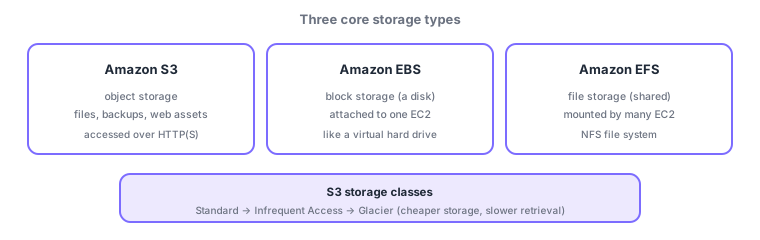
- Amazon S3: object storage for images, backups, logs, and static assets, accessed over HTTP(S); virtually unlimited and extremely durable (eleven nines).
- Amazon EBS: block storage—a virtual disk attached to an EC2 (typically one instance), used for OS and database disks.
- Amazon EFS: file storage—an NFS file system many EC2 instances can mount and share, for shared-file needs.
| Service | Type | Access | Typical use |
|---|---|---|---|
| Amazon S3 | Object | HTTP(S), from anywhere | Images, backups, assets, data lake |
| Amazon EBS | Block | Attached to one EC2 | OS/DB disk |
| Amazon EFS | File | Shared by many EC2 (NFS) | Shared files |
3.2.2S3 storage classes and lifecycle
S3 has storage classes by access frequency: S3 Standard (frequent) → Standard-IA (infrequent) → Glacier (archive)—cheaper to store as you go (note: within Glacier, Glacier Instant Retrieval offers millisecond retrieval; only Glacier Flexible Retrieval / Deep Archive take longer to restore). When access is unpredictable, S3 Intelligent-Tiering auto-moves objects to the best class. Lifecycle rules can auto-transition/expire objects, e.g., "to IA after 30 days, Glacier after 90, delete after a year."
Scenario: a logging platform. Aggregate app logs in S3 (unlimited, durable). Keep recent logs in Standard (searched often), then auto-transition IA→Glacier via lifecycle to cut cost. Use EBS for the EC2 OS disk and EFS for config files shared across servers. Place data by its nature.
Watch the mix-ups: (1) S3 (object, HTTP(S), shareable) vs EBS (a disk attached to one EC2)—S3 is not an EC2 boot disk. (2) EBS (one instance) vs EFS (shared by many EC2). (3) Storage classes (S3’s cost axis) are not about EBS/EFS. (4) Glacier is cheap but not instantly retrievable (retrieval time and cost).
Common points: S3 = object (durable, HTTP(S)) / EBS = block (attached to EC2) / EFS = file (shared), S3 storage classes (Standard/IA/Glacier) vs cost/retrieval, and lifecycle/Intelligent-Tiering.
3.2.3Additional in-scope compute and storage services
Beyond the core EC2/Lambda/S3/EBS/EFS, CLF-C02 also covers these compute and storage services. For compute: Amazon Lightsail to easily start simple websites/VPS at a flat price, AWS Elastic Beanstalk to auto-deploy and run web apps by just uploading code, and AWS Outposts to extend AWS services into your on-premises data center with the same operations. For storage: Amazon FSx for fully managed shared file systems (Windows File Server, high-performance Lustre), AWS Storage Gateway to bridge on-prem and cloud so local apps can use S3 and more, and AWS Elastic Disaster Recovery for low-downtime disaster recovery/migration of servers and databases to AWS. Distinguish by use: "flat-rate simplicity = Lightsail / upload-and-run = Elastic Beanstalk / on-prem extension = Outposts" and "shared files = FSx / hybrid entry point = Storage Gateway / DR = Elastic Disaster Recovery."
3.2.4Section summary
- S3 = object (durable, HTTP(S)) / EBS = block (EC2 virtual disk) / EFS = shared file
- S3 classes: Standard → IA → Glacier (cheaper storage, slower/costlier retrieval); auto-optimize with lifecycle/Intelligent-Tiering
- Additional: compute = Lightsail/Elastic Beanstalk/Outposts; storage = FSx/Storage Gateway/Elastic Disaster Recovery
Sign in to track progress — Log in.
Quick check
(just a quick review)Q1. Which AWS object storage holds images/backups accessed over HTTP(S)?
Q2. Which is block storage—a virtual disk attached to an EC2 instance?
Q3. Which S3 storage class most cheaply stores rarely-accessed data long term?
Q4. Which file storage can be mounted and shared by many EC2 instances at once?
Q5. Which S3 feature auto-transitions/expires data, e.g., "to IA after 30 days, delete after a year"?
Keep track of your progress
The full study guide is free to read. Sign up free to practice with the question bank, track what you have read, review your mistakes, and highlight passages.