

What's changed: Revamped AZ-900 Chapter 6 to the new depth (management tools interactive/scripted/IaC + Arc; monitoring Monitor/Log Analytics/App Insights/alerts/Advisor/Service Health)
6.1Managing and Deploying Resources
Understand the ways to operate and deploy Azure—Azure portal, Cloud Shell, Azure CLI, Azure PowerShell, ARM templates / Bicep (IaC), and Azure Arc—and when to use each.
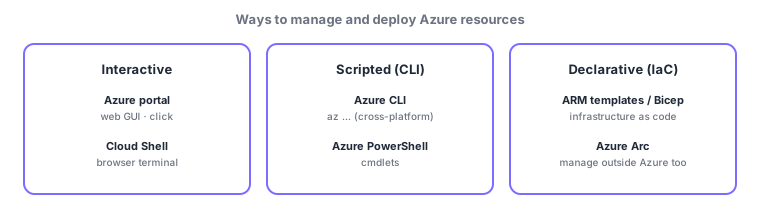
You can operate and deploy Azure resources in several ways, in three broad families—interactive (click) / scripted (commands) / declarative (code = IaC)—and every request goes through ARM (Azure Resource Manager) seen in earlier chapters, so results are consistent regardless of method. Choose by whether you want speed or automation/repeatability.
6.1.1Interactive tools
- Azure portal: the web GUI—click to inspect and create; good for learning, one-off tasks, and getting an overview.
- Azure Cloud Shell: a browser-based terminal (with Azure CLI and PowerShell, no setup, already authenticated)—use commands without installing anything locally.
6.1.2Scripting and code
- Azure CLI: commands starting with
az(cross-platform); good for automation/scripts. - Azure PowerShell: operate via
Azmodule cmdlets (verb-noun form). - ARM templates / Bicep: infrastructure as code (IaC)—declare configuration to deploy the same environment repeatably and automatically (Bicep is a cleaner, newer syntax than ARM JSON and compiles to ARM at deploy time).
A common confusion is "scripting (CLI/PowerShell)" vs "IaC (ARM/Bicep)." CLI/PowerShell run steps in order (imperative)—"create this, then configure that." IaC declares the end state (declarative)—write "the final shape should be this," and ARM reconciles the difference. Re-running yields the same result (idempotent), which is IaC strength.
| Tool | Type | Good for |
|---|---|---|
| Azure portal | Interactive (GUI) | Learning, one-off, overview |
| Cloud Shell | Interactive (browser terminal) | Run commands with no setup |
| Azure CLI / PowerShell | Scripted (imperative) | Automation, repetitive tasks |
| ARM / Bicep | IaC (declarative, idempotent) | Reproducible deployments |
| Azure Arc | Extended management | Govern non-Azure resources |
6.1.3Managing beyond Azure: Azure Arc
With Azure Arc, you manage servers, Kubernetes, and data services on-premises or in other clouds through Azure management plane (policy, tags, RBAC, monitoring). For the "scattered environments" problem in hybrid/multi-cloud, its value is extending Azure governance outward as-is.
Scenario: building parallel environments. To reliably reproduce an identical setup across prod/test/dev → manage Bicep (IaC) in a repo and deploy to each environment by changing only parameters (idempotent). Use the portal for small daily checks and CLI scripts for routine bulk operations, and bring on-prem servers under the same policies via Azure Arc.
Watch the mix-ups: (1) scripting (CLI/PowerShell = imperative) vs IaC (ARM/Bicep = declarative, idempotent). (2) Bicep is not a replacement for ARM but a cleaner syntax that becomes an ARM template. (3) Cloud Shell is the "place" (a browser terminal), while CLI/PowerShell are the "tools" you use inside it.
Q. CLI or PowerShell—which should I use? Both can do the same operations; pick based on your team and existing scripts (commonly: az CLI for Linux-style automation, the Az module if you have Windows/PowerShell assets).
Common points: portal = GUI / Cloud Shell = browser terminal / CLI (az) & PowerShell = scripting (imperative) / ARM & Bicep = IaC (declarative, idempotent, repeatable) / Azure Arc = manage beyond Azure, all through ARM.
6.1.4Section summary
- Interactive: portal (GUI) / Cloud Shell (browser terminal)
- Scripted (imperative): Azure CLI (az) / PowerShell; IaC (declarative, idempotent): ARM / Bicep
- Azure Arc = manage on-prem/other-cloud via Azure management plane; all operations go through ARM
Sign in to track progress — Log in.
Quick check
(just a quick review)Q1. Which deploys the same environment repeatably from declarative code (infrastructure as code)?
Q2. Which in-browser interactive shell comes with Azure CLI and PowerShell preinstalled?
Q3. Which manages on-premises or other-cloud servers through Azure’s management plane?
Q4. Which correctly distinguishes Azure CLI/PowerShell (imperative scripts) from ARM/Bicep (IaC)?
Q5. Which is correct about Bicep?
Keep track of your progress
The full study guide is free to read. Sign up free to practice with the question bank, track what you have read, review your mistakes, and highlight passages.