

What's changed: Revamped AZ-900 Chapter 5 to the new depth (cost factors/tools/savings, Policy/locks/RBAC/Purview/landing zones)
5.2Governance and Compliance
Understand enforcing rules and safe operations with Azure Policy, resource locks, and RBAC, plus data governance and compliance via Microsoft Purview and the Service Trust Portal.
Using the cloud in an organization requires governance—enforcing rules, preventing mistakes, granting permissions only to the right people, and staying compliant. Azure supports these with separate mechanisms. They are easy to confuse, so the trick is to organize them by what each one controls.
5.2.1Enforcing rules: Azure Policy
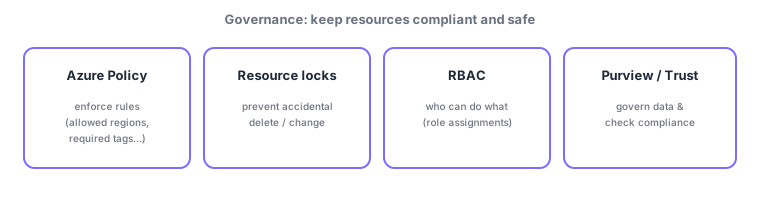
Azure Policy defines and enforces "conditions resources must meet" as rules (e.g., restrict allowed regions, require tags, limit VM sizes). It can deny non-compliant creation, evaluate compliance of existing resources, and even auto-remediate. A policy initiative bundles many policies to apply a whole set of rules (e.g., for a regulatory standard) at once.
5.2.2Preventing mistakes and managing permissions
- Resource locks: a safety net that prevents deletion or changes (CanNotDelete / ReadOnly), stopping mistakes even by those with permission.
- RBAC (role-based access control): manages who can do what via role assignments (least privilege, scope inheritance; see the previous chapter).
| Mechanism | What it controls | Example |
|---|---|---|
| Azure Policy | Conditions resources must meet (rules) | Allowed regions, required tags |
| RBAC | What people can do (permissions) | Reader/Contributor/Owner |
| Resource lock | Whether delete/change is allowed (safety net) | CanNotDelete / ReadOnly |
Policy, RBAC, and locks have distinct roles. Policy = "conditions resources must meet," RBAC = "who can act," and a lock = "a safety net that blocks delete/change." For instance, "even an Owner cannot delete a locked resource," and "even if RBAC allows it, a Policy violation denies creation"—they layer together.
5.2.3Compliance and trust
- Microsoft Purview: unified data governance, classification, and compliance (cataloging data, sensitivity labeling, etc.).
- Service Trust Portal: where you obtain Microsoft audit reports and compliance information (ISO, SOC, etc.).
5.2.4Peripheral knowledge: governance at scale
In large organizations, rather than configuring these one by one, the norm is to apply policy and RBAC at the management group level (previous chapter) so they inherit org-wide, and to provide a pre-governed environment template—a landing zone. The Cloud Adoption Framework (CAF) collects such design guidance. For AZ-900, it is enough to grasp "central control via management groups + policy" and "landing zone = a pre-governed starting environment."
Watch the mix-ups: (1) Azure Policy (resource conditions) vs RBAC (people permissions)—"what must be met" vs "who can act." (2) A resource lock is a delete/change safety net independent of permissions. (3) Purview (governing your data) vs Service Trust Portal (Microsoft-side audit docs) point in opposite directions.
Q. If Policy can enforce "required tags," are tags also a governance tool? Yes. Beyond cost organization (previous section), tags combine with Azure Policy to enforce governance like "require an owner tag on every resource." Tags work for both cost and governance.
Common points: Azure Policy = enforce rules/evaluate compliance (bundled as initiatives) / resource lock = prevent deletion / RBAC = people permissions / Purview = data governance / Service Trust Portal = Microsoft compliance docs, plus the Policy vs RBAC distinction and management groups + inheritance for governance at scale.
5.2.5Section summary
- Azure Policy = enforce rules/compliance (initiatives); resource locks = prevent deletion/change; RBAC = people permissions
- Distinguish roles: Policy (resource conditions) ≠ RBAC (people permissions) ≠ lock (safety net)
- Purview = data governance; Service Trust Portal = Microsoft compliance information
- Govern at scale with management groups + inheritance and landing zones (CAF)
Sign in to track progress — Log in.
Quick check
(just a quick review)Q1. Which prevents accidental deletion/changes to a resource, even by authorized users?
Q2. Which defines/enforces rules (allowed regions, required tags) and evaluates compliance?
Q3. Where can you obtain Microsoft audit reports and compliance information?
Q4. Which correctly distinguishes Azure Policy from RBAC?
Q5. Which Azure service provides unified data governance, classification, and compliance?
Keep track of your progress
The full study guide is free to read. Sign up free to practice with the question bank, track what you have read, review your mistakes, and highlight passages.