

What's changed: Revamped AZ-900 Chapter 5 to the new depth (cost factors/tools/savings, Policy/locks/RBAC/Purview/landing zones)
5.1Cost Management
Understand what drives cloud cost and the tools to manage it: estimating (Pricing Calculator / TCO Calculator), tracking actual spend (Microsoft Cost Management), and organizing (tags).
The cloud is pay-as-you-go, yet cost varies a lot with your design. The key to control is thinking in three phases: estimate before you build, track while running, and organize and save. First understand what drives cost, then use the right tool for each phase.
5.1.1What drives cost
| Factor | Explanation | Saving tip |
|---|---|---|
| Resource type/size | VM size, storage type, etc. | Right-size |
| Region | Prices differ by region | Pick a cheaper/near region |
| Uptime/usage | Running time, requests, stored volume | Stop idle resources |
| Data transfer (egress) | Outbound is commonly billed | Reduce/optimize transfer |
| Licensing | OS/software license cost | Use Azure Hybrid Benefit |
5.1.2Tools to estimate, track, and organize
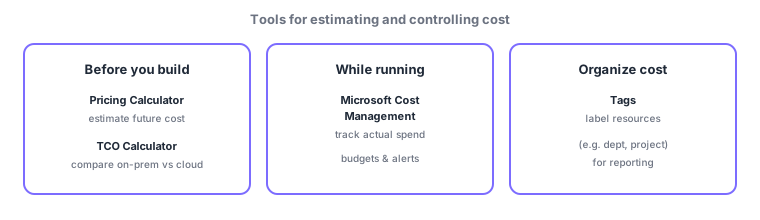
Cost tools split by "when you use them." The Pricing Calculator estimates the price of a not-yet-built configuration, and the TCO Calculator compares "own vs cloud" total cost of ownership when migrating from on-premises—both are for before you build. By contrast, Microsoft Cost Management visualizes and analyzes the actual spend of a running environment and alerts on budget overruns. And tags classify cost across resources.
| Tool | Purpose | When |
|---|---|---|
| Pricing Calculator | Estimate a configuration price | Before building |
| TCO Calculator | Compare on-prem vs cloud TCO | When planning migration |
| Microsoft Cost Management | Track/analyze actual spend, budgets/alerts | While running |
| Tags | Organize cost by dept/project | Ongoing |
5.1.3Ways to save
- Reservations (Reserved Instances / Savings Plans): commit to 1–3 years for large discounts.
- Spot: use spare capacity cheaply (can be evicted; good for batch).
- Azure Hybrid Benefit: bring existing Windows/SQL licenses for a discount.
- Autoscale, right-size, and stop: match capacity to demand and avoid waste.
Scenario: cutting dev-environment cost. Dev VMs are idle at night/weekends, so auto-stop them (less uptime). Always-on production VMs get a reservation discount. Split cost with tags (env=dev/prod) and alert on overruns via a Cost Management budget, reconciling against the upfront Pricing Calculator estimate.
Watch the mix-ups: (1) Pricing Calculator (future = estimate) vs Cost Management (actual = tracking). (2) TCO Calculator is specifically the on-prem comparison for migration. (3) Reservations/Spot/Hybrid Benefit are saving levers, distinct from the estimate/track tools.
Q. Are tags only for cost? No. Tags help cost reporting but are general-purpose labels also used for operations, automation, and governance (required tags can be enforced via Azure Policy). Cost is one prominent use.
Common points: Pricing Calculator = pre-build estimate / TCO Calculator = on-prem comparison / Cost Management = actual spend & budgets / tags = organize cost, and saving = reservations/spot/Hybrid Benefit/stop & right-size. Do not confuse "future estimate" with "tracking actual spend."
5.1.4Section summary
- Cost factors: type, size, region, uptime, data transfer (egress), licensing
- Pricing Calculator (estimate) / TCO Calculator (on-prem comparison) / Cost Management (actual & budgets) / tags (organize)
- Save with reservations, spot, Azure Hybrid Benefit, and stopping/right-sizing/region choice
Sign in to track progress — Log in.
Quick check
(just a quick review)Q1. Which tool compares total cost of ownership (TCO) between on-premises and the cloud?
Q2. Which service tracks/analyzes actual spend and sets budgets and alerts?
Q3. Which lets you attach named labels to resources to organize cost by department/project?
Q4. Which gives a large discount in exchange for committing to 1–3 years of use?
Q5. Which tool estimates the price of a configuration you have not built yet?
Keep track of your progress
The full study guide is free to read. Sign up free to practice with the question bank, track what you have read, review your mistakes, and highlight passages.