

What's changed: Revamped AZ-900 Chapter 6 to the new depth (management tools interactive/scripted/IaC + Arc; monitoring Monitor/Log Analytics/App Insights/alerts/Advisor/Service Health)
6.2Monitoring Tools
Centered on Azure Monitor, understand Log Analytics (log queries), Application Insights (app monitoring), and the roles of Azure Advisor (recommendations) and Azure Service Health (status).
Operating the cloud with confidence means making state visible and noticing issues early. Azure monitoring centers on Azure Monitor in a flow of "collect → analyze → alert." Alongside it, Advisor advises on your resources and Service Health reports the status of Azure itself. Many terms sound alike, so organize them by what they target and what they do.
6.2.1Collect and analyze
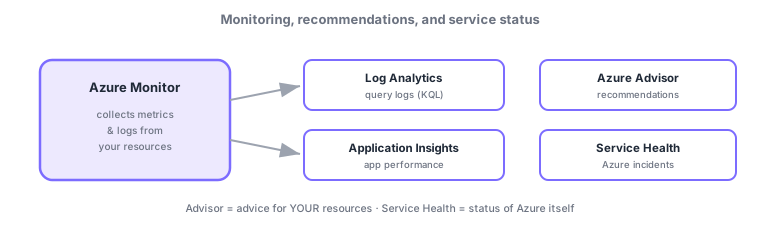
- Azure Monitor: the monitoring foundation that collects metrics (numbers) and logs (records) from resources; analysis, alerts, and visualization branch from here.
- Log Analytics: a workspace to query and analyze collected logs with KQL (Kusto Query Language).
- Application Insights: monitors application performance, exceptions, and usage (APM = application performance monitoring).
- Alerts: trigger notifications or actions (email, webhook, automation) based on metric/log conditions.
6.2.2Advice and service status
Separate from monitoring data, Azure has two "inform" services. Azure Advisor analyzes your resources and offers recommendations (cost, security, reliability, performance, operational excellence). Azure Service Health notifies you of Azure-side incidents, planned maintenance, and health. "About your configuration (Advisor)" vs "about Azure status (Service Health)"—their opposite targets are the key distinction.
| Service | Role | Target |
|---|---|---|
| Azure Monitor | Collect metrics/logs, alerts | Your resources |
| Log Analytics | Analyze logs with KQL | Collected logs |
| Application Insights | App performance monitoring (APM) | Your app |
| Azure Advisor | Improvement recommendations | Your resources |
| Service Health | Incidents, maintenance, health | Azure itself |
Distinguish two that are easily confused: Azure Advisor = "advice" for your resources, Azure Service Health = "incidents/health" of Azure itself. Different targets (you vs Azure).
Scenario: operating a production web app. Monitor response times/exceptions with Application Insights; when thresholds are exceeded, an Azure Monitor alert notifies the team. Investigate causes by querying logs across sources with Log Analytics (KQL). Advisor surfaces cost/security improvements. If an Azure-side outage is suspected, check Service Health—each tool for its role.
Watch the mix-ups: (1) Advisor (advice for you) vs Service Health (Azure incidents)—opposite targets. (2) Log Analytics (KQL log analysis) vs Application Insights (app performance)—both under Azure Monitor but different targets. (3) Defender for Cloud (security posture) is separate from monitoring (previous chapter).
Q. Are Log Analytics and Application Insights different? Both are part of Azure Monitor. Log Analytics is "where you analyze logs broadly with KQL," and Application Insights is "app-specific performance monitoring." App Insights data is stored in a Log Analytics workspace under the hood and is queryable with KQL.
Common points: Azure Monitor = collection hub / Log Analytics = KQL log analysis / Application Insights = app monitoring (APM) / alerts = notify on conditions / Advisor = recommendations for you / Service Health = Azure incidents. Don’t confuse Advisor with Service Health.
6.2.3Section summary
- Azure Monitor (collection hub, alerts) → Log Analytics (KQL log analysis) / Application Insights (app monitoring)
- Azure Advisor = recommendations for your resources; Azure Service Health = Azure-side incidents/health
- Don’t mix up "advice for you (Advisor)" with "Azure’s status (Service Health)"
Sign in to track progress — Log in.
Quick check
(just a quick review)Q1. Which monitors application performance such as response times and exceptions?
Q2. Which gives recommendations (cost, security, etc.) for your own Azure resources?
Q3. Which shows incidents and maintenance for Azure itself?
Q4. Where do you query and analyze collected logs with KQL (Kusto Query Language)?
Q5. Which triggers notifications or actions based on metric/log conditions?
Keep track of your progress
The full study guide is free to read. Sign up free to practice with the question bank, track what you have read, review your mistakes, and highlight passages.