

What's changed: Added AZ-900 Chapter 1 (Cloud Concepts)
1.2Cloud Service Types and the Shared Responsibility Model
Understand the three service models—IaaS, PaaS, SaaS—through a single axis: the trade-off between control and effort. Compare what each one manages, its representative Azure services, and where it fits, and see where serverless (FaaS) sits. Finally, learn the most important security concept in the cloud—the shared responsibility model—via a layer-by-layer responsibility matrix.
There are hundreds of cloud services, but one axis makes them far easier to reason about: how much the cloud provider handles vs how much you manage. The three classic points on that axis are IaaS, PaaS, and SaaS. Moving left gives more control but more effort (management responsibility); moving right gives less effort but less fine-grained control. This "control vs effort" trade-off is the heart of understanding the three models. Historically, we started from on-premises (owning everything), then virtualized physical servers into IaaS, then PaaS (focus on app development), and finally SaaS (use finished products)—a steady evolution toward handing off more of the work.
This axis becomes precise when expressed as the management stack. Layers stack from the bottom: physical hardware → virtualization → OS → runtime/middleware → application → data. Each model differs by which layers the provider manages. On-premises = all layers are yours; IaaS = the provider handles up to virtualization (below the OS); PaaS = the provider handles up to the OS and runtime; SaaS = the provider handles up to the application. We will look at each model with this layered stack in mind.
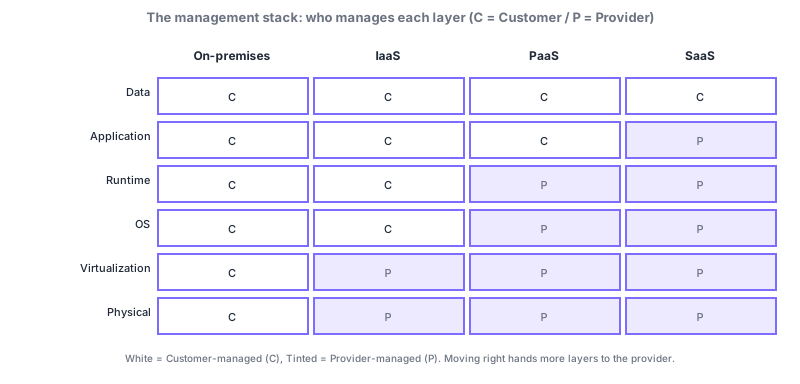
1.2.1The baseline: on-premises
Before the three models, anchor on the comparison baseline: on-premises. On-premises is the traditional style where you buy and own servers and network gear and run them in your own building or datacenter. You handle everything yourself: power, cooling, physical security, hardware failures, OS and software updates, and backups. Control is maximal, but the up-front investment (CapEx) is large and scaling out takes time. Viewing IaaS, PaaS, and SaaS as progressively shifting this "do-it-all-yourself" burden to the provider makes the differences click into place.
1.2.2IaaS — renting infrastructure
IaaS (Infrastructure as a Service) means renting raw infrastructure—virtual machines, virtual networks, and storage. The provider supplies the physical servers, power, cooling, and virtualization layer (hypervisor); you manage the OS and everything above it: installing and patching the OS, middleware, the app, and data. It offers the most control of the three models but also the most operational effort.
The flagship is Azure Virtual Machines (VMs). Other IaaS building blocks include Virtual Machine Scale Sets (VMSS) that auto-scale identical VMs, virtual networks (VNet) that connect them, managed disks for storage, and load balancers that distribute traffic at the entry point. Combining these lets you reproduce nearly the same setup as an on-premises datacenter in the cloud—without buying any physical hardware.
- Lift-and-shift migration: "pick up and move" existing on-premises servers to the cloud with little change.
- Dev/test environments: spin up VMs only when needed and delete them afterward to control cost.
- Special OS/software stacks: when you need a specific OS version or custom middleware that PaaS cannot accommodate.
1.2.3PaaS — renting a platform
PaaS (Platform as a Service) means renting a platform to run applications. The provider manages the OS, runtime, patching, and the scaling foundation, so you can focus on your application code and data. Freed from server chores (OS updates, security patches), teams ship faster—its biggest benefit.
Examples include Azure App Service (just deploy a web app and it runs), Azure SQL Database (a fully managed relational database), and Azure Cosmos DB (a globally distributed NoSQL database). Because scaling and redundancy are handled without you thinking about the OS, PaaS is the default choice for many teams that want to "leave the infrastructure to the provider but still decide how the app is built."
1.2.4SaaS — using finished software
SaaS (Software as a Service) means using finished software directly, e.g., from a browser. No installation or server management is needed—sign up and start immediately, with updates and backups handled by the provider. You generally manage only your own data and account settings.
Examples include Microsoft 365 (Exchange Online email, Teams, OneDrive) and Dynamics 365 (business apps for sales, finance, and more). Effort is minimal, but because the provider defines the software, it offers the least room for deep customization. It is ideal when you want to start using commodity functions every company needs—like email or accounting—as fast as possible, without reinventing the wheel.
1.2.5Going further: serverless and FaaS
Taking PaaS further leads to serverless, whose flagship is FaaS (Function as a Service) = Azure Functions. Without thinking about servers at all, your code runs only when an event arrives (an HTTP request, a queue message, a timer, etc.), and you are billed only for what you run (time and executions). Near-zero idle cost makes it great for rarely-run tasks and for nightly batches, notifications, and automation. Despite the name "serverless," the provider still runs servers underneath—it means you do not have to think about or manage servers. For AZ-900, it is enough to remember "serverless = no server management, pay only for what you use."
1.2.6Comparing the three models
| Aspect | IaaS | PaaS | SaaS |
|---|---|---|---|
| What you rent | Infrastructure (VMs, network, storage) | A platform to run apps | Finished software |
| You manage | OS, middleware, app, data | App and data | Data and account settings |
| Provider manages | Physical through virtualization | Physical through OS and runtime | Almost everything |
| Control | High | Medium | Low |
| Operational effort | High | Medium | Low |
| Azure example | Azure Virtual Machines | Azure App Service, Azure SQL Database | Microsoft 365, Dynamics 365 |
| Good for | Lift-and-shift / special configs | Shipping custom apps quickly | Using business apps instantly |
1.2.7Which to choose? A way to decide
There is no single right model; the principle is to decide against your requirements—control, speed, operational load, and cost. When unsure, a safe heuristic is "choose as far right (more managed) as you can, and move left only when a requirement forces it." The table below gives rough guidance for common needs.
| Your need | Recommended | Why |
|---|---|---|
| Move existing servers as-is | IaaS | Migrate while preserving the setup; full control down to the OS |
| Ship and scale a custom app fast | PaaS | No OS management; focus on the app and data |
| Use email/business software now | SaaS | Use a finished product with almost no operations |
| Run occasional tasks cheaply | Serverless (Functions) | Near-zero idle cost; pay only for what runs |
| Special OS / strict regulation | IaaS (sometimes on-prem) | Fine-grained control to meet exacting requirements |
1.2.8Understanding through scenarios
Scenario 1: a startup launching a new web service. They want to ship fast and survive sudden spikes. → PaaS (App Service + SQL Database) fits well: no staff spent on OS management, with autoscaling on demand. Adding serverless (Functions) for background tasks like image processing is a common pattern.
Scenario 2: moving a legacy core system (ERP) to the cloud. It depends on a specific OS and middleware, with no budget to rewrite. → Start with a lift-and-shift to IaaS (VMs), preserving the setup, then consider gradual modernization to PaaS once stable.
Scenario 3: company-wide email and file sharing. These are commodity functions every company needs, with little value in self-hosting. → SaaS (Microsoft 365): no servers or updates to run; users focus on managing identities and data.
1.2.9The shared responsibility model
The single most important idea in cloud security is the shared responsibility model. It is the agreement that security and operational duties are split between provider and customer, defining layer by layer where the provider responsibility ends and yours begins. Crucially, the boundary shifts with the service model: in IaaS you own the OS and up (a wide responsibility), while in SaaS the provider handles up to the app (a narrow one). "It is in the cloud, so it is safe" is wrong—you must protect your own share, and that is the starting point of cloud security.
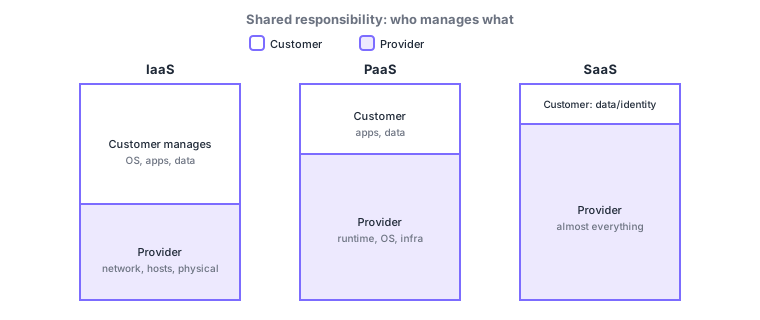
The table below lays out "whose responsibility" for representative layers across the three models (● = the side that primarily owns it). Upper layers lean toward the customer and lower layers toward the provider; as you move IaaS → PaaS → SaaS, the customer marks steadily decrease.
| Layer | IaaS | PaaS | SaaS |
|---|---|---|---|
| Data | Customer ● | Customer ● | Customer ● |
| Accounts & identities | Customer ● | Customer ● | Customer ● |
| Devices | Customer ● | Customer ● | Customer ● |
| Application | Customer ● | Shared | Provider ● |
| OS & runtime | Customer ● | Provider ● | Provider ● |
| Virtualization & network controls | Provider ● | Provider ● | Provider ● |
| Physical (DC, servers) | Provider ● | Provider ● | Provider ● |
Regardless of the service model, the customer always owns three things: data, accounts/identities, and devices. Conversely, physical security (datacenter, physical servers, physical network) is always the provider. Memorize these two fixed ends and you will not get lost.
A common misconception: "in the cloud, identity and data protection are all handled for you" is false. Even in SaaS (Microsoft 365), if a weak password or missing MFA leads to account compromise, that falls in the customer share. The provider secures the infrastructure and app, but your accounts and data depend on your own configuration.
Making it concrete per model helps. With an IaaS VM, OS patching, anti-malware, and fixing app vulnerabilities are all your job. With PaaS App Service, the provider updates the OS and runtime, so you are responsible for your app code and its settings (authentication, access control). With SaaS Microsoft 365, the provider maintains the software, and your main job narrows to identity and data management—"who may access which data." Anchor on the one fact that "data, identity, and devices" always stay with you in every model, and it all falls into place.
Q. Are "shared responsibility" and "service model" separate topics? No—they are two sides of one coin. The service model (IaaS/PaaS/SaaS) sets how much you rent, and the shared responsibility model shows where your responsibility therefore begins. The more you rent (SaaS), the narrower your responsibility; the less you rent (IaaS), the wider it is.
1.2.10Peripheral knowledge: where on-premises fits
Place on-premises (you own and manage everything down to the physical servers) just to the left of these three models and the whole picture connects. Moving right—on-premises → IaaS → PaaS → SaaS—consistently means less management effort and up-front investment (CapEx) in exchange for handing more over to the provider. Real organizations typically mix several models: heavily regulated systems on-premises or IaaS, routine internal work on SaaS, and in-house web services on PaaS. The point is not "which is correct" but choosing per requirement—control, speed, cost, and compliance.
Exam traps: (1) map examples to models (VM = IaaS / App Service & SQL Database = PaaS / Microsoft 365 = SaaS); (2) "who patches the OS?" → the customer in IaaS, the provider in PaaS/SaaS; (3) data, identity, devices are always the customer / physical is always the provider; (4) serverless = no server management, consumption billing. Watch for swapped options like "OS management is the customer even in SaaS."
1.2.11Section summary
- The three models sit on one axis—control ↔ effort: IaaS = infrastructure (free, high effort) / PaaS = platform (in between) / SaaS = finished software (low effort, low control)
- Examples: VM = IaaS / App Service & SQL Database = PaaS / Microsoft 365 = SaaS; plus Azure Functions = serverless/FaaS
- Shared responsibility: the boundary shifts by model. Data, identity, devices are always the customer / physical is always the provider
- On-prem → IaaS → PaaS → SaaS reduces effort and CapEx while handing more to the provider; real use mixes models
Sign in to track progress — Log in.
Quick check
(just a quick review)Q1. Which cloud service model are Azure Virtual Machines?
Q2. In the shared responsibility model, what is always the customer responsibility regardless of service type?
Q3. In which models does the provider handle OS security patching? (excluding the most control-heavy model)
Q4. Which Azure service runs code only when an event occurs and bills only for execution time?
Q5. Which traditional style means owning and managing everything yourself, from physical servers up to the OS and apps?
Q6. Which model best fits shipping a custom web app quickly with autoscaling and without managing the OS?
Keep track of your progress
The full study guide is free to read. Sign up free to practice with the question bank, track what you have read, review your mistakes, and highlight passages.